PowerCommons - The Open Silicon Commons
Welcome to PowerCommons
PowerCommons is an ambitious initiative to create the world’s first fully open, verifiable, and sovereign computing infrastructure based on the OpenPower architecture. We’re reviving and modernizing proven processor designs to deliver transparent, auditable, and secure computing platforms that serve the public interest rather than corporate surveillance.
In an era where digital infrastructure determines economic and political power, PowerCommons represents a crucial step toward technological independence and democratic control over computing resources.



What We’re Building
PowerCommons is reviving IBM’s A2O processor core—a proven 64-bit PowerPC design that powered Blue Gene/Q supercomputers—for modern FPGA platforms. We’re pairing it with Microwatt as a secure boot processor to create a fully open and verifiable SoC architecture, where every component from power-on to application execution can be inspected and audited.
Current work: A2O core revival targeting Xilinx VCU-118, with build system modernization for contemporary Vivado toolchains.
Foundation already laid: Linux booting on Microwatt/VCU-118, LiteDRAM integration, upstream contributions to the Microwatt repository.
Technical guidance: Direct collaboration with Prof. Peter Hofstee, original architect of IBM’s Cell Broadband Engine.
Where This Leads
A complete sovereign computing stack built on proven, auditable silicon—from embedded controllers through workstations to datacenter infrastructure. Not a slide deck vision: a concrete path from working FPGA implementations through formal verification to production hardware. Computing infrastructure that serves the public interest because every transistor’s behavior can be verified.
Partner With Us
A commons is only as strong as its community. We are looking for partners — industry, government, research institutions, hardware manufacturers, investors, civic society, and those with the means and conviction to back what they believe in — who understand that sovereign computing infrastructure is too important to be left to any single actor.
Our Vision
We’re building computing infrastructure that can be fully verified—where organizations and individuals can audit every component from silicon to software.
For government and critical infrastructure: Deploy systems where security doesn’t depend on trusting opaque vendor firmware.
For research institutions: Study and teach processor architecture with complete visibility into implementation.
For industry: Build products on foundations you can inspect, modify, and maintain independently.
The Broader Context
PowerCommons emerges from a recognition that computational infrastructure shapes society as fundamentally as roads, utilities, and communications networks. When this infrastructure is opaque and privately controlled, democratic oversight becomes impossible. We’re creating an alternative: computing as commons—collectively maintained, transparently operated, publicly auditable.
PowerCommons Development Roadmap
Long-Term Vision (2027+)
These phases depend on successful completion of the SoC platform and securing production partnerships:
- Hardware production: ASIC fabrication or volume FPGA deployment, contingent on formal verification completion and manufacturing partnerships
- Infrastructure deployment: Sovereign compute services built on verified PowerCommons hardware, contingent on hardware availability and operational partnerships
Our Mission
To democratize access to high-performance, secure, and transparent computing by creating fully open-source processor implementations and system architectures that can be verified, modified, and deployed by anyone, anywhere, without proprietary dependencies or hidden backdoors.
Project Summary
| Component | Status | Funding | Progress | Target |
|---|---|---|---|---|
| Adding VCU-118 board support to Microwatt SoC | 🟢 In Progress | Self funded | █████████░ 90% | Q3 2025 |
| PowerPC Support in LiteX SoC Framework: A Microwatt Linux Implementation on VCU-118 | 🟢 Planned | Self funded | ░░░░░░░░░░ 0% | Q4 2025 |
| From OpenPower to PowerCommons: Resurrecting and Modernizing the A2O Core | 🟡 Planning | NLnet (NGI Zero Commons Fund) | ░░░░░░░░░░ 0% | Q2 2026 |
| PowerCommons SoC Platform | 🔵 Researching | Requested | ░░░░░░░░░░ 0% | Q2 2027 |
Why This Matters
Digital Sovereignty
Every major processor today contains hidden management engines, proprietary firmware, and un-auditable code paths. PowerCommons changes this paradigm by ensuring every transistor’s behavior can be inspected and verified.
Post-Surveillance Computing
In alignment with post-capitalist visions of technology, PowerCommons creates computing infrastructure that serves communities rather than extracting value from them.
Technological Commons
Like public utilities and infrastructure, fundamental computing technology should be a commons - collectively owned, transparently operated, and democratically governed.
Get Involved
For Developers
- Code Repository: codeberg.org/PowerCommons
- Get Started: Getting Started Guide
- Matrix Chat: #powercommons:matrix.org
For Organizations
- Government & Critical Infrastructure: Deploy verifiable, sovereign computing
- Academic Institutions: Research and teach with fully transparent systems
- Industry Partners: Build secure products on open foundations
For Citizens
- Learn: Understand why open hardware matters for democracy
- Advocate: Support policies promoting open infrastructure
- Support: Contribute to sustainable development
Supported By
PowerCommons is funded by the NLnet Foundation through the NGI Zero Commons Fund, with financial support from the European Commission’s Next Generation Internet programme.
Updates
April 9, 2026: NLnet Funding Awarded for A2O Core Revival
PowerCommons has been awarded a €50,000 grant from the NLnet Foundation through the NGI Zero Commons Fund to revive and modernize the OpenPower A2O core. Announced as part of the ninth NGI Zero Commons Fund call.
February, 2026: Pre-built bitstreams and Linux images published
New features include VCU-118 DRAM support on Microwatt SoC, Linux Boot on Litex SoC.
February, 2026: PowerCommons SoC Proposal Submitted
Submitted NLNET funding proposal for PowerCommons SoC
September 30, 2025: NLnet Funding Proposals Submitted
Submitted NLNET funding proposal for A2O Core revival.
September 20, 2025: First Microwatt boot with LiteDRAM, clock and timing issues..
August 2025: MicroWatt VCU118 Success
Successfully booted Linux on VCU118 platform without DRAM.
July 2025: Project Inception
PowerCommons initiative launched with support from OpenPower Foundation.
PowerCommons is a public interest technology initiative aligned with European digital sovereignty goals and the principles of the commons.
Mission & Vision
Our Mission
To democratize high-performance computing by creating fully open, transparent, and verifiable processor architectures that serve as digital commons - collectively owned, democratically governed, and accessible to all.
PowerCommons develops and maintains open-source processor implementations, system architectures, and supporting infrastructure that eliminate proprietary dependencies, hidden functionalities, and corporate control over fundamental computing resources.
Our Vision
A Future of Sovereign Computing
We envision a world where:
- Every circuit is inspectable - No hidden management engines, no proprietary firmware, no unauditable code paths
- Communities control their infrastructure - Local sovereignty over digital resources, not dependency on foreign corporations
- Innovation serves humanity - Technology development guided by public interest, not surveillance capitalism
- Knowledge is truly free - Complete transparency from transistor to application, enabling genuine understanding and innovation
Join the Revolution
PowerCommons isn’t just building processors - we’re building the foundation for a democratic digital future. Every contribution, whether code, documentation, advocacy, or funding, advances our collective liberation from corporate control over computing.
The power of computing belongs to the people.
Get Involved
🛠️ Developers: Contribute code and documentation
📚 Educators: Teach open hardware principles
🏛️ Policymakers: Support sovereign computing initiatives
💰 Funders: Invest in democratic technology
🗣️ Advocates: Spread the word about digital sovereignty
“The master’s tools will never dismantle the master’s house. We must build our own tools - transparent, democratic, and free.”
— Adapted from Audre Lorde for the digital age
Get Involved
PowerCommons depends on the people who choose to back it — with code, capital, conviction, or a megaphone. Find your lane below.
Contribute
Code, documentation, testing. Whether you’re an FPGA developer, Linux kernel hacker, or technical writer — there’s a place for you.
Partner
A commons is only as strong as its community. We are looking for partners — industry, government, research institutions, hardware manufacturers, investors, civic society, and those with the means and conviction to back what they believe in — who understand that sovereign computing infrastructure is too important to be left to any single actor. If you build products that depend on trustworthy silicon, fabricate or supply hardware, run critical infrastructure, set policy, or invest in deep tech with strategic patience — there is a place for you here. Partnership can mean co-development, reference deployments, hardware donations, advisory engagement, or simply lending your name and gravity to the project. Early partners shape the architecture and the roadmap.
Fund
Open silicon is expensive. FPGA boards, fabrication runs, formal verification tools, full-time engineering, and the long patient years between prototype and production — none of it is free, and none of it can be sustained on enthusiasm alone. PowerCommons is generously supported by the NLnet Foundation, but a single grant cannot carry a stack from FPGA to fab. We are actively seeking additional funders — public bodies, private foundations, sovereign wealth, mission-aligned investors, and individuals who understand that infrastructure of this consequence cannot be left entirely to markets or to states. Every euro extends the runway. Every funded milestone moves the commons closer to silicon you can actually deploy.
Community
Advocates, writers, educators, and curious minds. Follow the work, spread the word, join the conversation on Matrix: #powercommons:matrix.org
→ For all other enquiries: hello AT powercommons.org
Digital Sovereignty
Reclaiming Control Over Our Digital Infrastructure
Digital sovereignty is not merely about data localization or regulatory compliance - it’s about fundamental democratic control over the technologies that increasingly govern our lives. PowerCommons embodies this principle by creating computing infrastructure that communities can truly own, understand, and control.
The Crisis of Technological Dependence
Hidden Control Mechanisms
Every modern processor contains multiple layers of proprietary control:
- Management Engines: Intel ME, AMD PSP run below the operating system with full system access
- Proprietary Firmware: Unauditable code controlling critical functions
- Hardware Backdoors: Undocumented features accessible to manufacturers
- Supply Chain Vulnerabilities: Components from untrusted sources with unknown modifications
These mechanisms create fundamental vulnerabilities that no amount of software security can address.
Economic Extraction
The current computing paradigm extracts value through:
- Planned Obsolescence: Artificial limitations forcing constant upgrades
- Vendor Lock-in: Proprietary standards preventing migration
- Surveillance Capitalism: Data extraction as primary business model
- Rent-Seeking: Software-as-a-Service replacing ownership
PowerCommons breaks these extraction patterns by ensuring permanent ownership and control.
Technical Foundations of Sovereignty
Verifiable Security
True sovereignty requires the ability to verify every aspect of the system:
- Open Hardware: Every logic gate documented and inspectable
- Reproducible Builds: Identical outputs from source code
- Formal Verification: Mathematical proofs of security properties
- Transparent Supply Chain: Known origin of every component
Technological Independence
PowerCommons achieves independence through:
- No Proprietary Dependencies: Fully open stack from silicon to application
- Local Manufacturing Capability: Designs suitable for diverse fab processes
- Knowledge Transfer: Complete documentation and education
- Tool Chain Freedom: Open development tools throughout
Call to Action
For Policymakers
- Mandate Open Hardware: Require transparency in public procurement
- Fund Development: Support open processor initiatives
- Create Standards: Establish sovereignty requirements
- Build Capacity: Invest in local manufacturing
For Technologists
- Contribute Code: Develop open implementations
- Share Knowledge: Document and teach
- Build Tools: Create development infrastructure
- Form Networks: Connect with aligned projects
For Citizens
- Demand Transparency: Require open systems in public services
- Support Development: Contribute to funding campaigns
- Learn and Share: Understand and explain the importance
- Organize Locally: Build community technology initiatives
Resources
Essential Reading
- “The Age of Surveillance Capitalism” - Shoshana Zuboff
- “Radical Technologies” - Adam Greenfield
- “The Stack” - Benjamin Bratton
- “Platform Capitalism” - Nick Srnicek
Pioneering Organizations
- European Digital Rights (EDRi)
- Free Software Foundation Europe
- Chaos Computer Club
- La Quadrature du Net
Policy Documents
- EU Digital Sovereignty Strategy
- German Sovereign Tech Fund Charter
- Barcelona Digital Sovereignty Plan
- Amsterdam Digital Agenda
“Technology is the answer, but what was the question?”
— Cedric Price
The question is: How do we build technology that serves humanity rather than exploiting it? PowerCommons provides one answer: through radical transparency, democratic control, and the commons model.
Digital sovereignty is not a destination but a continuous process of reclaiming control over our technological future. Join us in building infrastructure for human flourishing rather than corporate extraction.
Why OpenPower
The Foundation for True Computing Freedom
A Proven Architecture with Deep Roots
OpenPower isn’t just another instruction set architecture - it’s a battle-tested technology with over 30 years of deployment in mission-critical systems. From the servers running banking infrastructure to the supercomputers modeling climate change, Power architecture has proven its reliability at scale.
Unlike emerging architectures that promise future potential, OpenPower delivers today with:
- Mature ecosystem: Decades of software support, tools, and expertise
- Production proven: Powers enterprise workloads globally
- Performance leadership: Consistently ranks in supercomputing top500
- Open governance: True community control through OpenPower Foundation
Comparison Matrix
| Feature | OpenPower | RISC-V | ARM | x86 |
|---|---|---|---|---|
| ISA License | Open | Open | Proprietary | Proprietary |
| Open Implementations | Yes (Multiple) | Few | No | No |
| Ecosystem Maturity | 30+ years | <10 years | 20+ years | 40+ years |
| Linux Support | Excellent | Growing | Excellent | Excellent |
| Enterprise Deployment | Widespread | Limited | Growing | Dominant |
| Formal Verification | Possible | Possible | Difficult | Impossible |
| Patent Protection | OPF Pool | Fragmented | ARM Ltd | Intel/AMD |
| Community Governance | Yes | Partial | No | No |
Technical Superiority
Architecture Advantages
64-bit from the Ground Up
Power was designed as a 64-bit architecture from inception, not retrofitted like x86. This clean design yields:
- Consistent instruction encoding
- Efficient memory addressing
- Superior virtualization capabilities
- Hardware-enforced security boundaries
RISC Philosophy Done Right
- Fixed-length instructions for predictable decode
- Large register file (32 general purpose registers)
- Simple, orthogonal instruction set
- Powerful load/store architecture
Advanced Features
- Hardware transactional memory
- Decimal floating-point in hardware
- Advanced SIMD capabilities (VSX)
- Sophisticated branch prediction
Performance Characteristics
OpenPower processors excel in:
- Throughput Computing: Multiple execution units and deep pipelines
- Memory Bandwidth: Advanced cache hierarchies and memory controllers
- Parallel Processing: SMT4/SMT8 simultaneous multithreading
- Enterprise Reliability: ECC throughout, hardware error recovery
True Openness
While other architectures claim openness, OpenPower delivers:
| Architecture | License Model | Implementation |
|---|---|---|
| RISC-V | Open ISA | Most implementations proprietary |
| OpenPower | Open ISA | Open implementations (Microwatt, A2O) |
| ARM | Proprietary, expensive licenses | Heavily restricted |
| OpenPower | Royalty-free | No restrictions |
| x86 | Completely closed | Legally protected |
| OpenPower | Community-driven | Open governance |
Verification and Trust
With OpenPower’s open implementations:
- Every gate can be inspected
- No hidden backdoors possible
- Formal verification feasible
- Reproducible builds from source
Advisory Board
Leadership & Governance
PowerCommons operates under a collaborative governance model that balances technical expertise with democratic participation, ensuring our technology serves the public interest.
Project Stewardship
PowerCommons is initiated and maintained by Datalectic Oy, a Helsinki-based systems consultancy specialising in open infrastructure and sovereign compute.
Advisory Board / Mentors

Prof. Peter Hofstee
Chief Technical Advisor
Distinguished Research Staff Member, IBM | Professor, Delft University of Technology
Prof. Peter Hofstee is a distinguished research staff member at IBM Austin and part-time professor in Big Data Systems at Delft University of Technology. He is best known as chief architect of the Synergistic Processor Elements in the Cell Broadband Engine processor, used in Sony’s PlayStation 3 and IBM’s Roadrunner supercomputer — the first system to achieve sustained petaflop operation in 2008. The A2 processor family — including the A2O core that PowerCommons aims to revive—was developed following IBM’s game console processor designs: the Xbox 360 processor and Hofstee’s Cell processor for the PlayStation 3. Prof. Hofstee’s pioneering work on the Cell architecture directly influenced the A2 family’s design philosophy. His decades of experience in high-performance heterogeneous computing and deep knowledge of the architectural lineage connecting Cell to A2O make him uniquely qualified to guide PowerCommons’ technical strategy for reviving and modernizing the A2O core for contemporary applications including AI workloads and open-source supercomputing.

Ganesan Narayanasamy
Mentor and Community Advisor
President, OpenPower Foundation | CEO - ObjectAutomation Inc..
Ganesan Narayanasamy is a technology leader with nearly three decades of experience at IBM, where he held leadership positions focused on high-performance computing, chip design, and artificial intelligence. He was instrumental in driving the OpenPOWER and AI ecosystem initiatives, with emphasis on partner enablement and market development, creating training programs for partners and supporting emerging market opportunities worldwide.
As President of the OpenPOWER Foundation and CEO of Object Automation System Solutions Inc., Ganesan leads global initiatives to expand the OpenPOWER ecosystem through academic partnerships and industry collaboration. He actively collaborates with leading institutions including IIT Madras, IIT Roorkee, and IIT Ropar on Microwatt and chip design education initiatives ObjectAutomation, making him ideally positioned to guide PowerCommons’ technical direction and ecosystem development.
His extensive experience in ecosystem building, partner enablement, and academic outreach provides PowerCommons with critical strategic guidance for community engagement, institutional partnerships, and long-term sustainability planning.
Partner Organizations
Institutional Partners
- OpenPower Foundation - Technical standards and ecosystem
Advisors We Seek to Engage
PowerCommons is actively reaching out to thought leaders and policy makers who can help advance digital sovereignty:
Policy & Government Leaders
Margrethe Vestager
Executive Vice-President, European Commission
A Europe Fit for the Digital Age
Roberto Viola
Director-General, DG CONNECT
European Commission digital policy
Cédric O
Former French Secretary of State for Digital
European tech sovereignty advocate
Marina Kaljurand
MEP, Former Estonian Foreign Minister
Digital rights and cybersecurity
Technology & Innovation
Mitchell Baker
CEO, Mozilla Corporation
Open internet and technology democracy
Eben Moglen
Columbia Law School, Software Freedom Law Center
Free software legal frameworks
Bruce Schneier
Harvard Kennedy School
Security technologist and policy fellow
Zeynep Tufekci
Columbia University
Technology and society researcher
Economic & Social Innovation
Mariana Mazzucato
UCL Institute for Innovation
Mission-oriented innovation and public value
Kate Raworth
Oxford University
Doughnut economics and regenerative design
Evgeny Morozov
Technology critic and researcher
Digital sovereignty and platform regulation
Trebor Scholz
The New School
Platform cooperativism
If you have connections to these leaders or similar advocates for digital sovereignty, please get in touch.
Quick Start
Get Microwatt running on Litex Soc and boot Linux on Xilinx VCU 118 FPGA in under 30 minutes using prebuilt resources.
💬 Need Help? Stuck or have questions? Join #powercommons:matrix.org for real-time support from the community!
Prerequisites
- FPGA board with USB cable - we’ve only tested Xilinx VCU-118. Arty A7 100T support coming soon.
- You have already setup a PowerCommons WSL instance following the WSL Setup instructions or have an equivalent Linux setup.
- Vivado is not required for quickstart.
Steps
1. Download Prebuilt Bitstream and Linux images
Depending upon your end goal, download the corresponding bitstream. For example, if you want to see linux boot on the VCU 118 board with Litex SoC, download the following bitstream and linux image: For Xilinx VCU 118, download the following bitstream:
Download bitstream for Microwatt on Litex SoC microwatt-litex-vcu118-dram-2026-02-25.bit:
curl -O https://codeberg.org/PowerCommons/Releases/releases/download/vcu118-20260225/microwatt-litex-vcu118-dram-2026-02-25.bit
Download linux:
curl -O https://codeberg.org/PowerCommons/Releases/releases/download/vcu118-20260225/linux-6.12.0-litex-2026-02-25.dtbImage.microwatt.elf
2. Program the bitstream:
openFPGALoader -b vcu118 microwatt-litex-vcu118-dram-2026-02-25.bit
Check to see is serial/console is up:
litex_term /dev/ttyUSB2
You should see either DRAM initialization or the litex bios depending upon how quickly you connect to the console after flashing:
  +==========================================+
  |       P O W E R  C O M M O N S         |
  |    Microwatt PPC64LE | LiteX SoC       |
  +==========================================+

        __   _ __      _  __
       / /  (_) /____ | |/_/
      / /__/ / __/ -_)>  <
     /____/_/\__/\__/_/|_|
   Build your hardware, easily!

 (c) Copyright 2012-2025 Enjoy-Digital
 (c) Copyright 2007-2015 M-Labs

 BIOS built on Feb 25 2026 02:02:36
 BIOS CRC passed (9ccc6cfa)

 LiteX git sha1: 69f48eb98

--=============== SoC ==================--
CPU:            Microwatt @ 125MHz
BUS:            wishbone 32-bit @ 4GiB
CSR:            32-bit data little ordering
ROM:            128.0KiB
SRAM:           8.0KiB
L2:             8.0KiB
SDRAM:          2.0GiB 64-bit @ 1000MT/s (CL-9 CWL-9)
MAIN-RAM:       1.0GiB

--========== Initialization ============--

Initializing SDRAM @0x00000000...
Switching SDRAM to software control.
Write leveling:
  tCK equivalent taps: 592
  Cmd/Clk scan (0-296)
  |10000  |10000  |11000  |11110| best: 0
  Setting Cmd/Clk delay to 0 taps.
  Data scan:
  m0: |00000000000001111111111| delay: 195
  m1: |00000000000111111111111| delay: 162
  m2: |00000000000000000111111| delay: 262
  m3: |00000000000000000001111| delay: 293
  m4: |10000000000000000000111| delay: 307
  m5: |00000000000000000001111| delay: 295
  m6: |10000000000000000001111| delay: 304
  m7: |11000000000000000000011| delay: 326
Write latency calibration:
m0:0 m1:0 m2:0 m3:0 m4:0 m5:0 m6:0 m7:0
Read leveling:
  m0, b00: |00000000000000000000000000000000| delays: -
  m0, b01: |11100000000000000000000000000000| delays: 18+-18
  m0, b02: |00000000111111111111110000000000| delays: 226+-114
  m0, b03: |00000000000000000000000000111111| delays: 461+-50
  m0, b04: |00000000000000000000000000000000| delays: -
  m0, b05: |00000000000000000000000000000000| delays: -
  m0, b06: |00000000000000000000000000000000| delays: -
  m0, b07: |00000000000000000000000000000000| delays: -
  best: m0, b02 delays: 225+-113
  m1, b00: |00000000000000000000000000000000| delays: -
  m1, b01: |11100000000000000000000000000000| delays: 19+-19
  m1, b02: |00000000111111111111000000000000| delays: 218+-105
  m1, b03: |00000000000000000000000000111111| delays: 458+-52
  m1, b04: |00000000000000000000000000000000| delays: -
  m1, b05: |00000000000000000000000000000000| delays: -
  m1, b06: |00000000000000000000000000000000| delays: -
  m1, b07: |00000000000000000000000000000000| delays: -
  best: m1, b02 delays: 218+-105
  m2, b00: |00000000000000000000000000000000| delays: -
  m2, b01: |00000000000000000000000000000000| delays: -
  m2, b02: |00011111111111111000000000000000| delays: 155+-112
  m2, b03: |00000000000000000000011111111111| delays: 423+-88
  m2, b04: |00000000000000000000000000000000| delays: -
  m2, b05: |00000000000000000000000000000000| delays: -
  m2, b06: |00000000000000000000000000000000| delays: -
  m2, b07: |00000000000000000000000000000000| delays: -
  best: m2, b02 delays: 154+-112
  m3, b00: |00000000000000000000000000000000| delays: -
  m3, b01: |00000000000000000000000000000000| delays: -
  m3, b02: |00000111111111111110000000000000| delays: 176+-112
  m3, b03: |00000000000000000000000111111111| delays: 434+-76
  m3, b04: |00000000000000000000000000000000| delays: -
  m3, b05: |00000000000000000000000000000000| delays: -
  m3, b06: |00000000000000000000000000000000| delays: -
  m3, b07: |00000000000000000000000000000000| delays: -
  best: m3, b02 delays: 177+-114
  m4, b00: |00000000000000000000000000000000| delays: -
  m4, b01: |00000000000000000000000000000000| delays: -
  m4, b02: |11111111111100000000000000000000| delays: 92+-92
  m4, b03: |00000000000000001111111111111100| delays: 361+-110
  m4, b04: |00000000000000000000000000000000| delays: -
  m4, b05: |00000000000000000000000000000000| delays: -
  m4, b06: |00000000000000000000000000000000| delays: -
  m4, b07: |00000000000000000000000000000000| delays: -
  best: m4, b03 delays: 363+-111
  m5, b00: |00000000000000000000000000000000| delays: -
  m5, b01: |00000000000000000000000000000000| delays: -
  m5, b02: |11111111100000000000000000000000| delays: 68+-68
  m5, b03: |00000000000000111111111111100000| delays: 322+-102
  m5, b04: |00000000000000000000000000000000| delays: 509+-02
  m5, b05: |00000000000000000000000000000000| delays: -
  m5, b06: |00000000000000000000000000000000| delays: -
  m5, b07: |00000000000000000000000000000000| delays: -
  best: m5, b03 delays: 319+-103
  m6, b00: |00000000000000000000000000000000| delays: -
  m6, b01: |00000000000000000000000000000000| delays: -
  m6, b02: |11111111111111000000000000000000| delays: 110+-110
  m6, b03: |00000000000000000001111111111111| delays: 398+-107
  m6, b04: |00000000000000000000000000000000| delays: -
  m6, b05: |00000000000000000000000000000000| delays: -
  m6, b06: |00000000000000000000000000000000| delays: -
  m6, b07: |00000000000000000000000000000000| delays: -
  best: m6, b02 delays: 108+-108
  m7, b00: |00000000000000000000000000000000| delays: -
  m7, b01: |00000000000000000000000000000000| delays: -
  m7, b02: |00111111111111000000000000000000| delays: 123+-101
  m7, b03: |00000000000000000000111111111111| delays: 413+-97
  m7, b04: |00000000000000000000000000000000| delays: -
  m7, b05: |00000000000000000000000000000000| delays: -
  m7, b06: |00000000000000000000000000000000| delays: -
  m7, b07: |00000000000000000000000000000000| delays: -
  best: m7, b02 delays: 124+-103
Switching SDRAM to hardware control.
Memtest at 0 (2.0MiB)...
  Write: 0x0-0x200000 2.0MiB
   Read: 0x0-0x200000 2.0MiB
Memtest OK
Memspeed at 0 (Sequential, 2.0MiB)...
  Write speed: 117.2MiB/s
   Read speed: 151.8MiB/s
Setting up exception vectors... done.

--============== Boot ==================--
Booting from serial...
Press Q or ESC to abort boot completely.
sL5DdSMmkekro
Timeout
No boot medium found

--============= Console ================--

litex>
Press ctrl-c twice to exit.
3. Load Linux
litex_term --kernel linux-6.12.0-2026-litex-02-25.dtbImage.microwatt.elf --kernel-adr 0x5000000 --serial-boot /dev/ttyUSB2
Replace /dev/ttyUSB2 wit your USB console output. Press enter two times after the command and you will see a litex console. Type serialbootand press enter. Your screen should like below with login shell at the end:
litex> serialboot
Booting from serial...
Press Q or ESC to abort boot completely.
sL5DdSMmkekro
[LITEX-TERM] Received firmware download request from the device.
[LITEX-TERM] Uploading /home/powercommons/bitstreams/linux-6.12.0-litex-2026-02-25.dtbImage.microwatt.elf to 0x05000000 (5082344 bytes)...
[LITEX-TERM] Upload calibration... (inter-frame: 10.00us, length: 64)
[LITEX-TERM] Upload complete (9.9KB/s).
[LITEX-TERM] Booting the device.
[LITEX-TERM] Done.
ELF: Valid PPC64LE binary, entry=0x01300000
ELF: Loading segment 0: 0x004c6400 bytes to 0x1300000
Executing booted program at 0x01300000

--============= Liftoff! ===============--
[    0.000000] dt-cpu-ftrs: setup for ISA 3000
[    0.000000] dt-cpu-ftrs: final cpu/mmu features = 0x0000008380039181 0x20005040
[    0.000000] radix-mmu: Page sizes from device-tree:
[    0.000000] radix-mmu: Page size shift = 12 AP=0x0
[    0.000000] radix-mmu: Page size shift = 16 AP=0x5
[    0.000000] radix-mmu: Page size shift = 21 AP=0x1
[    0.000000] radix-mmu: Page size shift = 30 AP=0x2
[    0.000000] radix-mmu: Mapped 0x0000000000000000-0x0000000001400000 with 2.00 MiB pages (exec)
[    0.000000] radix-mmu: Mapped 0x0000000001400000-0x0000000020000000 with 2.00 MiB pages
[    0.000000] radix-mmu: Initializing Radix MMU
[    0.000000] Linux version 6.12.0 (powercommons@DESKTOP-ECRAP4O) (powerpc64le-buildroot-linux-gnu-gcc.br_real (Buildroot 2025.02.10-51-g4df2c68d0f-dirty) 13.4.0, GNU ld (GNU Binutils) 2.43.1) #2 Wed Feb 25 02:12:35 EET 2026
[    0.000000] Hardware name: Microwatt 0x630000 microwatt
[    0.000000] -----------------------------------------------------
[    0.000000] phys_mem_size     = 0x20000000
[    0.000000] dcache_bsize      = 0x40
[    0.000000] icache_bsize      = 0x40
[    0.000000] cpu_features      = 0x0000008380039181
[    0.000000]   possible        = 0x001ffbebcb5fb185
[    0.000000]   always          = 0x0000000380008181
[    0.000000] cpu_user_features = 0xcc002102 0x88800000
[    0.000000] mmu_features      = 0x20005040
[    0.000000] firmware_features = 0x0000000000000000
[    0.000000] vmalloc start     = 0xc008000000000000
[    0.000000] IO start          = 0xc00a000000000000
[    0.000000] vmemmap start     = 0xc00c000000000000
[    0.000000] -----------------------------------------------------
[    0.000000] barrier-nospec: using ORI speculation barrier
[    0.000000] Zone ranges:
[    0.000000]   Normal   [mem 0x0000000000000000-0x000000001fffffff]
[    0.000000] Movable zone start for each node
[    0.000000] Early memory node ranges
[    0.000000]   node   0: [mem 0x0000000000000000-0x000000001fffffff]
[    0.000000] Initmem setup node 0 [mem 0x0000000000000000-0x000000001fffffff]
[    0.000000] Kernel command line:
[    0.000000] Dentry cache hash table entries: 65536 (order: 7, 524288 bytes, linear)
[    0.000000] Inode-cache hash table entries: 32768 (order: 6, 262144 bytes, linear)
[    0.000000] Built 1 zonelists, mobility grouping on.  Total pages: 131072
[    0.000000] mem auto-init: stack:all(zero), heap alloc:off, heap free:off
[    0.000000] SLUB: HWalign=128, Order=0-3, MinObjects=0, CPUs=1, Nodes=1
[    0.000000] NR_IRQS: 64, nr_irqs: 64, preallocated irqs: 16
[    0.000000] ICS native initialized for sources 16..31
[    0.000000] ICS native backend registered
[    0.000144] time_init: 64 bit decrementer (max: 7fffffffffffffff)
[    0.000292] clocksource: timebase: mask: 0xffffffffffffffff max_cycles: 0x39a85c4118, max_idle_ns: 881590405314 ns
[    0.000479] clocksource: timebase mult[4000000] shift[23] registered
[    0.002451] pid_max: default: 32768 minimum: 301
[    0.004559] Mount-cache hash table entries: 1024 (order: 1, 8192 bytes, linear)
[    0.004889] Mountpoint-cache hash table entries: 1024 (order: 1, 8192 bytes, linear)
[    0.042938] Memory: 474044K/524288K available (4364K kernel code, 460K rwdata, 12020K rodata, 2220K init, 306K bss, 49052K reserved, 0K cma-reserved)
[    0.047762] devtmpfs: initialized
[    0.095252] clocksource: jiffies: mask: 0xffffffff max_cycles: 0xffffffff, max_idle_ns: 19112604462750000 ns
[    0.095558] futex hash table entries: 256 (order: 0, 6144 bytes, linear)
[    0.116811] NET: Registered PF_NETLINK/PF_ROUTE protocol family
[    0.143887] platform soc@c0000000: Fixed dependency cycle(s) with /soc@c0000000/interrupt-controller@bff1000
[    0.150267] platform soc@c0000000: Fixed dependency cycle(s) with /soc@c0000000/interrupt-controller@bff1000
[    0.197569] pps_core: LinuxPPS API ver. 1 registered
[    0.197695] pps_core: Software ver. 5.3.6 - Copyright 2005-2007 Rodolfo Giometti <[email protected]>
[    0.198289] PTP clock support registered
[    0.216145] clocksource: Switched to clocksource timebase
[    0.245834] NET: Registered PF_INET protocol family
[    0.249281] IP idents hash table entries: 8192 (order: 4, 65536 bytes, linear)
[    0.263361] tcp_listen_portaddr_hash hash table entries: 512 (order: 0, 4096 bytes, linear)
[    0.263712] Table-perturb hash table entries: 65536 (order: 6, 262144 bytes, linear)
[    0.264177] TCP established hash table entries: 4096 (order: 3, 32768 bytes, linear)
[    0.264911] TCP bind hash table entries: 4096 (order: 4, 65536 bytes, linear)
[    0.267771] TCP: Hash tables configured (established 4096 bind 4096)
[    0.269531] UDP hash table entries: 256 (order: 1, 8192 bytes, linear)
[    0.269895] UDP-Lite hash table entries: 256 (order: 1, 8192 bytes, linear)
[    0.272103] NET: Registered PF_UNIX/PF_LOCAL protocol family
[    0.298495] workingset: timestamp_bits=62 max_order=17 bucket_order=0
[    0.316858] io scheduler mq-deadline registered
[    0.317280] io scheduler bfq registered
[    0.348307] Serial: 8250/16550 driver, 4 ports, IRQ sharing disabled
[    0.411624] c8003800.serial: ttyLXU0 at MMIO 0x0 (irq = 16, base_baud = 0) is a liteuart
[    0.412114] printk: legacy console [liteuart0] enabled
[    1.745740] brd: module loaded
[    1.981850] loop: module loaded
[    2.010726] NET: Registered PF_INET6 protocol family
[    2.068458] Segment Routing with IPv6
[    2.072120] In-situ OAM (IOAM) with IPv6
[    2.076406] sit: IPv6, IPv4 and MPLS over IPv4 tunneling driver
[    2.121932] NET: Registered PF_PACKET protocol family
[    2.682557] clk: Disabling unused clocks
[    3.877907] Freeing unused kernel image (initmem) memory: 2220K
[    3.893489] Run /init as init process
Saving 256 bits of non-creditable seed for next boot
Starting syslogd: OK
Starting klogd: OK
Running sysctl: OK
Starting network: OK
Starting crond: OK


  +==========================================+
  |       P O W E R  C O M M O N S           |
  |    Microwatt PPC64LE | LiteX SoC        |
  |        Xilinx VCU-118                    |
  |  [email protected]          |
  +==========================================+

vcu118-litex-microwatt login:
See Release for other images.
Next Steps
No FPGA Hardware?
Use University of Oregon remote systems - free access for developers
Pre-Built Bit Streams
Development Environment
This page lists the minimum requirements for setting up the development toolchain as well as various tooling that’s required to build PowerCommons projects.
Minimum requirements and supported configurations
Currently, PowerCommons is only supported on X86/64 bit systems as 32 bit systems are limited to 4 GB in memory. There are workarounds available, but they are not officially supported or tested by the PowerCommons project.
Vivado is supported on the following operating systems on x86-64 processor architectures:
- Microsoft Windows Professional/Enterprise 10.0 22H2 Update
- Microsoft Windows 11.0 23H2 and 24H2 Update
- Red Hat Enterprise Workstation/Server 8.10, 9.4, 9.5, 9.6, and 10.0 (64-bit), English
- SUSE Linux Enterprise 15 SP4,15 SP6, and 15 SP7 (64-bit), English
- Amazon Linux 2 AL2023 LTS (64-bit)
- AlmaLinux 8.10, 9.4, 9.5, 9.6, and 10.0 (64-bit)
- Ubuntu Linux 22.04.3, 22.04.4, 22.04.5, 24.04, 24.04.1, and 24.04.2 (64-bit), English
- Rocky Linux 8.10, 9.6, and 10.0
Minimum Recommended Memory
We recommend a minimum of 32 GB of RAM for all PowerCommons related work. Technically, its possible to get the builds working for smaller FPGAs i.e. Arty A7 with 16 GB memory, but the builds will be painfully slow. Instead of wasting your time on slower systems, you can request access to our University of Oregon systems with powerful workstations and fully configured environment.
If you are building for any of the larger FPGA’s such as Xilinx VCU 118, we recommend at least 128 GB of RAM. Memory requirements for building for various boards are listed here
Common tooling - Required for all projects
You need to setup the following tools for all PowerCommon projects including Microwatt enhancements, A2O Revival and for A2O ISA Upgrade project. Installation and setup instructions for each of these components are also linked below. If you find an issue with the documentatinon, please open a ticket in our repository.
| Tool | Purpose | Install Time | Installation Instructions |
|---|---|---|---|
| WSL/Linux | Base environment | 10 min | WSL Installation |
| Vivado 2025.x | FPGA synthesis | 60 min | Vivado Installation |
| Git, tio, OpenFPGALoader, OpenOCD | Code versioning | 1 minute | Utilities |
Note
It is recommended to use the provided WSL setup script instead of setting up your on environment. It has all the necessary tooling and can get you running in no time.
Microwatt
If you are planning to work with the Microwatt codebase, you additionally need the following tools:
| Tool | Purpose | Install Time |
|---|---|---|
| FuseSoc | Microwatt’s native build system | 10 min |
| OpenFPGALoader | Used for flashing bitstreams and Linux kernel | 10 min |
Note
The WSL script automatically installs these and no additional setup is required.
A2O - Revival and Upgrade
| Tool | Purpose | Install Time |
|---|
No special tooling needed just yet.
Support
Issues? See Troubleshooting
WSL2 Ubuntu Setup
While not strictly a requirement, your development workflow might benefit from creating multiple WSL environments instead of using one environment for everything. By having multiple instances, you can cleanly isolate libraries, dependencies etc. and restart from clean state if need.
Installing WSL2 on Windows
This step is only required for Windows users. Linux users can skip this step. Before you continue with the steps below, make sure you have a working WSL 2 installation. For instructions on installing WSL 2 on Windows, follow the instructions on Microsoft’s website.
Next, verify that your WSL 2 installation. Open a Windows terminal or powershell and key in the wsl --version. You should see output similar to the following. Make sure your WSL version is also over 2.
> wsl --version
WSL version: 2.5.7.0
Kernel version: 6.6.87.1-1
WSLg version: 1.0.66
MSRDC version: 1.2.6074
Direct3D version: 1.611.1-81528511
DXCore version: 10.0.26100.1-240331-1435.ge-release
Windows version: 10.0.26100.7171
PowerCommons Ubuntu WSL Image - Automated Installation
You can use the following script to provision a complete WSL development environment for the PowerCommons project that includes all development dependencies, Litex, FuseSoc, OpenOCD etc.
Note
If you want to find your home directory, run the following in PowerShell:
echo $env:USERPROFILE
To use this script, create a folder called .cloud-init in your Windows $HOME folder. Create a file called Ubuntu-24.04.user-data inside this folder and copy paste the following contents in this file:
#cloud-config
locale: en_US
users:
- name: powercommons
  gecos: Power Commons
  groups: [adm,dialout,cdrom,floppy,sudo,audio,dip,video,plugdev,netdev]
  sudo: ALL=(ALL) NOPASSWD:ALL
  shell: /bin/bash

write_files:
- path: /etc/wsl.conf
  append: true
  content: |
    [user]
    default=powercommons

packages: [git, libc6-dev-i386, net-tools, graphviz, make, unzip, zip, g++,
          xvfb,  libnss3-dev, libgdk-pixbuf2.0-dev, libgtk-3-dev,
          libxss-dev, libasound2-dev, openssl, fdisk, libsecret-1-dev, curl, wget,
          build-essential, libssl-dev, zlib1g-dev, libbz2-dev, libreadline-dev, libsqlite3-dev,
          libncurses-dev, xz-utils, tk-dev, libxml2-dev, libxmlsec1-dev, libffi-dev, liblzma-dev, libzstd-dev, tio,
          cmake, ninja-build, ccache, autoconf, automake, libtool, pkg-config,  gcc-powerpc64le-linux-gnu, g++-powerpc64le-linux-gnu,
          binutils-powerpc64le-linux-gnu, flex, bison, bc, libssl-dev, libelf-dev, device-tree-compiler, qemu-system-ppc64, openocd]

runcmd:
   - sudo apt update && sudo apt -y upgrade
   - sudo git clone https://github.com/Microsoft/vcpkg.git /opt/vcpkg
   - /opt/vcpkg/bootstrap-vcpkg.sh
   - su - powercommons -c 'curl -fsSL https://pyenv.run | bash'
   - su - powercommons -c 'curl -s https://ohmyposh.dev/install.sh | bash -s'
   - su - powercommons -c 'ssh-keygen -t ed25519 -N "" -f ~/.ssh/id_ed25519'
   # Write all bashrc entries
   - |
     su - powercommons -c 'cat >> ~/.bashrc << "EOF"
     export PYENV_ROOT="$HOME/.pyenv"
     [[ -d $PYENV_ROOT/bin ]] && export PATH="$PYENV_ROOT/bin:$HOME/.local/bin:$PATH"
     eval "$(pyenv init - bash)"
     eval "$(pyenv virtualenv-init -)"
     eval "$(oh-my-posh init bash --config ~/.cache/oh-my-posh/themes/atomic.omp.json)"
     EOF'
   # Chain pyenv commands in one shell with explicit env setup
   - |
     su - powercommons -c 'export PYENV_ROOT="$HOME/.pyenv" && \
       export PATH="$PYENV_ROOT/bin:$HOME/.local/bin:$PATH" && \
       eval "$(pyenv init -)" && \
       pyenv install 3.12 && \
       pyenv virtualenv 3.12 microwatt'
   - su - powercommons -c 'mkdir -p projects && cd projects && git clone https://codeberg.org/PowerCommons/microwatt.git'
   # LiteX in activated venv
   - |
     su - powercommons -c 'export PYENV_ROOT="$HOME/.pyenv" && \
       export PATH="$PYENV_ROOT/bin:$HOME/.local/bin:$PATH" && \
       eval "$(pyenv init -)" && \
       eval "$(pyenv virtualenv-init -)" && \
       pyenv activate microwatt && \
       pip3 install --upgrade fusesoc && \
       mkdir -p ~/projects/litex && cd ~/projects/litex && \
       wget https://raw.githubusercontent.com/enjoy-digital/litex/master/litex_setup.py && \
       chmod +x litex_setup.py && \
       ./litex_setup.py --init --install --config=standard'
   - sudo ln -s /usr/lib/x86_64-linux-gnu/libcurses.so /lib64/libncurses.so.6
   - sudo ln -s /usr/lib/x86_64-linux-gnu/libtinfo.so /lib64/libtinfo.so.5
Next, open a Windows Terminal or Powershell and run the following command. Note that the name of the distribution must match the name of the file you created above.
wsl --install -d Ubuntu-24.04 --name PowerCommons
Once the process completes, you will be logged into your new WSL instance.
Note
The cloud-config will:
- Create a user named powercommons with the password powercommons and set it as default via /etc/wsl.conf
- Create a python virtual environment called microwatt
- Install all required packages and dependencies as listed in the
packagessection of the yml config above.- The script will create a folder called projects in the home folder of the user
powercommons, clone microwatt repository, and install Litex with standard distribution.
Feel free to explore the yml configuration script above to understand what is installed and configured.
Creating an Ubuntu WSL 2 Instance - Manual installation
If you want to install and configure your WSL instance manually, you can run wsl --install -d Ubuntu-24.04 --name PowerCommonsA2OISAUpgrade. :
> wsl --install -d Ubuntu-24.04 --name PowerCommonsA2OISAUpgrade
Downloading: Ubuntu 24.04 LTS
Installing: Ubuntu 24.04 LTS
Distribution successfully installed. It can be launched via 'wsl.exe -d PowerCommonsA2OISAUpgrade'
Launching PowerCommonsA2OISAUpgrade...
Provisioning the new WSL instance PowerCommonsA2OISAUpgrade
This might take a while...
Create a default Unix user account: power2people
New password:
Retype new password:
passwd: password updated successfully
To run a command as administrator (user "root"), use "sudo <command>".
See "man sudo_root" for details.
power2people@DESKTOP-P4O:/mnt/c/Users/anonymous$
Choose a username and a password when prompted and save it in a password manager - you will need it later. In the example above, we used power2people as the username. Once the process finishes, you will be logged in to the new instance and land at the shello.
This process will also install a shortcut by the name of PowerCommonsA2OISAUpgrade in your start menu in Windows. You can use this shortcut to launch the PowerCommonsA2OISAUpgrade Ubuntu instance later or after a restart.
Note that multiple shells can be opened simultaneously without interfering with each other. Refer to Ubuntu’s WSL documentation for details.
Creating multiple WSL instances
If you are going to be working on multiple projects, it is highly recommended to create multiple WSL 2 instances - one for each project to avoid mixing up libraries and for isolation. To creat a second instance using Ubuntu, just change the --name parameter for you new installation. For instance, you can have three WSL instaces - each dedicated to a specific project:
wsl --install -d Ubuntu-24.04 --name A2ORevival: Creates an instance for A2O Revival project.wsl --install -d Ubuntu-24.04 --name A2OISAUpgrade: Creates an instance for A2O Upgrade project.wsl --install -d Ubuntu-24.04 --name Microwatt: Creates an instance for Microwatt project.
Next Steps
Vivado Installation
Vivado is required for synthesizing bitstream for FPGAs - both for Microwatt and for A2O.
The following steps are derived from the Vivado Design Suite User Guide: Release Notes, Installation, and Licensing (UG973)
Downloading Vivado
Download Vivado 2025.2 from AMD/Xilinx. This will require you to register and provide your details before downloading. All PowerCommons projects are built and tested with Vivado 2025.2. It is recommended to download the Single File Download if you will be creating multiple WSL instances - it will save you significant amount of time as you dowload the installer only once. However, this requires more disk space. If you don’t have a fast internet connection or have limited disk space, you can download the Unified Web installer for Linux.
Note
You need to dowload the Linux version even if you are using Windows as you main operating system. We will copy the installer to WSL Linux once we’re ready to install.
Assuming you are on Windows and downloaded the installer to `C:\Downloads\FPGAs_AdaptiveSoCs_Unified_SDI_2025.2_1114_2157.tar“, copy the installer to WSL instance. You can do it by running the following command from inside WSL Debian instance:
>cp /mnt/C/Downloads/FPGAs_AdaptiveSoCs_Unified_SDI_2025.2_1114_2157.tar ~
or if you downloaded the web installer:
>cp /mnt/C/Downloads/FPGAs_AdaptiveSoCs_Unified_SDI_2025.2_1114_2157_Lin64.bin ~
This will copy the installer to your home directory in WSL 2 Debian instance. Note this might take a few minutes depending upon your disk speed.
Installing Vivado Prerequisites
Before you actually install Vivado in your WSL 2 instance, install the prerequisites. In many cases, the installer can fail if the required libraries are missing. Vivado 2025 includes a script to check for and install any missing libraries. For both the Unified Single File Download (SFD) and the Webinstaller, the installLibs.sh script is located at the image root. To access the image root area with the Webinstaller, use the following command in batch mode on a Linux machine to extract the image.
><Download_Dir>/FPGAs_AdaptiveSoCs_Unified_202X.Y_MMDD_HHMM_Lin64.bin –keep --noexec --target <WI_Client_Dir>
Replace <WI_Client_Dir> with the target directory where you want to extract the files. Alternatively, if you are using the tar file, you can extract the files as shown below:
> tar -xvf FPGAs_AdaptiveSoCs_Unified_SDI_2025.2_1114_2157.tar
Once the files are extracted, you will find a script called installLibs.sh. This script will install all the libraries required for Vivado installation.
> cd FPGAs_AdaptiveSoCs_Unified_SDI_2025.2_1114_2157
>  sudo ./installLibs.sh
[sudo] password for power2people:
ubuntu-24 install
Hit:1 http://archive.ubuntu.com/ubuntu noble InRelease
Get:2 http://archive.ubuntu.com/ubuntu noble-updates InRelease [126 kB]
Get:3 http://security.ubuntu.com/ubuntu noble-security InRelease [126 kB]
Get:4 http://archive.ubuntu.com/ubuntu noble-backports InRelease [126 kB]
Get:5 http://archive.ubuntu.com/ubuntu noble/universe amd64 Packages [15.0 MB]
Get:6 http://archive.ubuntu.com/ubuntu noble/universe Translation-en [5982 kB]
....
....
Preparing to unpack .../5-libsecret-1-dev_0.21.4-1build3_amd64.deb ...
Unpacking libsecret-1-dev:amd64 (0.21.4-1build3) ...
Setting up libgpg-error-dev (1.47-3build2.1) ...
Setting up libsecret-common (0.21.4-1build3) ...
Setting up libsecret-1-0:amd64 (0.21.4-1build3) ...
Setting up gir1.2-secret-1:amd64 (0.21.4-1build3) ...
Setting up libgcrypt20-dev (1.10.3-2build1) ...
Setting up libsecret-1-dev:amd64 (0.21.4-1build3) ...
Processing triggers for libc-bin (2.39-0ubuntu8.6) ...
Processing triggers for man-db (2.12.0-4build2) ...
Processing triggers for install-info (7.1-3build2) ...
INFO: For more information please check /home/power2people/FPGAs_AdaptiveSoCs_Unified_SDI_2025.2_1114_2157/installLibs.sh_2025-12-13_15-36-28 log.
Now you are ready to install Vivado.
Vivado Installation
To launch the vivado installer, lanunch the installer binary as shown below:
> sudo chmod +x FPGAs_AdaptiveSoCs_Unified_20XX.Y_MMDD_HHMM_Lin64.bin
> ./FPGAs_AdaptiveSoCs_Unified_20XX.Y_MMDD_HHMM_Lin64.bin
Alternatively, if you downloaded the SDI tar file, launch the installer from the folder (FPGAs_AdaptiveSoCs_Unified_SDI_2025.2_1114_2157) extracted above:
>./xsetup
From the list of products to install, select Vivado. Note that you only need Vivado to work with PowerCommons projects - you don’t need Vitis or any other products. On the next screen, choose Vivado ML Enterprise if you have a license or alternatively choose Vivado ML standard. Remove any unnecessary Vitis or other components - you only need the minimum components as shown below along with components specific to your FPGA device (Ultrascale+ in this case).
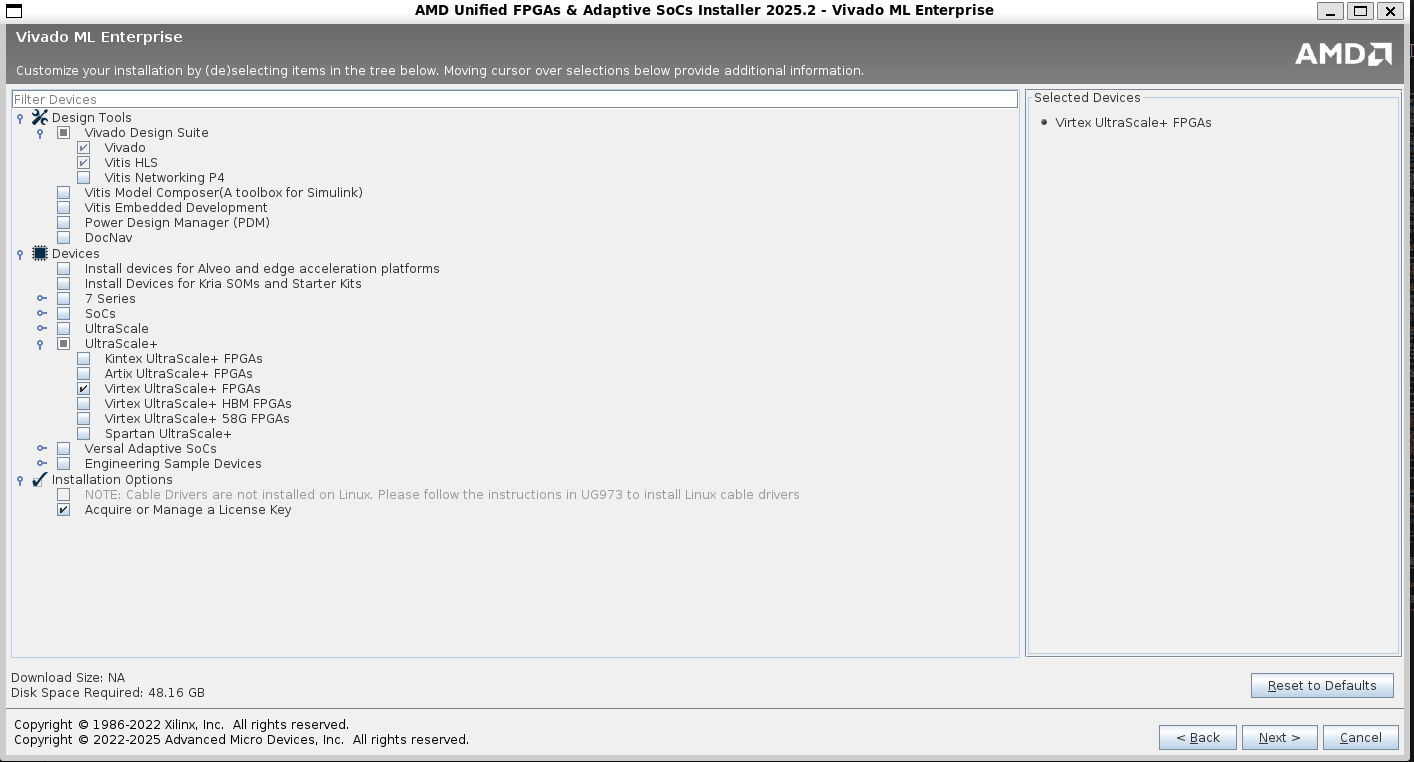
Click next to continue.
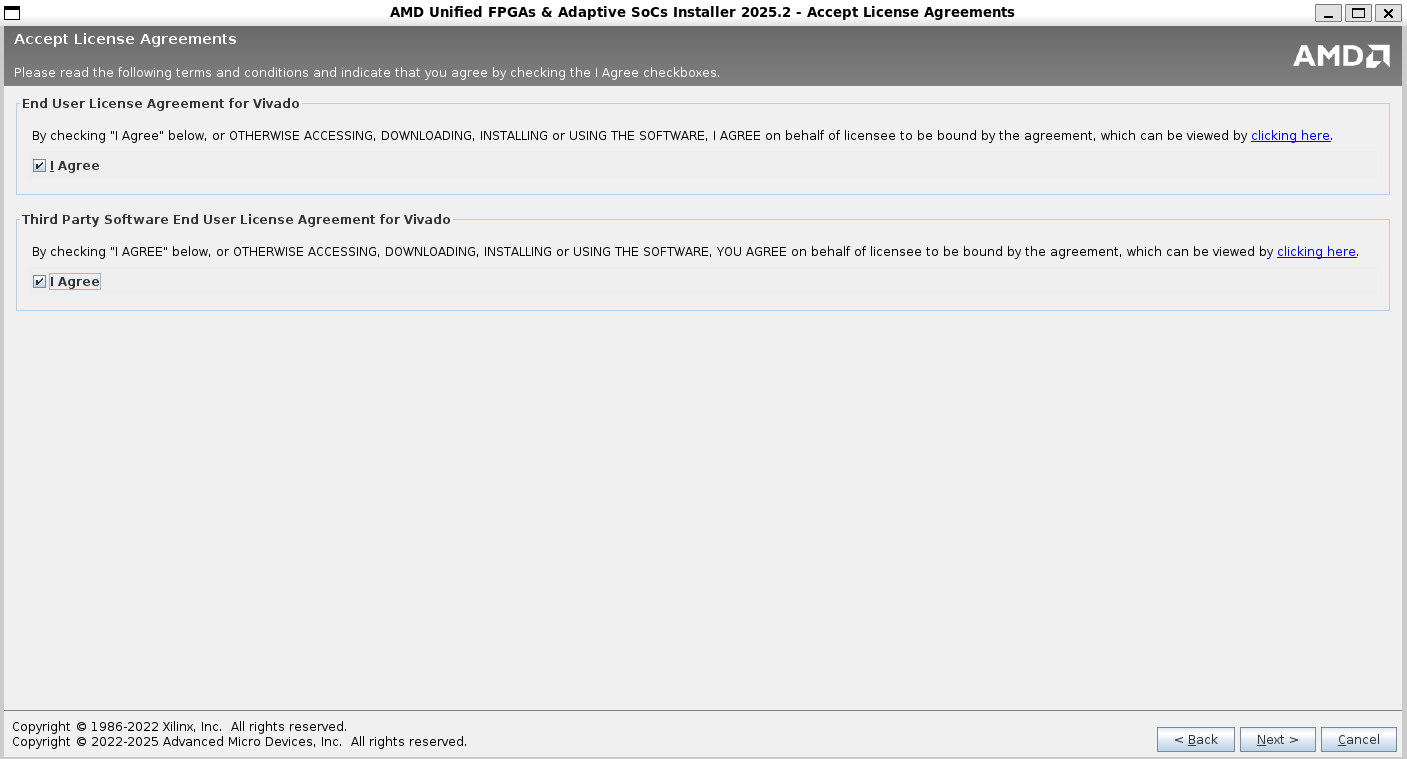
Accept the license and usage terms, click next to continue.
Specify an installation directory and click next to continue.
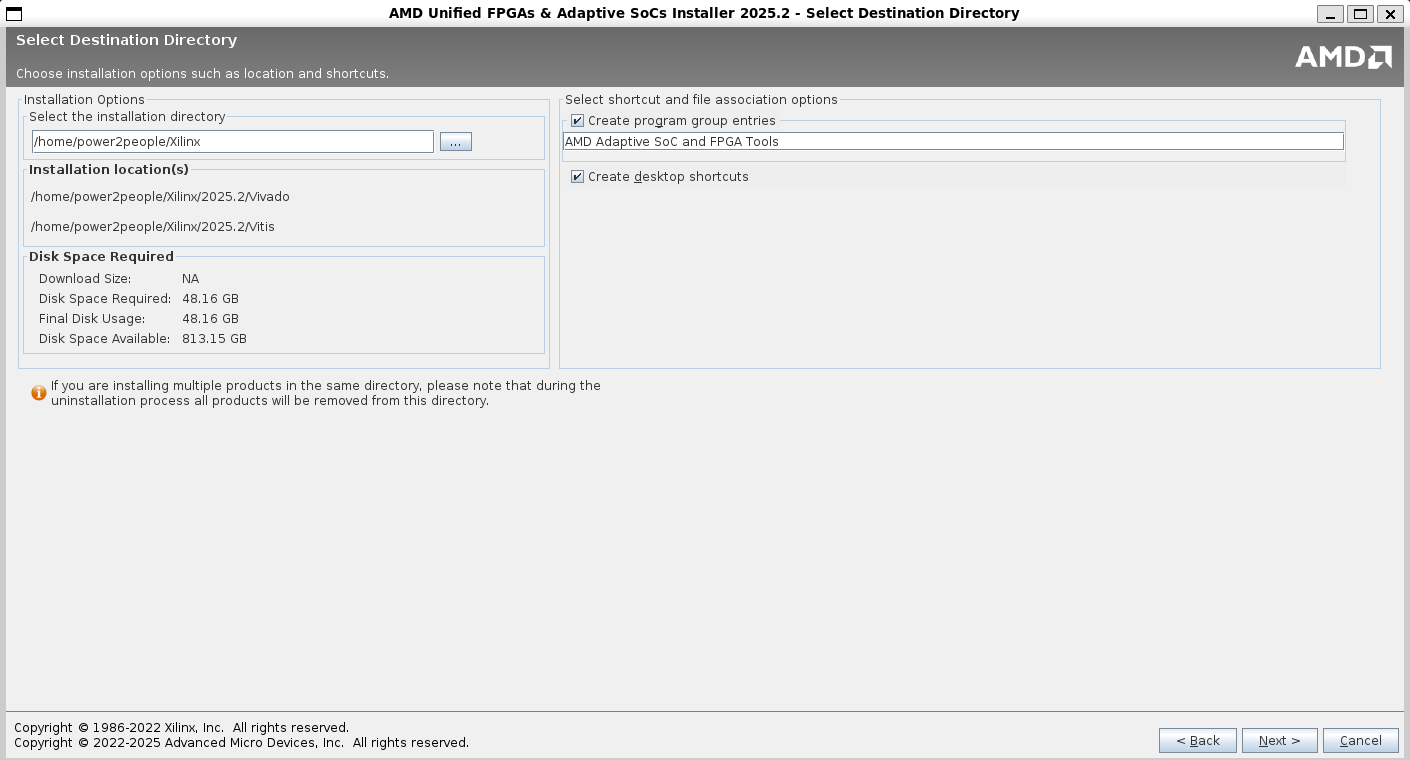
Review the installation summary and click Install to start the installation. Wait for the installer to download the files in case you are using web installer - it can take 30-60 minutes or even longer on slower internet connections.
Setting up Vivado Paths for terminal utilities
Once the installation is complete, add Vivado to your path. The following assumes you are using bash on WSL 2 but the process is similar for other shells too:
# Open your .bashrc file in vim editor
> echo 'source <PathToXilinxInstallationDIR>/Vivado/2025.2/settings64.sh' >> ~/.bashrc
Replace PathToXilinxInstallationDIR with the path to Xilinx installation folder from the previous step.
Installing USB drivers and pass through on Windows
The final step in Vivado installation on WSL is to allow USB passthrough from Windows to WSL 2.
Install USBIPD on Windows 11
Note
Vivado is not supported on ARM platforms. Please make sure you download the installer for your AMD/Intel based machines.
Go to the USBIPD Release Page and download the latest x64 installer for Windows. You may get a warning asking you to confirm that you trust this download. Run the downloaded usbipd-win_x.msi installer file. Running the installer will install:
- A service called usbipd (display name: USBIP Device Host). You can check the status of this service using the Services app from Windows.
- A command line tool usbipd. The location of this tool will be added to the PATH environment variable.
- A firewall rule called usbipd to allow all local subnets to connect to the service. You can modify this firewall rule to fine tune access control.
List all of the USB devices connected to Windows by opening PowerShell in administrator mode and entering the following command. Once the devices are listed, select and copy the bus ID of the device you’d like to attach to WSL.
usbipd list
Before attaching the USB device, the command usbipd bind must be used to share the device, allowing it to be attached to WSL. This requires administrator privileges. Select the bus ID of the device you would like to use in WSL and run the following command. After running the command, verify that the device is shared using the command usbipd list again.
usbipd bind --busid 4-4
To attach the USB device, run the following command. (You no longer need to use an elevated administrator prompt.) Ensure that a WSL command prompt is open in order to keep the WSL 2 lightweight VM active. Note that as long as the USB device is attached to WSL, it cannot be used by Windows. Once attached to WSL, the USB device can be used by any distribution running as WSL 2. Verify that the device is attached using usbipd list. From the WSL prompt, run lsusb to verify that the USB device is listed and can be interacted with using Linux tools.
usbipd attach --wsl --busid <busid>
Open Ubuntu (or your preferred WSL command line) and list the attached USB devices using the command:
>lsusb
You should see the device you just attached and be able to interact with it using normal Linux tools. This should be sufficient to access the device from Vivado and other utilities. However, in some cases, you may need to configure udev rules to allow non-root users to access the device.
Once you are done using the device in WSL, you can either physically disconnect the USB device or run this command from PowerShell:
usbipd detach --busid <busid>
To learn more about how this works, see the Windows Command Line Blog and the usbipd-win repo on GitHub.
Warning
You will have re-bind the USB device if you re-start or disconnect your FPGA board.
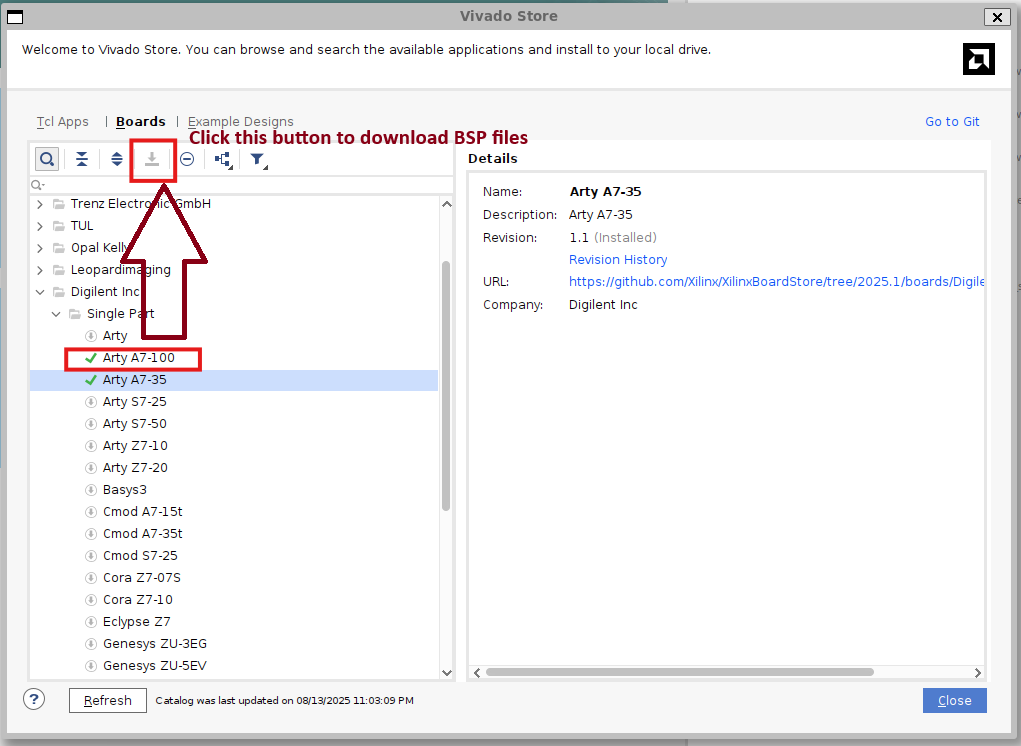
Install Digilent Board files
This step is only required if you are using any of Digilent Boards such as Arty A7 100T. If you are using Xilinx boards such as VCU-118, skip this step.
To install BSP files, launch vivado from WSL:
>vivado
Once Vivado starts, select Vivado Store from the Tools menu:
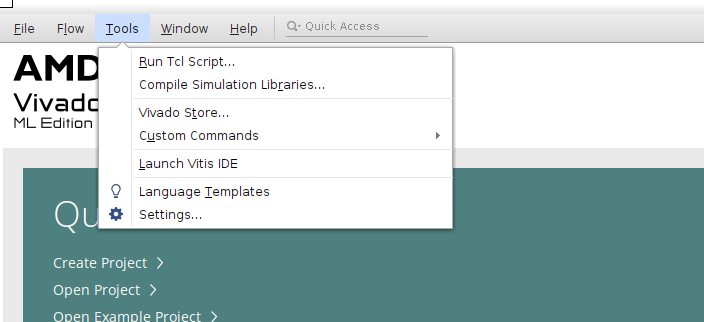
Check the “Don’t show this dialog again” checkbox and click ok.
In the Vivado Store Window, click on “Boards Tab”. In the left tree pane, look for Digilent Inc. Expand the tree node and then expand the child “Single Part” tree node and look for your device. For example, if you are installing for Arty A7 100T, select the device from the tree and click on Download button on the top. Once the donwload button finishes, you will see a green tick against the device name indicating the BSP files have been installed. Click close and exist the Vivado Store.
Next Steps
Version Compatibility
PowerCommons projects target Vivado 2025.x. Using older versions (2023.x, 2024.x) may require constraint updates.
LiteX Setup
LiteX SoC builder framework for generating DDR controllers, peripherals, and SoC infrastructure.
Installation
1. Install LiteX
# Using pip (recommended)
pip3 install --user litex litex-boards

# Verify
python3 -c "import litex; print(litex.__version__)"
2. Clone LiteX Ecosystem (for development)
mkdir ~/litex && cd ~/litex
wget https://raw.githubusercontent.com/enjoy-digital/litex/master/litex_setup.py
chmod +x litex_setup.py

./litex_setup.py --init --install --user
This installs:
litex- Core frameworklitex-boards- Board definitionslitedram- DDR controller generatorliteeth- Ethernet MAC/PHYlitepcie- PCIe controllerlitesata- SATA controller
Test LiteX
Generate a simple SoC
# For VCU-118
litex_soc --board vcu118 --cpu-type microwatt --build

# For Arty A7
litex_soc --board arty --cpu-type vexriscv --build
Build time: ~5-10 minutes.
LiteDRAM for DDR4
PowerCommons uses LiteDRAM for VCU-118 DDR4 memory.
Test DDR4 initialization
cd ~/litex/litedram
./litedram_gen.py --sdram-module MT40A512M16 --sdram-data-width 64
PowerPC Support in LiteX
PowerCommons has contributed Microwatt (PowerPC) CPU support to LiteX.
Check CPU options
litex_soc --cpu-list | grep -i power
Expected output:
microwatt
Configuration for VCU-118
Example build command:
litex_soc \
    --board vcu118 \
    --cpu-type microwatt \
    --cpu-variant standard \
    --sys-clk-freq 100e6 \
    --integrated-rom-size 0x10000 \
    --integrated-sram-size 0x2000 \
    --with-ethernet \
    --build
Output: build/vcu118/gateware/vcu118.bit
Directory Structure
~/litex/
├── litex/               # Core framework
├── litex-boards/        # Board support
├── litedram/            # DDR controllers
├── liteeth/             # Ethernet
├── litepcie/            # PCIe
└── litesata/            # SATA
Environment Variables
Add to ~/.bashrc:
export PATH=$HOME/.local/bin:$PATH
export LITEX_BOARDS=$HOME/litex/litex-boards
Common Issues
“Command not found: litex_soc”
export PATH=$HOME/.local/bin:$PATH
“Board not found”
pip3 install --user --upgrade litex-boards
Synthesis errors with Vivado Ensure Vivado is in PATH:
source /opt/Xilinx/Vivado/2025.1/settings64.sh
Advanced: Custom SoC Configuration
Create soc_config.py:
from litex_boards.targets import vcu118
from litex.soc.cores.cpu import Microwatt

class CustomSoC(vcu118.BaseSoC):
    def __init__(self):
        super().__init__(
            cpu_type="microwatt",
            sys_clk_freq=125e6,
            with_ethernet=True
        )

if __name__ == "__main__":
    soc = CustomSoC()
    soc.build()
Run:
python3 soc_config.py
Documentation
- LiteX Wiki: github.com/enjoy-digital/litex/wiki
- PowerCommons LiteX integration: Projects → Microwatt → LiteX Integration
Next Steps
PowerPC Toolchain
This page describes the tool chain and compilers needed to build Linux and other binaries for PowerPC architectures (Microwatt, A2O, A2I etc.). This page also serves as an introduction to all cross compile packages and utilities that are available to anyone developing for PPC64 architecture.
Overview
As more experienced users might already know, PowerPC compilers and utilities are available into both Big Endian and Little Endian formats. The most popular formats these days is Little Endian and PowerCommons projects use Little Endian formats.
PowerPC64 Little-Endian (LE) Cross-Compilation Toolchain
| Package | Purpose | Install |
|---|---|---|
gcc-powerpc64le-linux-gnu | C cross-compiler | sudo apt install gcc-powerpc64le-linux-gnu |
g++-powerpc64le-linux-gnu | C++ cross-compiler | sudo apt install g++-powerpc64le-linux-gnu |
binutils-powerpc64le-linux-gnu | Linker, assembler, objdump | sudo apt install binutils-powerpc64le-linux-gnu |
libc6-dev-ppc64el-cross | C library headers & dev files | sudo apt install libc6-dev-ppc64el-cross |
linux-libc-dev-ppc64el-cross | Linux kernel UAPI headers | sudo apt install linux-libc-dev-ppc64el-cross |
gdb-multiarch | Multi-target debugger | sudo apt install gdb-multiarch |
qemu-user-static | Userspace emulation for ppc64le | sudo apt install qemu-user-static |
Install:
sudo apt install gcc-powerpc64le-linux-gnu g++-powerpc64le-linux-gnu binutils-powerpc64le-linux-gnu libc6-dev-ppc64el-cross linux-libc-dev-ppc64el-cross gdb-multiarch qemu-user-static
Verify:
powerpc64-linux-gnu-gcc --version
PowerPC64 Big-Endian (BE) Cross-Compilation Toolchain
| Package | Purpose | Install |
|---|---|---|
gcc-powerpc64-linux-gnu | C cross-compiler | sudo apt install gcc-powerpc64-linux-gnu |
g++-powerpc64-linux-gnu | C++ cross-compiler | sudo apt install g++-powerpc64-linux-gnu |
binutils-powerpc64-linux-gnu | Linker, assembler, objdump | sudo apt install binutils-powerpc64-linux-gnu |
libc6-dev-ppc64-cross | C library headers & dev files | sudo apt install libc6-dev-ppc64-cross |
linux-libc-dev-ppc64-cross | Linux kernel UAPI headers | sudo apt install linux-libc-dev-ppc64-cross |
gdb-multiarch | Multi-target debugger | sudo apt install gdb-multiarch |
qemu-user-static | Userspace emulation for ppc64 | sudo apt install qemu-user-static |
Install:
sudo apt install gcc-powerpc64-linux-gnu g++-powerpc64-linux-gnu binutils-powerpc64-linux-gnu libc6-dev-ppc64-cross linux-libc-dev-ppc64-cross gdb-multiarch qemu-user-static
Verify:
powerpc64-linux-gnu-gcc --version
Test Cross-Compilation
Hello World
// hello.c
#include <stdio.h>
int main() {
    printf("Hello from PowerPC!\n");
    return 0;
}
Compile:
powerpc64-linux-gnu-gcc -o hello hello.c
file hello
Expected:
hello: ELF 64-bit MSB executable, 64-bit PowerPC
WSL 2 Ubuntu Setup
This page provides instructions to setup all the different utilities that you will need to work with various PowerCommons projects.
Git & tio
Git is a free and open source distributed version control system designed to handle everything from small to very large projects with speed and efficiency.
tio is a serial device tool which features a straightforward command-line and configuration file interface to easily connect to serial TTY devices for basic I/O operations.
You can install both Git and tio with a single command:
>sudo apt install git tio
First Bitstream Build
Complete guide to building and booting Linux on Microwatt with the VCU-118 FPGA.
Prerequisites: This guide assumes you are using the official PowerCommons WSL images and have followed all instructions in the Development Environment section.
Overview
Build and boot Linux on VCU-118 in four steps:
- Build Buildroot (cross-compiler + userspace)
- Build Linux kernel (with Microwatt patches)
- Build FPGA bitstream (Microwatt + DDR4 + QSPI)
- Flash and boot
Clone Repositories
cd ~/projects

# Microwatt with VCU-118 support
git clone https://codeberg.org/PowerCommons/microwatt.git
cd microwatt
git checkout xilinx-vcu-118-dram
cd ..

# Linux kernel (upstream v6.12)
git clone --depth=1 --branch v6.12 \
    https://git.kernel.org/pub/scm/linux/kernel/git/torvalds/linux.git linux

# PowerCommons kernel patches
git clone https://codeberg.org/PowerCommons/linux-powercommons.git

# Buildroot for userspace
git clone https://github.com/shenki/buildroot -b microwatt buildroot-microwatt
Step 1: Build Buildroot
Build the cross-compiler and root filesystem:
cd ~/projects/buildroot-microwatt
make ppc64le_microwatt_defconfig
make -j$(nproc)
Build time: ~30 minutes
Output:
- Cross-compiler:
output/host/bin/powerpc64le-buildroot-linux-gnu-gcc - Root filesystem:
output/images/rootfs.cpio
Step 2: Build Linux Kernel
Apply PowerCommons Patches
cd ~/projects/linux
git am ~/projects/linux-powercommons/patches/microwatt-vcu118/*.patch
This applies the RCU fix and device tree updates needed for Microwatt on VCU-118. See the linux-powercommons README for details on why the RCU workaround is needed.
Configure Kernel
make ARCH=powerpc microwatt_defconfig
Set Initramfs Path
Edit .config and set the path to your rootfs.cpio:
CONFIG_INITRAMFS_SOURCE="/home/powercommons/projects/buildroot-microwatt/output/images/rootfs.cpio"
Build Kernel
export PATH="/home/powercommons/projects/buildroot-microwatt/output/host/bin:$PATH"
make ARCH=powerpc CROSS_COMPILE=powerpc64le-buildroot-linux-gnu- -j$(nproc) zImage
Build time: ~5 minutes
Output: arch/powerpc/boot/dtbImage.microwatt.elf
Step 3: Build FPGA Bitstream
Generate LiteDRAM Core
cd ~/projects/microwatt/litedram/gen-src
python3 generate.py xilinx-vcu-118
Build Bitstream
cd ~/projects/microwatt
fusesoc library add microwatt .
fusesoc run --target=xilinx-vcu-118 microwatt --no_bram --spi_flash_offset=33554432
Parameters:
--no_bram: Boot from external flash instead of internal BRAM--spi_flash_offset=33554432: Linux kernel location at 32MB offset
Build time: ~45 minutes
Output: build/microwatt_0/xilinx-vcu-118-vivado/microwatt_0.bit
Step 4: Flash and Boot
Program Bitstream
openFPGALoader -b vcu118 --write-flash ~/projects/microwatt/build/microwatt_0/xilinx-vcu-118-vivado/microwatt_0.bit
Program Linux Kernel (at 32MB offset)
openFPGALoader -b vcu118 --write-flash -o 0x2000000 ~/projects/linux/arch/powerpc/boot/dtbImage.microwatt.elf
Connect Serial Console
tio /dev/ttyUSB0 -b 115200
Power Cycle
Power cycle the VCU-118 board. You should see:
Welcome to Microwatt !

 Soc signature: f00daa5500010001
  Soc features: UART DRAM SPIFLASH
          DRAM: 2047 MB
           CLK: 125 MHz
  SPI FLASH ID: 20bb21 Micron 1G [quad IO mode]

LiteDRAM built from LiteX f55ea7075
Initializing SDRAM @0x40000000...
Memtest OK

Trying flash...
Booting from DRAM at 1700000

[... Linux boot messages ...]

Welcome to Buildroot
microwatt login:
Login with root (no password).
Troubleshooting
| Problem | Solution |
|---|---|
| SPI FLASH ID: 000000 | Check STARTUPE3 DO/DI wiring. |
| Kernel crashes in rcu_process_callbacks | Apply the PowerCommons patches. See linux-powercommons README |
| “Can’t open blockdev” | Set CONFIG_INITRAMFS_SOURCE to your rootfs.cpio path |
| DDR4 training fails | Check clock stability and reset sequencing |
Repository Links
- Microwatt: codeberg.org/PowerCommons/microwatt (branch:
xilinx-vcu-118-dram) - Kernel Patches: codeberg.org/PowerCommons/linux-powercommons
- Buildroot: github.com/shenki/buildroot (branch:
microwatt)
Troubleshooting
Common issues and solutions.
Environment Setup
Vivado Not Found
Symptom: vivado: command not found
Solution:
source /opt/Xilinx/Vivado/2025.1/settings64.sh

# Make permanent
echo 'source /opt/Xilinx/Vivado/2025.1/settings64.sh' >> ~/.bashrc
Python Import Errors
Symptom: ModuleNotFoundError: No module named 'litex'
Solution:
pip3 install --user litex litex-boards
export PATH=$HOME/.local/bin:$PATH
USB Permission Denied
Symptom: Error: libusb_open() failed with LIBUSB_ERROR_ACCESS
Solution:
# Temporary
sudo chmod 666 /dev/ttyUSB*

# Permanent
sudo usermod -a -G dialout $USER
# Logout and login
Build Errors
Synthesis Fails - Timing
Symptom:
CRITICAL WARNING: Timing constraints are not met
WNS: -1.234ns
Solution:
Reduce clock frequency:
# LiteX
python3 vcu118.py --sys-clk-freq=80e6  # Was 100e6
Out of Memory
Symptom: Build crashes, system freezes
Solution:
# Limit parallel jobs
export MAKEFLAGS="-j2"

# Increase swap
sudo fallocate -l 16G /swapfile
sudo chmod 600 /swapfile
sudo mkswap /swapfile
sudo swapon /swapfile
License Error
Symptom: License checkout failed
Solution:
# Check license
echo $XILINXD_LICENSE_FILE

# Or run license manager
vlm &
For VCU-118, you need Standard edition license (eval or purchased). WebPACK doesn’t support Ultrascale+.
Missing FPGA Part
Symptom: Part xcvu9p not found
Solution:
Re-run installer to add Ultrascale+ device support:
sudo /opt/Xilinx/Vivado/2025.1/xsetup
FPGA Programming
Cable Not Detected
Symptom: No devices detected
Solution:
- Check USB connection:
lsusb | grep Xilinx
- Install cable drivers:
cd /opt/Xilinx/Vivado/2025.1/data/xicom/cable_drivers/lin64/install_script/install_drivers
sudo ./install_drivers
- WSL users - USB passthrough:
usbipd list
usbipd attach --wsl --busid X-X
Programming Fails
Symptom: Programming failed at 30%
Solution:
- Check power supply to board
- Verify correct .bit file for board
- Try lower JTAG frequency:
openocd -c "adapter speed 1000" -f board/vcu118.cfg
Serial Console
No Output
Symptom: Screen is blank after programming
Solution:
- Check baud rate:
screen /dev/ttyUSB1 115200 # Not 9600
- Check correct USB port:
ls -l /dev/ttyUSB*
# Usually ttyUSB0 = JTAG, ttyUSB1 = UART
- Check FPGA programmed:
- Look for LEDs on board
- Run
lsusb, should show Xilinx device
- Try reset:
- Press reset button on board
- Power cycle
Garbled Output
Symptom: Random characters
Solution:
Clock frequency mismatch. Check UART clock divider matches system clock.
Boot Issues
Linux Kernel Panics
Symptom:
Kernel panic - not syncing: VFS: Unable to mount root fs
Solution:
- Check device tree:
dtc -I dtb -O dts microwatt.dtb | grep memory
- Verify initrd:
file rootfs.cpio.gz
# Should be gzip compressed
- Check bootargs:
console=ttyS0,115200 root=/dev/ram0
Hangs at Boot
Symptom: Boot stops at “Starting kernel…”
Solution:
- Enable early printk in kernel config
- Check memory controller initialization
- Verify DDR4 timing constraints
LiteX Specific
Build Fails - Yosys
Symptom: Yosys not found
Solution:
cd ~/litex
./litex_setup.py --install --user
SoC Build Fails - Missing Board
Symptom: Board vcu118 not found
Solution:
pip3 install --user --upgrade litex-boards
Performance Issues
WSL Builds Slow
Symptom: Build takes 3x longer than expected
Solution:
Move project to WSL filesystem:
# Bad (slow)
cd /mnt/c/Users/name/projects

# Good (fast)
cd ~/projects
File I/O across WSL/Windows boundary is slow.
Vivado GUI Sluggish
Symptom: Vivado GUI freezes, slow
Solution:
- Use batch mode when possible:
vivado -mode batch -source build.tcl
- Resource limits:
Ensure WSL has enough RAM (see
.wslconfig)
Getting Help
Still stuck?
- Check logs:
cat build/*/vivado.log
- Community:
- Matrix: #powercommons:matrix.org
- Codeberg: codeberg.org/PowerCommons
- Upstream:
- Microwatt: github.com/antonblanchard/microwatt
- LiteX: github.com/enjoy-digital/litex/wiki
- Vivado: xilinx.com/support
- Provide details:
- OS and version
- Vivado version
- Complete error log
- Steps to reproduce
Projects Overview
Building the Open Computing Stack
PowerCommons develops interconnected projects that together create a complete, transparent, and sovereign computing platform. Each project advances specific technical goals while contributing to the larger vision of liberation technology.
Core Processor Projects
✅ Microwatt Xilinx VCU-118 Integration
Status: In Progress | Estimate: October 2025
Successfully integrated Microwatt processor with enterprise-grade Xilinx VCU-118 board, enabling Linux boot.
Achievements: ✅ Added VCU-118 support to Microwatt SoC (FuseSoC + VHDL). This additionally sets up LEDs to debug issues with clock, reset signal, UART etc. ✅ Extended Microwatt SoC LiteDRAM support to VCU-118 board 🟡 Fixed LitexBios and LitexSoC to support Linux on Microwatt as Litex BIOS was only designed to boot RISC V.
Why It Matters: Established VCU-118 as the primary development platform for high-end OpenPower FPGA work.
🔥 PowerCommons A2O: OpenPower A2O Core Revival
Status: Active Development | Target: Q4 2025
Reviving IBM’s battle-tested A2O processor - the out-of-order superscalar core that powered Blue Gene/Q supercomputers. This enterprise-grade processor brings serious computational power to the open hardware ecosystem.
Key Objectives:
- Restore compatibility with modern FPGA toolchains
- Fix timing closure and synthesis issues
- Create comprehensive documentation
- Establish software toolchain
Why It Matters: A2O provides the high-performance computing capability needed for real-world workloads, from scientific computing to database servers.
🏗️ PowerCommons SoC Platform
Status: Architecture Phase | Target: 2026
Creating the world’s first fully open System-on-Chip with verifiable security from boot to application. Combines Microwatt (control) and A2O (compute) processors in a heterogeneous architecture.
Key Objectives:
- Integrate dual-core heterogeneous design
- Implement open BMC replacement
- Create secure boot architecture
- Develop complete firmware stack
Why It Matters: Eliminates the last proprietary components in modern computing systems, including the hidden management engines.
Project Integration Strategy
┌─────────────────────────────────────────────┐
│            PowerCommons Platform            │
├─────────────────────────────────────────────┤
│                                             │
│  ┌─────────────┐      ┌─────────────┐      │
│  │  Microwatt  │◄────►│     A2O     │      │
│  │   (Boot)    │      │  (Compute)  │      │
│  └─────────────┘      └─────────────┘      │
│         ▲                    ▲              │
│         └────────┬───────────┘              │
│                  ▼                          │
│         ┌─────────────┐                    │
│         │    LiteX    │                    │
│         │  Framework  │                    │
│         └─────────────┘                    │
│                  ▼                          │
│  ┌──────────────────────────────────┐      │
│  │     Peripherals & Memory         │      │
│  └──────────────────────────────────┘      │
│                                             │
└─────────────────────────────────────────────┘
“The future is not some place we are going, but one we are creating. The paths are not to be found, but made.” - John Schaar
Microwatt Integration
Open PowerPC Core on Modern FPGAs
Overview
Microwatt is an open-source PowerPC soft core developed by Anton Blanchard and IBM. PowerCommons has extended Microwatt to run on high end FPGA platforms with full Linux support.
Core: Microwatt v0.1
Architecture: PowerPC 64-bit
Platform: Xilinx VCU-118
Status: Linux operational
Development Work
Native Microwatt SoC
Implementation using Microwatt’s native build system (FuseSoC/VHDL):
- VCU-118 board support with debug capabilities
- DDR4 memory integration via LiteDRAM
- Linux boot from native Microwatt
LiteX Framework Integration
Integration of Microwatt into LiteX SoC framework:
- PowerPC support in LiteX BIOS
- Endianness and boot protocol fixes
- Linux boot through LiteX infrastructure
Key Achievements
| Metric | Result |
|---|---|
| Clock Speed | 125MHz |
| Memory | 2GB DDR4 |
| Linux Boot | + seconds |
| Stability | + hours |
Upstream Contributions
- Microwatt: VCU-118 platform support
- LiteX: PowerPC architecture fixes
- LiteDRAM: DDR4 timing configurations
Resources
Microwatt SoC on VCU-118
Overview
Implementation of Microwatt SoC on Xilinx VCU-118 using the native Microwatt build system (FuseSoC/VHDL). This work establishes basic board support, DDR4 and debugging capabilities.
Platform: Xilinx VCU-118 (XCVU9P FPGA)
Build System: FuseSoC
Language: VHDL
Task 1: Basic build support for VCU-118
Objective
Update the build system and add build options for Xilinx VCU 118.
Implementation
Added build definition in microwatt core along with pin constraints (xdc) and a bare minimum top level file for the board.
Task 2: Constraint Updates, Top Level Entity and Architecture
Task 3: Re-compile the firmware and Re-build
Task 3: Add GPIO Debug LEDs for Hardware Troubleshooting
Objective
Add VCU-118 as a supported platform in Microwatt with GPIO-based debugging capabilities to diagnose bring-up issues.
Implementation
Created FuseSoC core files and VHDL top-level for VCU-118:
# Build commands
fusesoc run --target=vcu118 microwatt --ram_init_file=hello_world.hex
Debug LED mapping for hardware troubleshooting:
- LED 0: PLL lock status
- LED 1: Reset state
- LED 2-3: UART TX/RX activity
- LED 4-7: User-defined debug signals
-- Debug LED connections in top-level VHDL
leds(0) <= pll_locked;
leds(1) <= not soc_rst;
leds(2) <= uart_tx;
leds(3) <= uart_rx;
[Screenshot placeholder: VCU-118 board with LEDs showing successful clock lock]
Running Microwatt (No DRAM)
# Build the bitstream without DRAM
[Build command placeholder]

# Generate hello world binary
[Compile command placeholder]

# Program the FPGA
[Programming command placeholder]

# Connect to UART console
[Serial terminal command placeholder]
Challenges Solved
- Clock domain crossing from 300MHz input to 100MHz system clock
- Pin assignment for mixed voltage I/O standards
- Reset sequencing for stable initialization
Code: codeberg.org/PowerCommons/microwatt-vcu118
Task 4: Generating LiteDRAM core
Objective
Integrate LiteDRAM DDR4 controller to access the VCU-118’s 4GB memory, enabling Linux boot.
Implementation
Extended the basic VCU-118 support with DDR4 memory:
# LiteDRAM configuration
class VCU118DDR4(Module):
    def __init__(self, sys_clk_freq=125e6):
        self.submodules.ddrphy = USDDRPHY(
            pads = platform.request("ddram"),
            memtype = "DDR4",
            sys_clk_freq = sys_clk_freq,
            cmd_latency = 1
        )
Memory initialization sequence:
- Assert DDR4 reset for 500us minimum
- Configure PHY with training patterns
- Execute read/write leveling
- Verify with memory test
- Report status via UART
[Screenshot placeholder: Terminal showing DDR4 training completion and memory test pass]
Task 5: Updating signal/pin mapping
Task 6: Upgrading LiteDRAM Wrapper
Task 7: Building and Running
Running Microwatt with DRAM
# Build Microwatt with LiteDRAM
[Build command with DRAM placeholder]

# Generate memory test binary
[Memory test compile placeholder]

# Program FPGA with DRAM support
[FPGA programming command placeholder]

# Run memory test
[Memory test execution placeholder]

# Load and boot Linux kernel
[Linux boot command placeholder]
Results
- Bandwidth: 1.6 GB/s sustained
- Size: 256MB mapped (4GB physical available)
- Stability: 48-hour memtest passed
Code: codeberg.org/PowerCommons/litedram-vcu118
LiteX SoC with Microwatt on VCU-118
PowerPC Support in LiteX Framework
Overview
Integration of Microwatt PowerPC core into the LiteX SoC framework, enabling Linux boot through LiteX’s infrastructure. This required fixing numerous RISC-V assumptions in LiteX.
Platform: Xilinx VCU-118
Framework: LiteX
CPU: Microwatt PowerPC
Task: PowerPC Boot Support in LiteX
Objective
Adapt LiteX SoC and BIOS to boot PowerPC Linux, fixing RISC-V assumptions throughout the codebase.
Implementation
Key fixes for PowerPC compatibility:
Endianness handling - PowerPC is big-endian:
// Fixed MMIO access for PowerPC
#ifdef __powerpc__
#define readl(addr) __builtin_bswap32(*(uint32_t *)(addr))
#define writel(val, addr) *(uint32_t *)(addr) = __builtin_bswap32(val)
#endif
Boot protocol - PowerPC uses function descriptors:
// Correct Linux entry for PowerPC
typedef struct {
    void *entry;
    void *toc;
} func_desc_t;

func_desc_t *desc = (func_desc_t *)KERNEL_ADDR;
void (*kernel_entry)(void) = desc->entry;
Memory layout - Fixed for PowerPC requirements:
- Kernel at 0x400000 (not RISC-V’s 0x40000000)
- Exception vectors at 0x0
- Device tree at 0xf00000
# Build and boot Linux
./build_kernel.sh
litex_term /dev/ttyUSB1 --kernel=linux.bin --kernel-adr=0x400000
[Screenshot placeholder: Linux boot messages on serial console]
Running Linux on LiteX/Microwatt
# Build LiteX SoC with Microwatt
[LiteX build command placeholder]

# Build Linux kernel for PowerPC
[Kernel build command placeholder]

# Build device tree
[DTB build command placeholder]

# Program FPGA with complete SoC
[FPGA programming placeholder]

# Boot Linux via serial terminal
[Linux serial boot command placeholder]

# Alternative: Boot from SPI flash
[SPI flash boot command placeholder]
Boot Performance
LiteX BIOS on Microwatt/VCU-118
CPU:    100MHz
RAM:    256MB
Kernel: 2.3MB loaded
Boot:   45 seconds to prompt
Bugs Fixed
- Wrong entry point handling for PowerPC
- Endianness issues in all MMIO access
- Memory barriers for PowerPC architecture
- Cache management operations
- Exception vector locations
Code: codeberg.org/PowerCommons/litex-powerpc
PowerCommons A2O - A2O Core Revival
💬 Get Involved! Join the A2O revival discussion on Matrix: #powercommons:matrix.org - connect with developers, share ideas, and help bring this legendary processor back to life!
Project Overview
The PowerCommons A2O initiative revives and modernizes IBM’s A2O processor core - a proven architecture that powered the world’s most powerful supercomputers. By making this enterprise-grade technology accessible on modern FPGA platforms, we’re democratizing access to high-performance, transparent computing.
Project Status: 🟡 Active Development Timeline: September 2025 - March 2026 Funding: €50,000 (NLnet Foundation - pending) Repository: codeberg.org/PowerCommons/powercommons-a2o
Why A2O?
Proven Heritage
The A2O processor isn’t experimental - it’s battle-tested technology that ran in production for years:
- Powered Blue Gene/Q supercomputers
- Achieved 16.32 petaflops in Sequoia system
- Demonstrated reliability at massive scale
- Optimized for power efficiency
Technical Excellence
- 64-bit PowerPC Architecture: Full ISA 2.06 compliance
- Out-of-Order Execution: Advanced performance optimization
- Multi-Threading: 4-way SMT capability
- Vector Processing: QPX floating-point unit
- Cache Hierarchy: Sophisticated L1/L2 cache design
Open Liberation
IBM released A2O as open source, but the code has suffered from:
- Incompatibility with modern toolchains
- Broken build systems
- Missing documentation
- Lack of community support
PowerCommons fixes these issues, making A2O accessible to everyone.
Technical Objectives
Phase 1: Infrastructure Setup (Months 1) 🚧✅
- Assess current codebase state
- Identify toolchain incompatibilities
- Document build requirements
- Establish development environment
Phase 2: Core Revival, Implementation & Software (Months 3-4) 🚧
- Fix Vivado 2025.x compatibility issues
- Resolve timing closure problems
- Update synthesis constraints
- Create automated build system
Phase 3: Integration and Documentation (Months 5-6) 📋
- Implement missing peripherals
- Add LiteX integration
- Create FPGA reference designs
- Roadmap
Current Challenges
Build System Issues
// Example of outdated synthesis directive
(* ram_style = "block" *)  // Vivado 2025 requires different syntax
reg [63:0] cache_data [0:1023];
The original build system uses obsolete Xilinx tools and scripts incompatible with modern Vivado versions.
Timing Closure
Critical paths in the original design exceed timing constraints on modern FPGAs:
- Cache access paths
- Out-of-order execution logic
- Vector unit operations
Software Stack
Limited software support requires development of:
- Modern GCC toolchain
- Linux kernel patches
- Bootloader implementation
- Debug infrastructure
A2O Processor Revival - Task Breakdown
💬 Join the Community! Discuss A2O revival on Matrix: #powercommons:matrix.org
This document outlines the specific tasks for reviving the OpenPower A2O processor core based on the NLnet funding proposal. The project is structured across three phases over 6 months.
Project Overview
Timeline: 6 months Budget: €50,000 Primary Goal: Restore full functionality to the A2O processor core for modern FPGA platforms
Phase 1: Infrastructure Setup (Months 1-2)
Status: 4 open, 0 closed (0/4 complete)
| # | Title | Category | Tags | Status | Priority | Assignee |
|---|---|---|---|---|---|---|
| #543 | Version control and repository structure | Repository | - | ⬜ Open | 🟠 High | - |
| #542 | Development environment documentation | Documentation | - | ⬜ Open | 🟠 High | - |
| #541 | Configure Vivado 2025.x compatibility | Fpga-tools | - | ⬜ Open | 🔴 Critical | - |
| #540 | Set up modern build infrastructure | Build-system | - | ⬜ Open | 🔴 Critical | - |
Phase 2: Core Implementation & Software (Months 3-4)
Status: 8 open, 0 closed (0/8 complete)
| # | Title | Category | Tags | Status | Priority | Assignee |
|---|---|---|---|---|---|---|
| #551 | Peripheral implementation | Peripherals | - | ⬜ Open | 🟡 Medium | - |
| #550 | Bootloader development | Bootloader | - | ⬜ Open | 🟠 High | - |
| #549 | PowerPC cross-compiler setup | Toolchain | - | ⬜ Open | 🟠 High | - |
| #548 | Core functional testing | Testing | - | ⬜ Open | 🔴 Critical | - |
| #547 | Synthesis issue resolution | Synthesis | - | ⬜ Open | 🔴 Critical | - |
| #546 | Fix timing closure issues | Timing | - | ⬜ Open | 🔴 Critical | - |
| #545 | Alternative FPGA board support | Fpga-platform | - | ⬜ Open | 🟡 Medium | - |
| #544 | VCU-118 FPGA integration | Fpga-platform | - | ⬜ Open | 🔴 Critical | - |
Phase 3: Integration & Documentation (Months 5-6)
Status: 8 open, 0 closed (0/8 complete)
| # | Title | Category | Tags | Status | Priority | Assignee |
|---|---|---|---|---|---|---|
| #559 | Performance benchmarking roadmap | Performance | - | ⬜ Open | 🟡 Medium | - |
| #558 | Formal verification roadmap | Verification | - | ⬜ Open | 🟡 Medium | - |
| #557 | Contribution guidelines | Community | - | ⬜ Open | 🟡 Medium | - |
| #556 | Usage and getting started guide | User-guide | - | ⬜ Open | 🟠 High | - |
| #555 | Implementation guide | Implementation | - | ⬜ Open | 🟠 High | - |
| #554 | Architecture documentation | Architecture | - | ⬜ Open | 🔴 Critical | - |
| #553 | LiteX integration planning | Litex | - | ⬜ Open | 🟡 Medium | - |
| #552 | Linux kernel research and planning | Linux | - | ⬜ Open | 🟠 High | - |
Cross-Cutting Tasks
Status: 3 open, 0 closed (0/3 complete)
| # | Title | Category | Tags | Status | Priority | Assignee |
|---|---|---|---|---|---|---|
| #562 | Hardware access and board sharing | Infrastructure | - | ⬜ Open | 🟡 Medium | - |
| #561 | OpenPower Foundation collaboration | Community | - | ⬜ Open | 🟠 High | - |
| #560 | Community engagement and outreach | Community | - | ⬜ Open | 🟡 Medium | - |
Milestones
Month 2: Build System Complete
- Modern, reproducible build infrastructure
- Vivado 2025.x compatibility
- Comprehensive development environment docs
Month 4: Working A2O on FPGA
- A2O booting on VCU-118
- Basic functional tests passing
- Cross-compiler toolchain operational
- Simple bootloader running
Month 6: Production Ready
- Comprehensive documentation complete
- Alternative FPGA board support
- Future roadmap planning (formal verification, performance benchmarking)
- Community infrastructure established
Success Criteria
- ✅ A2O successfully synthesizes with Vivado 2025.x
- ✅ Timing closure achieved at ≥100 MHz on VCU-118
- ✅ Basic instruction tests pass on hardware
- ✅ Bootloader runs and provides debug console
- ✅ Cross-compiler produces working binaries
- ✅ Documentation enables new contributors to build and deploy
- ✅ Roadmaps for future development (Linux boot, formal verification, performance optimization)
Note on ISA 3.1 Compliance
The full ISA 3.1 compliance upgrade is tracked separately in the A2O Upgrade project, which details 9 workstreams covering instruction set updates, hypervisor support, interrupt architecture, MMU modernization, and VMX/VSX implementation.
Resources
- Repository: https://codeberg.org/PowerCommons/a2o
- Chat: #powercommons:matrix.org
- Website: https://powercommons.org/projects/a2o
- Funding: NLnet A2O Proposal
This task breakdown is based on the PowerCommons A2O OpenPower A2O Processor Revival Initiative funded by NLnet Foundation.
Technical Specifications
Coming Soon!
Development Roadmap
Coming soon!
Build Instructions
Coming soon!
A2O ISA Compliance - Workstream Summary
💬 Join the Community! We’re building the A2O upgrade together! Join us on Matrix: #powercommons:matrix.org to discuss implementation details, ask questions, share ideas, or collaborate on workstreams. New to Matrix? It’s a federated, open-source chat platform - get started here.
| WS | Workstream | Duration | Team | New Instr | Removed Instr | Main Outcome | Dependencies |
|---|---|---|---|---|---|---|---|
| WS1 | Instruction Set Updates | 12-16 wks | 2-3 | 40+ | 15+ | User-mode ISA compliance, bit manipulation, atomics, set operations | None |
| WS2 | Hypervisor & Virtualization | 16-20 wks | 2-3 | 0 | 1 | LPAR support, MSR[HV], per-thread partitions, KVM enablement | WS3 |
| WS3 | Interrupt Architecture | 10-12 wks | 2 | 3 | 7 | Book III-S interrupts, HSRR0/1, LPCR[AIL/HAIL], scv/rfscv | None |
| WS4 | Storage Management (MMU) | 20-24 wks | 3-4 | 2 | 15+ | Radix translation, 2-level LPAR, page walker, page walk cache | None |
| WS5 | Debug Facilities | 8-10 wks | 1-2 | 0 | 0 | DAWR0/1, DAWRX0/1, CIABR, Trace interrupt | WS2 |
| WS6 | Performance Monitor | 6-8 wks | 1-2 | 0 | 0 | Architected PMU, MMCR0/1/2/A, PMC1-6, SIER | None |
| WS7 | VMX/VSX Implementation | 24-32 wks | 3-4 | 400+ | 0 | LCS compliance, vector registers, run Fedora/Ubuntu/RHEL | WS1 |
| WS8 | Prefixed Instructions | 10-12 wks | 2 | 18 | 0 | v3.1 support, 64-bit instructions, prefixed load/store | WS1 |
| WS9 | Integration & Verification | 16-20 wks | 4-5 | 0 | 0 | ISA compliance suite execution, Linux boot, KVM validation | All |
Instruction Count Summary
- Total New Instructions: 463+ (40 scalar + 400 VMX/VSX + 18 prefixed + 5 other)
- Total Removed Instructions: 38+ (15 user-mode + 7 interrupt + 15 MMU + 1 hypervisor)
- Net Instruction Growth: +425 instructions
Dependency Order & Execution Strategy
Phase 1 - Foundation (No Dependencies):
┌─────────────────────────────────────────────┐
│ WS1: Instructions   (12-16 weeks)           │
│ WS3: Interrupts     (10-12 weeks)           │
│ WS4: MMU/Radix      (20-24 weeks) ← CRITICAL│
│ WS6: PMU            (6-8 weeks)              │
└─────────────────────────────────────────────┘
         ↓                    ↓
Phase 2 - Dependent on Phase 1:
┌─────────────────────────────────────────────┐
│ WS2: Hypervisor     (16-20 weeks) ← WS3     │
│ WS7: VMX/VSX        (24-32 weeks) ← WS1     │
│ WS8: Prefixed       (10-12 weeks) ← WS1     │
└─────────────────────────────────────────────┘
         ↓
Phase 3 - Dependent on Phase 2:
┌─────────────────────────────────────────────┐
│ WS5: Debug          (8-10 weeks)  ← WS2     │
└─────────────────────────────────────────────┘
         ↓
Phase 4 - Integration:
┌─────────────────────────────────────────────┐
│ WS9: Integration    (16-20 weeks) ← ALL     │
│      ★ COMPLIANCE SUITE EXECUTION           │
└─────────────────────────────────────────────┘
Start in Parallel:
- WS1, WS3, WS4, WS6 (week 1)
- WS4 (MMU) is on critical path - must complete first
Start When Dependencies Met:
- WS2 starts when WS3 complete (week 12)
- WS7, WS8 start when WS1 complete (week 16)
- WS5 starts when WS2 complete (week 28)
- WS9 starts when WS4, WS2 substantially complete (week 36)
Where Compliance Suite Runs
Primary Execution: WS9 - Integration & Verification (Weeks 36-56)
Timeline:
├─ Week 36-40: Initial compliance suite execution
│  ├─ Book I tests (user mode)
│  ├─ Book II tests (virtual mode)
│  └─ Book III tests (privileged mode)
│
├─ Week 41-48: Debug compliance failures
│  ├─ Fix identified issues
│  ├─ Re-run failed tests
│  └─ Iterate until passing
│
├─ Week 49-52: Final compliance verification
│  ├─ Full suite re-run
│  ├─ Linux Test Project
│  └─ glibc test suite
│
└─ Week 53-56: Certification
   ├─ Generate compliance report
   ├─ Document any deviations
   └─ Submit for certification
Test Suites Used
-
OpenPOWER Foundation ISA Compliance Tests
- Source: https://github.com/OpenPOWER-Foundation
- Coverage: All three ISA books
- Format: Automated test vectors
-
Linux Test Project (LTP)
- Validates OS-level ISA compliance
- Tests system calls, threading, signals
- Execution: On booted Linux
-
glibc Test Suite
- Critical for LCS compliance
- Tests VMX/VSX usage in standard library
- Execution: During Linux userspace bring-up
-
KVM Selftests
- Validates hypervisor functionality
- Tests guest isolation, nested paging
- Execution: Under KVM on Linux
Testing Infrastructure
| Platform | Purpose | Availability |
|---|---|---|
| RTL Simulation | Early testing, debug | Week 1+ |
| FPGA Emulation | Faster testing, pre-silicon | Week 20+ |
| Silicon | Final validation | Post tape-out |
Test Execution Strategy
Phase 1 (Weeks 36-40): Discovery
└─ Run full compliance suite
└─ Identify all failures
└─ Categorize by workstream
└─ Assign to responsible teams

Phase 2 (Weeks 41-48): Resolution
└─ Fix bugs in parallel
└─ Re-test incrementally
└─ Track pass rate improvement
└─ Target 95%+ pass rate

Phase 3 (Weeks 49-52): Certification
└─ Achieve 100% pass rate
└─ Document exceptions (if any)
└─ Performance validation
└─ Generate compliance report

Phase 4 (Weeks 53-56): Validation
└─ Boot Linux distributions
└─ Run application workloads
└─ KVM multi-guest testing
└─ Final sign-off
Workstream Dependencies & Critical Path
Critical Path (56 weeks total):
━━━━━━━━━━━━━━━━━━━━━━━━━━━━━━━━━━━━━━━━━━━━━━━━━━━━━━

WS4: Storage Management (Radix MMU)
[████████████████████████] (20-24 weeks)
                         ↓
           WS2: Hypervisor & Virtualization
           [████████████████] (16-20 weeks)
                         ↓
              WS9: Integration & Verification
              [████████████] (16-20 weeks)
Parallel Workstreams (Off Critical Path)
Week: 0    10   20   30   40   50   56
      |    |    |    |    |    |    |
WS1:  [████████████]
WS3:  [██████████]
WS6:  [██████]
WS5:      [████████]
WS8:         [██████████]
WS7:  [████████████████████████████]
Key Outcomes by Workstream
WS1: Instruction Set Updates
✓ 40+ new arithmetic, logic, and bit manipulation instructions
✓ Quadword atomic operations (lq/stq/lqarx/stqcx)
✓ Set and compare instructions (setb, cmpeqb, cmprb)
✓ Modern CPU instructions (darn for random numbers)
✓ Clean removal of deprecated Book III-E instructions
WS2: Hypervisor & Virtualization
✓ LPAR support with LPCR, HRMOR, PCR
✓ Per-thread partitioning (critical for KVM)
✓ MSR[HV] replaces MSR[GS] with proper privilege model
✓ Hypervisor-specific SPRs (HSRR0/1, HSPRG0/1, HDAR, HDSISR)
✓ Enables unmodified KVM with multi-threaded guests
WS3: Interrupt Architecture
✓ Single HSRR0/1 save/restore (removes GSRR, CSRR, MCSRR)
✓ rfid and hrfid for proper privilege transitions
✓ LPCR[AIL]/[HAIL] for flexible interrupt addressing
✓ System Call Vectored (scv/rfscv) for modern syscalls
✓ Book III-S compliant interrupt vectors
WS4: Storage Management (CRITICAL PATH)
✓ Full radix tree page table walker
✓ Two-level (radix-on-radix) translation for LPAR
✓ Page walk cache for performance (<100 cycle TLB miss)
✓ PTCR, partition table, process table support
✓ Clean removal of Book III-E TLB management
✓ Enables modern Linux memory management
WS5: Debug Facilities
✓ DAWR0/1 and DAWRX0/1 for data watchpoints
✓ CIABR for instruction breakpoints
✓ Trace interrupt support
✓ ISA-compliant debug architecture
WS6: Performance Monitor Unit
✓ Architected PMU with MMCR0/1/2/A
✓ PMC1-6 performance counters
✓ SIER for sampled instruction events
✓ Standard event codes for portability
WS7: VMX/VSX Implementation (FOR LCS)
✓ 400+ vector and scalar instructions
✓ 32 x 128-bit vector registers (VR0-31)
✓ 64 x 128-bit VSX registers (VSR0-63)
✓ Enables glibc and standard Linux distributions
✓ Required for Fedora, Ubuntu, RHEL
WS8: Prefixed Instructions (v3.1)
✓ 64-bit instruction support
✓ 18 prefixed load/store instructions
✓ paddi for large immediates
✓ Enhanced addressing modes
WS9: Integration & Verification
✓ Full ISA compliance test suite execution
✓ OpenPOWER certification
✓ Unmodified Linux distribution boot
✓ KVM functionality validation
✓ Performance benchmarking
✓ Final release preparation
Decision Points
Decision #1: ISA Version
- v3.0C: Skip WS8, simpler (54 weeks total)
- v3.1C: Include WS8, current spec (56 weeks total)
- Recommendation: v3.1C (stay current)
Decision #2: Compliance Level
- SFFS: Skip WS7, custom Linux only (32 weeks saved)
- LCS: Include WS7, run standard distros (56 weeks total)
- Recommendation: LCS (enables wider adoption)
Decision #3: VMX/VSX Strategy
- Build: 24-32 weeks, full control
- License: 8-12 weeks, $$$ cost
- Open Source: 12-16 weeks, integration effort
- Recommendation: Evaluate open source cores first
Testing Locations Summary
| Test Type | Workstream | Timing | Purpose |
|---|---|---|---|
| Unit tests | WS1-WS8 | During development | Per-feature validation |
| Integration tests | WS9 | Weeks 36-40 | Cross-workstream validation |
| ISA Compliance Suite | WS9 | Weeks 36-52 | Official certification |
| Linux Test Project | WS9 | Weeks 49-52 | OS-level validation |
| glibc tests | WS9 | Weeks 49-52 | ABI compliance |
| KVM selftests | WS9 | Weeks 49-52 | Hypervisor validation |
| Performance benchmarks | WS9 | Weeks 53-56 | Performance validation |
Resource Requirements
Engineering Team
- Core RTL Engineers: 6-8
- Verification Engineers: 4-5
- Integration Engineers: 2-3
- Total: 12-16 engineers
Infrastructure
- High-performance simulation servers
- FPGA prototyping boards (optional but recommended)
- Compliance test licenses
- Linux distribution access
Timeline
- Aggressive: 18 months (high risk)
- Nominal: 20-22 months (recommended)
- Conservative: 24 months (low risk)
For detailed task breakdowns, see individual workstream documents.
Get Involved: 💬 Matrix Chat | 📧 Get Involved | 💻 Code | 📖 Full Docs
Technical Specifications
💬 Technical Questions? Join #powercommons:matrix.org to discuss ISA specifications, architectural decisions, and implementation details.
A2O Architecture: From Embedded to Server-Class ISA Compliance
Heritage and Current Architecture
The A2O processor core represents a significant piece of open-source Power architecture heritage, originally developed by IBM for the Blue Gene/Q supercomputer program. The A2 family comprises two variants:
- A2I (In-order): A 4-way simultaneously multithreaded (SMT4) in-order execution core
- A2O (Out-of-order): A 2-way simultaneously multithreaded (SMT2) out-of-order execution core with advanced speculation and dynamic scheduling
Both cores were designed to the Power ISA v2.06 Embedded specification, optimized for high-efficiency parallel computing environments where power consumption, thread density, and deterministic behavior were paramount. The A2 cores successfully powered some of the world’s most energy-efficient supercomputers, demonstrating exceptional performance-per-watt characteristics.
Embedded Architecture Foundation
As Book III-E (Embedded) implementations, the A2 cores feature:
- Software-loaded TLB with hardware support for radix tree lookups via “indirect” entries
- Embedded Hypervisor model using MSR[GS] (Guest State) for virtualization
- Multiple SRR pairs (SRR0/1, CSRR0/1, DSRR0/1, MCSRR0/1) for nested interrupt handling
- Implementation-specific debug facilities (DAC, DBCR, IAC registers)
- Implementation-specific performance monitoring (custom PMU counters and controls)
- No VMX/VSX support (Vector/SIMD extensions)
This embedded-focused design made the A2 ideal for embedded, real-time, and specialized HPC workloads but created barriers for running modern general-purpose software stacks.
The Compliance Gap: v2.06 to v3.1C
The journey from Power ISA v2.06 Embedded to v3.0C/v3.1C compliance represents a fundamental architectural transformation, not merely an incremental update. This upgrade bridges the gap between embedded and server-class implementations, enabling compatibility with mainstream Linux distributions and modern virtualization frameworks.
Two Compliance Targets
SFFS (Scalar Fixed-point and Floating-point Subset)
- Core instruction set compliance without vector extensions
- Sufficient for custom software stacks and embedded Linux
- Smaller implementation footprint
- Approximately 40+ new scalar instructions
LCS (Linux Compliancy Subset)
- Full compliance including VMX/VSX vector extensions
- Required for modern glibc (depends on VMX for optimized string operations)
- Enables compatibility with Fedora, Ubuntu, RHEL, and other mainstream distributions
- Adds 400+ vector/scalar instructions on top of SFFS requirements
- Essential for running unmodified Linux distribution binaries
Book I: User-Mode Instruction Set Evolution
The Book I (user-mode) changes represent the most visible transformation, adding powerful new capabilities:
New Instruction Categories
Atomic Operations: Quadword load/store atomic (lqarx/stqcx.) enable lock-free algorithms on 128-bit data structures, critical for modern concurrent programming.
Bit Manipulation: New bit permutation and manipulation instructions (cnttzw, cnttzd, extswsli) improve performance for cryptographic operations, compression algorithms, and bit field processing.
Prefixed Instructions (v3.1): 64-bit instruction encoding enables PC-relative addressing with ±8 EiB range and immediate operands up to 34 bits, dramatically improving code density and position-independent code generation.
Message Synchronization: Architected message-passing primitives improve inter-thread communication efficiency.
VMX/VSX Vector Extensions
For LCS compliance, implementing the complete VMX (Vector Multimedia Extension) and VSX (Vector-Scalar Extension) instruction sets represents the largest single implementation effort:
- 128-bit SIMD operations: 32 vector registers (VR0-VR31) for parallel data processing
- 64-bit scalar floating-point: 64 VSX registers overlaying FPRs and VRs
- Fused multiply-add operations: High-throughput floating-point computation
- Permute and shuffle: Flexible data reorganization within vectors
- Load/store vectors: Efficient memory access for parallel data
Modern glibc depends on VMX for optimized implementations of memcpy, memset, strcmp, and other fundamental library functions, making VMX/VSX essential for running unmodified Linux distributions.
See: WS1 - Instruction Set Updates | WS7 - VMX/VSX Implementation | WS8 - Prefixed Instructions
Book III: Privileged Architecture Transformation
The Book III changes represent a complete rearchitecture from embedded (Book III-E) to server (Book III-S) privileged facilities. This transformation touches every aspect of privileged operation.
Hypervisor Model: From Embedded to Server
Current (Embedded Hypervisor):
- MSR[GS] bit distinguishes guest from hypervisor
- Flat privilege model with limited partitioning
- Suitable for single-guest environments
Target (Server Hypervisor):
- MSR[HV] bit defines hypervisor mode
- LPCR (Logical Partitioning Control Register) for per-partition configuration
- HRMOR (Hypervisor Real Mode Offset Register) for hypervisor address space isolation
- PCR (Processor Compatibility Register) for ISA compatibility modes
- Per-thread partition IDs enabling true KVM support
- Two-level memory translation (guest virtual → guest real → host real)
This transformation enables the A2O to run modern KVM-based virtualization stacks, supporting multiple isolated virtual machines with hardware-assisted memory protection.
See: WS2 - Hypervisor & Virtualization
Interrupt Architecture Consolidation
Current: Multiple save/restore register pairs (SRR0/1, CSRR0/1, DSRR0/1, MCSRR0/1) for nested interrupt contexts, typical of embedded designs.
Target: Consolidated HSRR0/1 (Hypervisor SRR) with streamlined interrupt handling:
- System Call Vectored (scv) instruction for low-latency system calls
- Return from scv (rfscv) with reduced context switching overhead
- Simplified interrupt priority and masking
This consolidation reduces hardware complexity while improving interrupt latency for hypervisor and operating system transitions.
See: WS3 - Interrupt Architecture
MMU: From Software TLB to Hardware Radix Translation
The MMU transformation represents one of the most significant architectural changes:
Current State:
- Software-loaded TLB (operating system manages TLB entries explicitly)
- Radix tree support via “indirect” TLB entries (hardware walks radix trees for indirect entries)
- Hybrid approach with software control
Target State:
- Full hardware radix tree page table walker
- Page-walk cache for translation caching (reduces memory accesses for address translation)
- Two-level translation for LPAR (Logical Partitioning):
- Level 1: Guest virtual → Guest real (managed by guest OS)
- Level 2: Guest real → Host real (managed by hypervisor)
- Guest-real addressing mode for hypervisor efficiency
- Nested page table support for KVM
This MMU upgrade enables:
- Modern Linux memory management compatibility
- Efficient large page support (64KB, 2MB, 1GB pages)
- Hardware-accelerated address translation
- Industry-standard LPAR implementation for cloud and virtualization workloads
See: WS4 - Storage Management (MMU)
Debug Facilities Modernization
Replace: Implementation-specific registers (DAC, DBCR, IAC)
With: Architected debug facilities:
- DAWR/DAWRX (Data Address Watchpoint Register) for data breakpoints
- CIABR (Completed Instruction Address Breakpoint Register) for instruction breakpoints
- Standardized debug event handling
Performance Monitor Unit (PMU) Standardization
Replace: Custom implementation-specific PMU counters
With: Architected PMU:
- MMCR0-2 (Monitor Mode Control Registers) for event selection and configuration
- PMC1-6 (Performance Monitor Counters) for standardized event counting
- SIER (Sampled Instruction Event Register) for precise event attribution
- Compatibility with standard Linux perf tools and profilers
See: WS6 - Performance Monitor Unit
Implementation Strategy and Priorities
Phase 1: SFFS Compliance Foundation
- Book I scalar instructions (40+ new instructions)
- Basic Book III-S structure (MSR[HV], LPCR, HSRR0/1)
- Simplified interrupt architecture
- Debug and PMU standardization
- Custom Linux kernel support
Phase 2: MMU and Hypervisor
- Hardware radix page table walker
- Page-walk cache implementation
- Two-level translation for LPAR
- Full KVM support with per-thread partitioning
- Guest-real addressing mode
Phase 3: LCS Full Compliance
- VMX instruction set (128-bit SIMD)
- VSX instruction set (64-bit scalar + vector extensions)
- Vector register file (32 × 128-bit VRs)
- Mainstream Linux distribution compatibility (Fedora, Ubuntu, RHEL)
Phase 4: v3.1 Advanced Features
- Prefixed instruction support (64-bit encoding)
- PC-relative addressing infrastructure
- Extended immediate operands (34-bit)
See: Workstream Summary for detailed timeline and dependencies
Instruction Set Summary
Total Changes
- New Instructions: 463+ (40 scalar + 400 VMX/VSX + 18 prefixed + 5 other)
- Removed Instructions: 38+ (15 user-mode + 7 interrupt + 15 MMU + 1 hypervisor)
- Net Growth: +425 instructions
By Workstream
| Workstream | New Instructions | Removed Instructions |
|---|---|---|
| WS1 - User Mode | 40+ | 15+ |
| WS2 - Hypervisor | 0 | 1 |
| WS3 - Interrupts | 3 | 7 |
| WS4 - MMU | 2 | 15+ |
| WS7 - VMX/VSX | 400+ | 0 |
| WS8 - Prefixed | 18 | 0 |
The Value Proposition
This comprehensive upgrade transforms the A2O from a specialized embedded processor into a server-class, general-purpose Power architecture core capable of:
- Running unmodified Linux distributions (Ubuntu, Fedora, RHEL, Debian)
- Hosting KVM virtual machines with hardware-assisted isolation
- Supporting modern development toolchains (glibc, GCC, LLVM)
- Enabling cloud and datacenter workloads with industry-standard LPAR
- Maintaining open-source heritage while achieving commercial viability
The A2O upgrade represents a unique opportunity in the open-source hardware ecosystem: transforming a proven, high-efficiency supercomputer core into a fully capable, ISA-compliant processor suitable for general-purpose computing. By bridging the embedded-to-server gap, PowerCommons enables the A2O to serve markets ranging from sovereign computing initiatives to academic research, embedded systems to cloud infrastructure—all while remaining fully open source.
This is not merely a compliance exercise; it is the revival of a world-class processor architecture for the next generation of open, auditable, and trustworthy computing systems.
Resource Requirements
Engineering Team
- Core RTL Engineers: 6-8
- Verification Engineers: 4-5
- Integration Engineers: 2-3
- Total: 12-16 engineers
Timeline
- Aggressive: 18 months (high risk)
- Nominal: 20-22 months (recommended)
- Conservative: 24 months (low risk)
Infrastructure
- High-performance simulation servers
- FPGA prototyping boards (VCU-118 recommended)
- Compliance test licenses
- Linux distribution access
Compliance and Verification
The A2O upgrade targets full compliance with Power ISA v3.0C or v3.1C specifications through comprehensive testing:
Test Strategy
- Unit tests during development (WS1-WS8)
- Integration tests for cross-workstream validation (WS9)
- ISA compliance suite execution (WS9, weeks 36-52)
- Linux Test Project for OS-level validation
- glibc test suite for ABI compliance
- KVM selftests for hypervisor validation
See: WS9 - Integration & Verification | Compliance Testing Strategy
Related Documentation
- Workstream Summary - Full task breakdown and dependencies
- A2O Revival Project - Restoring current A2O functionality
- Compliance Testing Strategy - Verification approach
- Individual workstream pages (WS1-WS9) - Detailed task lists
For implementation questions and collaboration opportunities, join us on Matrix: #powercommons:matrix.org
ISA Compliance & Testing Strategy
💬 Discuss Testing: Join #powercommons:matrix.org to discuss ISA compliance testing strategies, share test results, and collaborate on verification efforts.
When Compliance Testing Happens
Location: WS9 (Integration & Verification)
Timing: Weeks 36-56 of project
Duration: 20 weeks
Week 36-40: Initial test runs, identify failures
Week 41-48: Fix bugs, iterative re-testing
Week 49-52: Final verification, achieve 100% pass
Week 53-56: Linux validation, certification
Test Suites
1. OpenPOWER ISA Compliance Tests
- Source: https://github.com/OpenPOWER-Foundation
- Coverage: Book I (user), Book II (virtual), Book III (privileged)
- Purpose: Official ISA certification
2. Linux Test Project (LTP)
- Purpose: OS-level ISA validation
- Tests: System calls, threading, signals
3. glibc Test Suite
- Purpose: Validate VMX/VSX usage in standard library
- Critical for: LCS compliance
4. KVM Selftests
- Purpose: Hypervisor functionality
- Tests: Guest isolation, nested paging
Testing Platforms
| Platform | When Available | Purpose |
|---|---|---|
| RTL Simulation | Week 1+ | Early testing, detailed debug |
| FPGA Emulation | Week 20+ | Faster testing, pre-silicon validation |
| Silicon | Post tape-out | Final validation, performance |
Test Execution Process
Phase 1: Discovery (Weeks 36-40)
- Run full compliance suite on all platforms
- Categorize failures by workstream
- Assign to responsible teams
Phase 2: Resolution (Weeks 41-48)
- Fix bugs in parallel
- Re-test incrementally
- Track pass rate improvement
- Target: 95%+ pass rate
Phase 3: Certification (Weeks 49-52)
- Achieve 100% pass rate
- Document any exceptions
- Performance validation
- Generate compliance report
Phase 4: Validation (Weeks 53-56)
- Boot Linux distributions (Fedora, Ubuntu)
- Run application workloads
- KVM multi-guest testing
- Final sign-off
Success Criteria
- Pass 100% of ISA compliance tests (Book I/II/III)
- Boot unmodified Linux distributions
- KVM functional with multi-threaded guests
- Performance within 90% of baseline
Test Coverage by Workstream
| Workstream | Tests |
|---|---|
| WS1 | Instruction execution, encoding |
| WS2 | Hypervisor, LPAR, privilege levels |
| WS3 | Interrupts, exceptions, vectors |
| WS4 | MMU, page tables, TLB |
| WS5 | Debug facilities, breakpoints |
| WS6 | Performance counters, events |
| WS7 | VMX/VSX instructions, registers |
| WS8 | Prefixed instructions |
| WS9 | System integration, Linux boot |
Detailed Test Issues
See WS9 section in WS5-WS9_Additional_Workstreams.md for:
- Issue #371: ISA compliance test suite (30 days)
- Issue #372: Regression suite (20 days)
- Issue #373: Linux kernel bring-up (15 days)
- Issue #374: Distribution testing (20 days)
- Issue #375: KVM testing (15 days)
Work Stream - User Mode Instructions
Owner: TBD Duration: 12-16 weeks Priority: High
💬 Discuss WS1: Join #powercommons:matrix.org to discuss instruction implementation, bit manipulation strategies, and decoder modifications.
Objectives
Implement new user-mode instructions added since v2.06 and remove/relocate deprecated instructions.
Deliverables
- RTL for 40+ new instructions
- Decoder updates for new instruction encodings
- Test cases for all new instructions
- Removal/sandboxing of deprecated instructions
Roadmap
Phase 1: Analysis & Planning (Weeks 1-2)
- Review ISA specifications for all new instructions
- Identify decoder modifications needed
- Plan execution unit assignments
Phase 2: Basic Arithmetic/Logic (Weeks 3-5)
- Implement bit manipulation instructions
- Implement count/byte operations
Phase 3: Load/Store Extensions (Weeks 6-8)
- Implement quadword atomics
- Implement new synchronization
Phase 4: Floating Point (Weeks 9-11)
- Implement FP control instructions
- Implement FP merge operations
Phase 5: Cleanup & Verification (Weeks 12-16)
- Remove deprecated instructions
- Integration testing
- Performance validation
Dependencies
- Decoder infrastructure
- Execution unit availability
- Test framework
Risks
- Timing closure for complex bit manipulation instructions
- Integration conflicts with existing instructions
- Test coverage gaps
Success Criteria
- All 40+ new instructions functional
- All deprecated instructions removed/sandboxed
- 100% instruction decode coverage
- Pass ISA compliance tests for Book I
- No timing degradation
Issues
Status: 45 open, 0 closed (0/45 complete)
| # | Title | Category | Tags | Status | Priority | Assignee |
|---|---|---|---|---|---|---|
| #442 | Implement brd instruction | Instruction | bit-manipulation, instruction | ⬜ Open | 🟡 Medium | - |
| #443 | Implement brw instruction | Instruction | bit-manipulation, instruction | ⬜ Open | 🟡 Medium | - |
| #444 | Implement brh instruction | Instruction | bit-manipulation, instruction | ⬜ Open | 🟡 Medium | - |
| #445 | Implement cfuged instruction | Instruction | bit-manipulation, instruction | ⬜ Open | 🟡 Medium | - |
| #446 | Implement pdepd instruction | Instruction | bit-manipulation, instruction | ⬜ Open | 🟡 Medium | - |
| #447 | Implement pextd instruction | Instruction | bit-manipulation, instruction | ⬜ Open | 🟡 Medium | - |
| #448 | Implement cntlzdm instruction | Instruction | count-ops, instruction | ⬜ Open | 🟡 Medium | - |
| #449 | Implement cnttzdm instruction | Instruction | count-ops, instruction | ⬜ Open | 🟡 Medium | - |
| #450 | Implement cnttzd instruction | Instruction | count-ops, instruction | ⬜ Open | 🟡 Medium | - |
| #451 | Implement cnttzw instruction | Instruction | count-ops, instruction | ⬜ Open | 🟡 Medium | - |
| #452 | Implement setbr, setbcr, setnbc, setnbcr instructions | Instruction | compare, instruction | ⬜ Open | 🟡 Medium | - |
| #453 | Implement setb instruction | Instruction | compare, instruction | ⬜ Open | 🟡 Medium | - |
| #454 | Implement cmpeqb instruction | Instruction | compare, instruction | ⬜ Open | 🟡 Medium | - |
| #455 | Implement cmprb instruction | Instruction | compare, instruction | ⬜ Open | 🟡 Medium | - |
| #456 | Implement addex instruction | Instruction | arithmetic, instruction | ⬜ Open | 🟡 Medium | - |
| #457 | Implement maddld instruction | Instruction | arithmetic, instruction | ⬜ Open | 🟡 Medium | - |
| #458 | Implement maddhd instruction | Instruction | arithmetic, instruction | ⬜ Open | 🟡 Medium | - |
| #459 | Implement maddhdu instruction | Instruction | arithmetic, instruction | ⬜ Open | 🟡 Medium | - |
| #460 | Implement modulo instructions (modsd, modsw, modud, moduw) | Instruction | arithmetic, instruction | ⬜ Open | 🟡 Medium | - |
| #461 | Implement extswsli instruction | Instruction | arithmetic, instruction | ⬜ Open | 🟢 Low | - |
| #462 | Implement lq instruction | Instruction | atomic, instruction, load-store | ⬜ Open | 🟠 High | - |
| #463 | Implement stq instruction | Instruction | atomic, instruction, load-store | ⬜ Open | 🟠 High | - |
| #464 | Implement lqarx instruction | Instruction | atomic, instruction, load-store | ⬜ Open | 🟠 High | - |
| #465 | Implement stqcx instruction | Instruction | atomic, instruction, load-store | ⬜ Open | 🟠 High | - |
| #466 | Implement scv instruction | Instruction | instruction, system-call | ⬜ Open | 🟠 High | - |
| #467 | Implement bctar instruction | Instruction | branch, instruction | ⬜ Open | 🟡 Medium | - |
| #468 | Implement darn instruction | Instruction | instruction, random | ⬜ Open | 🟡 Medium | - |
| #469 | Implement addpcis instruction | Instruction | address, instruction | ⬜ Open | 🟢 Low | - |
| #470 | Implement mcrxrx instruction | Instruction | instruction, register | ⬜ Open | 🟢 Low | - |
| #471 | Implement icbt instruction | Instruction | cache-hint, instruction | ⬜ Open | 🟢 Low | - |
| #472 | Implement FP control instructions (mffscdrn, mffscdrni, mffsce, etc.) | Instruction | floating-point, instruction | ⬜ Open | 🟡 Medium | - |
| #473 | Implement fmrgew and fmrgow instructions | Instruction | floating-point, instruction | ⬜ Open | 🟡 Medium | - |
| #474 | Implement hashst instruction | Instruction | hash, instruction | ⬜ Open | 🟢 Low | - |
| #475 | Implement hashchk instruction | Instruction | hash, instruction | ⬜ Open | 🟢 Low | - |
| #476 | Remove/sandbox dcba instruction | Cleanup | cleanup, deprecated | ⬜ Open | 🟡 Medium | - |
| #477 | Remove/sandbox cache touch instructions (dcblc, dcbtls, dcbtsls, icblc, icbtls) | Cleanup | cleanup, deprecated | ⬜ Open | 🟡 Medium | - |
| #478 | Remove icswx instruction | Cleanup | cleanup, deprecated | ⬜ Open | 🟡 Medium | - |
| #479 | Remove ldawx, wchkall, wclr instructions | Cleanup | cleanup, deprecated | ⬜ Open | 🟡 Medium | - |
| #480 | Replace mbar with eieio | Cleanup | cleanup, deprecated, synchronization | ⬜ Open | 🟠 High | - |
| #481 | Remove mfdcrux and mtdcrux instructions | Cleanup | cleanup, deprecated | ⬜ Open | 🟡 Medium | - |
| #482 | Remove makeitso, replace with miso | Cleanup | cleanup, deprecated | ⬜ Open | 🟡 Medium | - |
| #483 | Remove/relocate SPRG4-7 registers | Cleanup | cleanup, deprecated, registers | ⬜ Open | 🟡 Medium | - |
| #484 | Update instruction decoder for all new instructions | Decoder | decoder, integration | ⬜ Open | 🟠 High | - |
| #485 | Create comprehensive instruction test suite | Verification | testing, verification | ⬜ Open | 🟠 High | - |
| #486 | Performance validation of new instructions | Performance | performance, verification | ⬜ Open | 🟡 Medium | - |
Last updated: 2025-12-05 16:48:17
WS2: Hypervisor & Virtualization Facilities
Owner: TBD Duration: 16-20 weeks Priority: Critical
💬 Discuss WS2: Join #powercommons:matrix.org to discuss LPAR implementation, hypervisor state transitions, and KVM enablement strategies.
Objectives
Transform embedded hypervisor model (Book III-E) to ISA v3.0C/v3.1C hypervisor/LPAR model.
Deliverables
- MSR[HV] bit implementation (replacing MSR[GS])
- LPAR support with LPCR, HRMOR, PCR
- Hypervisor-specific SPRs (HSRR0/1, HSPRG0/1, HDAR, HDSISR)
- Per-thread partition support
- Hypervisor Emulation Assist Interrupt (HEAI)
Roadmap
Phase 1: Architecture Study (Weeks 1-2)
- Analyze Book III-E vs Book III-S differences
- Design state transition model
- Plan SPR remapping
Phase 2: Core State Logic (Weeks 3-8)
- Implement MSR[HV] bit
- Remove MSR[GS] logic
- Rework privilege checking
Phase 3: SPR Implementation (Weeks 9-13)
- Implement new hypervisor SPRs
- Remove embedded hypervisor SPRs
- Update SPR access control
Phase 4: LPAR Support (Weeks 14-17)
- Implement LPCR/HRMOR/PCR
- Add per-thread partition support
- Implement HEAI
Phase 5: Integration (Weeks 18-20)
- System-level testing
- KVM validation
- Performance optimization
Dependencies
- WS3: Interrupt Architecture (interrupt routing changes)
- WS4: Storage Management (LPIDR integration with MMU)
Risks
- Per-thread partition support adds significant complexity
- KVM compatibility issues
- Privilege state transition bugs
- Performance degradation in partition switching
Success Criteria
- MSR[HV] operational, MSR[GS] removed
- All hypervisor SPRs implemented
- LPAR fully functional
- Per-thread partitioning working
- KVM boots and runs guests
- Pass ISA hypervisor compliance tests
- <10% overhead for partition switching
Issues
Status: 27 open, 0 closed (0/27 complete)
| # | Title | Category | Tags | Status | Priority | Assignee |
|---|---|---|---|---|---|---|
| #94 | Replace MSR[GS] with MSR[HV] | Hypervisor | architecture, hypervisor, msr | ⬜ Open | 🔴 Critical | - |
| #95 | Remove guest state SPR mapping | Hypervisor | hypervisor, spr | ⬜ Open | 🔴 Critical | - |
| #96 | Implement privilege state logic per ISA v3.1C | Hypervisor | hypervisor, privilege | ⬜ Open | 🔴 Critical | - |
| #97 | Implement HSRR0/HSRR1 registers | Hypervisor | hypervisor, registers, spr | ⬜ Open | 🟠 High | - |
| #98 | Implement HSPRG0/HSPRG1 registers | Hypervisor | hypervisor, registers, spr | ⬜ Open | 🟠 High | - |
| #99 | Implement HDAR register | Hypervisor | hypervisor, registers, spr | ⬜ Open | 🟠 High | - |
| #100 | Implement HDSISR register | Hypervisor | hypervisor, registers, spr | ⬜ Open | 🟠 High | - |
| #101 | Implement HEIR register | Hypervisor | hypervisor, registers, spr | ⬜ Open | 🟠 High | - |
| #102 | Implement HEIR register | Hypervisor | hypervisor, registers, spr | ⬜ Open | 🟠 High | - |
| #103 | Implement LPCR register | Hypervisor | hypervisor, lpar, spr | ⬜ Open | 🔴 Critical | - |
| #104 | Implement HRMOR register | Hypervisor | hypervisor, lpar, spr | ⬜ Open | 🔴 Critical | - |
| #105 | Implement PCR register | Hypervisor | compatibility, hypervisor, lpar, spr | ⬜ Open | 🟡 Medium | - |
| #106 | Remove EPCR register | Cleanup | cleanup, embedded-hv | ⬜ Open | 🟠 High | - |
| #107 | Remove MSRP register | Cleanup | cleanup, embedded-hv | ⬜ Open | 🟠 High | - |
| #108 | Remove GESR, GDEAR registers | Cleanup | cleanup, embedded-hv | ⬜ Open | 🟡 Medium | - |
| #109 | Remove ehpriv instruction | Cleanup | cleanup, embedded-hv, instruction | ⬜ Open | 🟠 High | - |
| #110 | Modify sc (system call) instruction | Hypervisor | hypervisor, system-call | ⬜ Open | 🟠 High | - |
| #111 | Implement Hypervisor Emulation Assist Interrupt (HEAI) | Hypervisor | hypervisor, interrupt | ⬜ Open | 🟠 High | - |
| #112 | Implement privilege violation routing per LPCR[EVIRT] | Hypervisor | hypervisor, interrupt, privilege | ⬜ Open | 🟠 High | - |
| #113 | Update interrupt delivery for guest vs hypervisor | Hypervisor | hypervisor, interrupt | ⬜ Open | 🟠 High | - |
| #114 | Remove per-core partition restriction | Hypervisor | hypervisor, lpar, multi-threading | ⬜ Open | 🔴 Critical | - |
| #115 | Implement per-thread LPIDR | Hypervisor | hypervisor, lpar, multi-threading | ⬜ Open | 🟠 High | - |
| #116 | Create hypervisor privilege state test suite | Verification | testing, verification | ⬜ Open | 🟠 High | - |
| #117 | Create LPAR isolation test suite | Verification | lpar, testing, verification | ⬜ Open | 🟠 High | - |
| #118 | KVM integration testing | Verification | kvm, testing, verification | ⬜ Open | 🔴 Critical | - |
| #119 | Hypervisor performance optimization | Performance | optimization, performance | ⬜ Open | 🟡 Medium | - |
| #499 | Replace MSR[GS] with MSR[HV] | Hypervisor | architecture, hypervisor, msr | ⬜ Open | 🔴 Critical | - |
Last updated: 2025-12-05 16:48:17
WS3: Interrupt Architecture
Owner: TBD Duration: 10-12 weeks Priority: Critical
💬 Discuss WS3: Join #powercommons:matrix.org to discuss interrupt vector migration, HSRR0/1 implementation, and scv/rfscv strategies.
Objectives
Migrate from Book III-E interrupt model to ISA v3.0C/v3.1C interrupt architecture.
Deliverables
- Replace multiple save/restore register sets with HSRR0/1
- Implement rfid and hrfid instructions
- Remove IVPR/GIVPR, implement LPCR[AIL]/[HAIL]
- Implement scv/rfscv instructions
- Update interrupt vectors per ISA
Roadmap
Phase 1: Analysis (Weeks 1-2)
- Map Book III-E to Book III-S interrupt differences
- Design new interrupt flow
- Plan SPR transitions
Phase 2: Save/Restore Logic (Weeks 3-6)
- Remove GSRR0/1, CSRR0/1, MCSRR0/1
- Remove rfgi, rfci, rfmci instructions
- Implement hrfid
Phase 3: Vector Control (Weeks 7-9)
- Remove IVPR/GIVPR
- Implement LPCR[AIL]/[HAIL]
- Update vector address calculation
Phase 4: New Instructions (Weeks 10-11)
- Implement scv/rfscv
Phase 5: Integration (Weeks 12)
- System testing
- Performance validation
Dependencies
- WS2: Hypervisor facilities (HSRR0/1, LPCR, MSR[HV])
Risks
- Interrupt priority changes may affect real-time behavior
- Vector address calculation complexity
- Interaction with hypervisor interrupt routing
Success Criteria
- All Book III-E interrupt mechanisms removed
- ISA-compliant interrupt vectors
- scv/rfscv functional
- LPCR[AIL]/[HAIL] operational
- Pass ISA interrupt compliance tests
- Interrupt latency within 5% of baseline
Issues
Status: 27 open, 0 closed (0/27 complete)
| # | Title | Category | Tags | Status | Priority | Assignee |
|---|---|---|---|---|---|---|
| #120 | Remove GSRR0/GSRR1 registers | Interrupt | cleanup, interrupt, registers | ⬜ Open | 🟠 High | - |
| #121 | Remove CSRR0/CSRR1 registers | Interrupt | cleanup, interrupt, registers | ⬜ Open | 🟠 High | - |
| #122 | Remove MCSRR0/MCSRR1 registers | Interrupt | cleanup, interrupt, registers | ⬜ Open | 🟠 High | - |
| #123 | Update SRR0/SRR1 usage | Interrupt | interrupt, registers | ⬜ Open | 🟠 High | - |
| #124 | Replace rfi with rfid | Interrupt | instruction, interrupt | ⬜ Open | 🟠 High | - |
| #125 | Implement hrfid instruction | Interrupt | hypervisor, instruction, interrupt | ⬜ Open | 🟠 High | - |
| #126 | Remove rfgi instruction | Interrupt | cleanup, instruction, interrupt | ⬜ Open | 🟠 High | - |
| #127 | Remove rfci instruction | Interrupt | cleanup, instruction, interrupt | ⬜ Open | 🟠 High | - |
| #128 | Remove rfmci instruction | Interrupt | cleanup, instruction, interrupt | ⬜ Open | 🟠 High | - |
| #129 | Remove rfdi instruction (if exists) | Interrupt | cleanup, instruction, interrupt | ⬜ Open | 🟢 Low | - |
| #130 | Remove IVPR register | Interrupt | cleanup, interrupt, registers | ⬜ Open | 🟠 High | - |
| #131 | Remove GIVPR register | Interrupt | cleanup, interrupt, registers | ⬜ Open | 🟠 High | - |
| #132 | Remove IVOR registers | Interrupt | cleanup, interrupt, registers | ⬜ Open | 🟠 High | - |
| #133 | Implement LPCR[AIL] functionality | Interrupt | interrupt, lpar | ⬜ Open | 🟠 High | - |
| #134 | Implement LPCR[HAIL] functionality | Interrupt | hypervisor, interrupt, lpar | ⬜ Open | 🟡 Medium | - |
| #135 | Update interrupt vector offsets per ISA | Interrupt | interrupt, vectors | ⬜ Open | 🟠 High | - |
| #136 | Implement Hypervisor-specific interrupt vectors | Interrupt | hypervisor, interrupt, vectors | ⬜ Open | 🟠 High | - |
| #137 | Implement scv instruction | Interrupt | instruction, interrupt, syscall | ⬜ Open | 🟠 High | - |
| #138 | Implement rfscv instruction | Interrupt | instruction, interrupt, syscall | ⬜ Open | 🟠 High | - |
| #139 | Update sc instruction per ISA | Interrupt | instruction, interrupt, syscall | ⬜ Open | 🟠 High | - |
| #140 | Remove wrtee instruction | Interrupt | cleanup, instruction, interrupt | ⬜ Open | 🟠 High | - |
| #141 | Remove wrteei instruction | Interrupt | cleanup, instruction, interrupt | ⬜ Open | 🟠 High | - |
| #142 | Update machine check architecture | Interrupt | interrupt, machine-check | ⬜ Open | 🟠 High | - |
| #143 | Update DSISR register format | Interrupt | interrupt, registers | ⬜ Open | 🟡 Medium | - |
| #144 | Update SRR1 bit layout for interrupts | Interrupt | interrupt, registers | ⬜ Open | 🟡 Medium | - |
| #145 | Create interrupt architecture test suite | Verification | testing, verification | ⬜ Open | 🟠 High | - |
| #146 | Interrupt performance characterization | Performance | performance, verification | ⬜ Open | 🟡 Medium | - |
Last updated: 2025-12-05 16:48:17
WS4: Storage Management (MMU/Radix Translation)
Owner: TBD Duration: 20-24 weeks Priority: Critical
💬 Discuss WS4: This is a critical workstream! Join #powercommons:matrix.org to discuss radix tree translation, page walker design, and two-level LPAR support.
Objectives
Replace Book III-E TLB-based MMU with ISA v3.0C/v3.1C radix tree translation, including two-level (radix-on-radix) support for LPAR.
Deliverables
- Radix tree page table walker
- Page walk cache implementation
- Two-level translation for LPAR
- PTCR, partition table, process table
- New TLB management instructions
- Removal of Book III-E MMU
Roadmap
Phase 1: Architecture & Design (Weeks 1-4)
- Study ISA radix translation
- Design page walker architecture
- Design page walk cache
- Plan TLB integration
Phase 2: Single-Level Radix (Weeks 5-12)
- Implement partition/process tables
- Implement radix page walker
- Implement page walk cache
- Basic TLB integration
Phase 3: Two-Level Translation (Weeks 13-18)
- Implement nested radix translation
- Update page walker for 2-level
- Update page walk cache
Phase 4: Cleanup & Optimization (Weeks 19-22)
- Remove Book III-E MMU
- Performance optimization
- TLB management updates
Phase 5: Integration (Weeks 23-24)
- Full system testing
- Performance validation
Dependencies
- WS2: Hypervisor facilities (LPIDR, LPCR)
- Memory subsystem for page walker
- TLB hardware
Risks
- High Complexity: Radix walker with two-level translation is complex
- Performance: Page walk latency could be high without good caching
- Verification: Comprehensive testing required for correctness
- Schedule: Most time-consuming workstream, likely on critical path
Success Criteria
- Radix page walker functional for all page sizes
- Two-level translation working for LPAR
- Page walk cache achieves >90% hit rate
- TLB management instructions compliant
- All Book III-E MMU removed
- Pass ISA MMU compliance tests
- Linux boots with radix translation
- TLB miss latency <100 cycles (with cache hits)
Issues
Status: 40 open, 0 closed (0/40 complete)
| # | Title | Category | Tags | Status | Priority | Assignee |
|---|---|---|---|---|---|---|
| #500 | Design radix page table walker architecture | Mmu | architecture, design, mmu | ⬜ Open | 🔴 Critical | - |
| #501 | Design page walk cache architecture | Mmu | architecture, cache, design, mmu | ⬜ Open | 🔴 Critical | - |
| #502 | Implement PTCR register | Mmu | mmu, registers, spr | ⬜ Open | 🔴 Critical | - |
| #503 | Implement partition table logic | Mmu | mmu, partition-table | ⬜ Open | 🔴 Critical | - |
| #504 | Implement process table logic | Mmu | mmu, process-table | ⬜ Open | 🔴 Critical | - |
| #505 | Implement PID register | Mmu | mmu, registers, spr | ⬜ Open | 🟠 High | - |
| #506 | Implement radix page table walker state machine | Mmu | mmu, page-walker | ⬜ Open | 🔴 Critical | - |
| #507 | Implement memory interface for page walker | Mmu | memory, mmu, page-walker | ⬜ Open | 🔴 Critical | - |
| #508 | Implement page size support | Mmu | mmu, page-walker | ⬜ Open | 🟠 High | - |
| #509 | Implement reference and change bit handling | Mmu | mmu, page-walker | ⬜ Open | 🟠 High | - |
| #510 | Implement permission checking | Mmu | mmu, page-walker, security | ⬜ Open | 🟠 High | - |
| #511 | Implement page walk cache structure | Mmu | cache, mmu, performance | ⬜ Open | 🔴 Critical | - |
| #512 | Integrate page walk cache with walker | Mmu | cache, mmu, page-walker | ⬜ Open | 🔴 Critical | - |
| #513 | Implement page walk cache invalidation | Mmu | cache, mmu, tlb-management | ⬜ Open | 🟠 High | - |
| #514 | Design two-level translation architecture | Mmu | architecture, design, lpar, mmu | ⬜ Open | 🔴 Critical | - |
| #515 | Implement guest (L1) radix walker | Mmu | lpar, mmu, page-walker | ⬜ Open | 🔴 Critical | - |
| #516 | Implement host (L2) radix walker for nested translation | Mmu | lpar, mmu, page-walker | ⬜ Open | 🔴 Critical | - |
| #517 | Implement nested page walk cache | Mmu | cache, lpar, mmu, performance | ⬜ Open | 🟠 High | - |
| #518 | Implement TLB fill from page walker | Mmu | mmu, page-walker, tlb | ⬜ Open | 🔴 Critical | - |
| #519 | Implement TLB miss handling flow | Mmu | mmu, page-walker, tlb | ⬜ Open | 🔴 Critical | - |
| #520 | Implement tlbie instruction | Mmu | instruction, mmu, tlb-management | ⬜ Open | 🔴 Critical | - |
| #521 | Implement tlbiel instruction | Mmu | instruction, mmu, tlb-management | ⬜ Open | 🟠 High | - |
| #522 | Remove DEAR register, migrate to DAR | Mmu | cleanup, mmu, registers | ⬜ Open | 🟠 High | - |
| #523 | Remove ESR register, migrate to DSISR | Mmu | cleanup, mmu, registers | ⬜ Open | 🟠 High | - |
| #524 | Remove MAS registers (MAS0-8) | Mmu | cleanup, mmu, registers | ⬜ Open | 🟠 High | - |
| #525 | Remove TLB0CFG, TLB0PS, EPTCFG registers | Mmu | cleanup, mmu, registers | ⬜ Open | 🟡 Medium | - |
| #526 | Remove LRATCFG, LRATPS, LPER, LPERU registers | Mmu | cleanup, mmu, registers | ⬜ Open | 🟡 Medium | - |
| #527 | Remove EPLC, EPSC registers | Mmu | cleanup, mmu, registers | ⬜ Open | 🟡 Medium | - |
| #528 | Remove eratilx, erativax, eratre, eratsrx, eratsx, eratwe instructions | Mmu | cleanup, instruction, mmu | ⬜ Open | 🟠 High | - |
| #529 | Remove tlbilx, tlbivax, tlbre, tlbsrx, tlbsx, tlbwe instructions | Mmu | cleanup, instruction, mmu | ⬜ Open | 🟠 High | - |
| #530 | Remove external PID facility | Mmu | cleanup, external-pid, mmu | ⬜ Open | 🟡 Medium | - |
| #531 | Change endianness from per-page to global (MSR[LE]) | Mmu | endianness, mmu | ⬜ Open | 🟠 High | - |
| #532 | Create radix MMU test suite | Verification | mmu, testing, verification | ⬜ Open | 🔴 Critical | - |
| #533 | Update TLB structure for radix | Mmu | mmu, tlb | ⬜ Open | 🔴 Critical | - |
| #534 | Implement slbia instruction (if needed) | Mmu | instruction, mmu, tlb-management | ⬜ Open | 🟢 Low | - |
| #535 | Remove MMUCFG, MMUCR0-3, MMUCSR0 registers | Mmu | cleanup, mmu, registers | ⬜ Open | 🟠 High | - |
| #536 | Update alignment interrupt conditions per ISA | Mmu | alignment, interrupt, mmu | ⬜ Open | 🟡 Medium | - |
| #537 | Create LPAR MMU isolation tests | Verification | lpar, mmu, testing, verification | ⬜ Open | 🟠 High | - |
| #538 | MMU performance characterization | Performance | mmu, performance, verification | ⬜ Open | 🟠 High | - |
| #539 | Linux boot test with radix MMU | Verification | integration, mmu, testing, verification | ⬜ Open | 🔴 Critical | - |
Last updated: 2025-12-05 16:48:17
WS5: Debug Facilities
Owner: TBD Duration: 8-10 weeks Priority: Medium
💬 Discuss WS5: Join #powercommons:matrix.org to discuss DAWR/CIABR implementation and debug facility migration strategies.
Objectives
Replace Book III-E debug facilities with ISA v3.1C debug architecture.
Tasks
Additional Privileged Changes
Workstream: Miscellaneous Privileged Updates
Owner: Distributed across other workstreams Duration: Integrated with other work
SPR Removals
Instruction Removals
SPR Additions
Success Criteria
- All deprecated SPRs/instructions removed
- All new SPRs/instructions implemented
- Pass ISA compliance tests
Issues
Status: 23 open, 0 closed (0/23 complete)
| # | Title | Category | Tags | Status | Priority | Assignee |
|---|---|---|---|---|---|---|
| #71 | Remove DAC1-4, DBCR0-3, DBSR, DBSRWR, DVC1-2, IAC1-4 registers | General | - | ⬜ Open | 🟡 Medium | - |
| #72 | Implement DAWR0/DAWR1 registers | General | - | ⬜ Open | 🟡 Medium | - |
| #73 | Implement DAWRX0/DAWRX1 registers | General | - | ⬜ Open | 🟡 Medium | - |
| #74 | Implement CIABR register | General | - | ⬜ Open | 🟡 Medium | - |
| #75 | Implement Trace interrupt | General | - | ⬜ Open | 🟡 Medium | - |
| #76 | Create debug facilities test suite | General | - | ⬜ Open | 🟡 Medium | - |
| #77 | Remove DECAR, TCR, TSR, TENC, TENS, TENSR, UDEC | General | - | ⬜ Open | 🟡 Medium | - |
| #78 | Remove ACOP, HACOP | General | - | ⬜ Open | 🟡 Medium | - |
| #79 | Remove CCR0-3, IUCR0-2, XUCR0-4 | General | - | ⬜ Open | 🟡 Medium | - |
| #80 | Remove IAR, IMMR, IMR | General | - | ⬜ Open | 🟡 Medium | - |
| #81 | Remove IUDBG1-2, IULFSR, IULLCR, XUDBG0-2 | General | - | ⬜ Open | 🟡 Medium | - |
| #82 | Remove MCSR register (or update for ISA) | General | - | ⬜ Open | 🟡 Medium | - |
| #83 | Remove TRACE register | General | - | ⬜ Open | 🟡 Medium | - |
| #84 | Remove mfdcr, mfdcrx, mtdcr, mtdcrx | General | - | ⬜ Open | 🟡 Medium | - |
| #85 | Remove dcbi, dci, ici | General | - | ⬜ Open | 🟡 Medium | - |
| #86 | Remove dcread, icread | General | - | ⬜ Open | 🟡 Medium | - |
| #87 | Implement DPDES register | General | - | ⬜ Open | 🟡 Medium | - |
| #88 | Implement msgsnd, msgclr instructions | General | - | ⬜ Open | 🟡 Medium | - |
| #89 | Implement msgsndp, msgclrp instructions | General | - | ⬜ Open | 🟡 Medium | - |
| #90 | Implement PURR register | General | - | ⬜ Open | 🟡 Medium | - |
| #91 | Implement SPURR register | General | - | ⬜ Open | 🟡 Medium | - |
| #92 | Implement PSPB register | General | - | ⬜ Open | 🟡 Medium | - |
| #93 | Implement RPR register | General | - | ⬜ Open | 🟡 Medium | - |
Last updated: 2025-12-05 16:48:17
WS6: Performance Monitor Unit
Owner: TBD Team Size: 1-2 engineers Duration: 6-8 weeks Priority: Medium
💬 Discuss WS6: Join #powercommons:matrix.org to discuss PMU architecture, event mappings, and Linux perf integration.
Objectives
Replace implementation-specific PMU with architected ISA v3.1C PMU.
Background
The A2 core currently implements A2-specific performance monitoring registers (AESR, CESR, IESR, MESR, XESR). To achieve ISA v3.1C compliance, we need to replace these with the architected Performance Monitor Unit (PMU) defined in Book III-S.
The architected PMU provides:
- Standardized interface: MMCR0/1/2/A control registers
- Six performance counters: PMC1-6 (SPR 771-776)
- Event sampling: SIER for sampled instruction data
- Portability: Standard event codes across POWER implementations
- Linux perf support: Required for
perfcommand and performance analysis
Tasks
Remove A2-Specific PMU Registers
Implement Architected PMU Registers
Event Mapping
Testing and Validation
Implementation Notes
Counter Overflow Handling
When PMC[i] overflows (bit 0 transitions from 0 to 1):
1. Set MMCR0[PMAO] (alert occurred)
2. If MMCR0[PMAE]=1, trigger Performance Monitor Interrupt
3. Freeze counters if MMCR0[FCECE]=1
4. Sample instruction data into SIER if enabled
Performance Monitor Interrupt
- Vector: 0xF00 (Performance Monitor Exception)
- Saves PC in SRR0
- Must be enabled via MSR[EE] and MMCR0[PMAE]
- Critical for profiling tools
Linux Integration
The architected PMU enables:
perf stat- hardware counter statisticsperf record- sampling-based profilingperf top- real-time profilingperf annotate- instruction-level profiling
Register Summary
| SPR Number | Register | Purpose |
|---|---|---|
| 768 | SIER | Sampled Instruction Event Register |
| 769 | MMCR2 | Monitor Mode Control Register 2 |
| 770 | MMCR1, MMCRA | Monitor Mode Control Registers |
| 771-776 | PMC1-6 | Performance Monitor Counters |
| 779 | MMCR0 | Monitor Mode Control Register 0 |
Dependencies
- None (can start immediately)
- Parallel with WS1, WS3, WS4
Success Criteria
- All A2-specific PMU registers removed
- All architected PMU registers implemented
- At least 10 architected events supported
- PMU interrupts working correctly
- Counters count accurately (verified against RTL simulation)
- Linux
perfcommand works on A2 core - Pass ISA compliance PMU tests
Performance Impact
- Minimal impact on core frequency
- Counters run in parallel with execution
- Event detection should not be on critical timing path
- Target: No frequency degradation
Documentation Requirements
- User Manual chapter on Performance Monitoring
- List all supported events with descriptions
- Example code for programming PMU
- Performance monitoring best practices
Open Questions
- Event Selection: Which architected events are feasible to implement in A2?
- Sampling Frequency: What is acceptable overhead for SIER sampling?
- Backwards Compatibility: Do we provide emulation for old A2 PMU registers?
References
- Power ISA v3.1C Book III-S, Chapter 4: Performance Monitor
- OpenPOWER ELF v2 ABI: PMU Programming Interface
- Linux kernel:
arch/powerpc/perf/implementation - IBM POWER PMU documentation
Issues
Status: 10 open, 0 closed (0/10 complete)
| # | Title | Category | Tags | Status | Priority | Assignee |
|---|---|---|---|---|---|---|
| #49 | Remove AESR, CESR, IESR1-2, MESR1-2, XESR1-2 registers | General | - | ⬜ Open | 🟡 Medium | - |
| #50 | Implement PMC1-6 registers | General | - | ⬜ Open | 🟡 Medium | - |
| #51 | Implement MMCR0 register | General | - | ⬜ Open | 🟡 Medium | - |
| #52 | Implement MMCR1 register | General | - | ⬜ Open | 🟡 Medium | - |
| #53 | Implement MMCR2 register | General | - | ⬜ Open | 🟡 Medium | - |
| #54 | Implement MMCRA register | General | - | ⬜ Open | 🟡 Medium | - |
| #55 | Implement SIER register | General | - | ⬜ Open | 🟡 Medium | - |
| #56 | Implement architected event selection | General | - | ⬜ Open | 🟡 Medium | - |
| #57 | Add implementation-specific events | General | - | ⬜ Open | 🟡 Medium | - |
| #58 | Create PMU test suite | General | - | ⬜ Open | 🟡 Medium | - |
Last updated: 2025-12-05 16:48:17
WS7: VMX/VSX Implementation
Owner: TBD Duration: 24-32 weeks Priority: High (Critical for LCS Compliance)
💬 Discuss WS7: This is our most complex workstream! Join #powercommons:matrix.org to discuss VMX/VSX implementation strategies, share resources, or collaborate on this critical component.
Objectives
Implement VMX (AltiVec) and VSX (Vector-Scalar Extension) for Linux Compatible Subset (LCS) compliance.
Critical Importance
This is the largest and most resource-intensive workstream. Without VMX/VSX:
- ❌ Cannot run standard Linux distributions (Fedora, Ubuntu, RHEL)
- ❌ glibc requires VMX/VSX for optimized string and memory operations
- ❌ Many applications fail (compiled with
-mcpu=power8or later) - ❌ Only achieves SFFS (Server Floating Point Subset), not LCS
With VMX/VSX:
- ✅ LCS Compliance - industry standard for Linux on POWER
- ✅ Run unmodified distros - Fedora, Ubuntu, RHEL work out-of-box
- ✅ Application compatibility - vast majority of ppc64le software works
- ✅ Performance - SIMD operations for HPC, multimedia, crypto
Background
VMX (Vector Multimedia Extension)
Also known as AltiVec, VMX provides:
- 32 x 128-bit vector registers (VR0-VR31)
- SIMD operations on integer and floating-point data
- Data types: byte, halfword, word, single-precision float
- ~200 instructions for parallel processing
- Introduced in POWER6, based on original AltiVec
VSX (Vector-Scalar Extension)
VSX extends VMX with:
- 64 x 128-bit registers (VSR0-VSR63)
- VSR0-VSR31 overlay FPR0-FPR31 (scalar FP registers)
- VSR32-VSR63 overlay VR0-VR31 (VMX vector registers)
- Double-precision floating-point SIMD
- Scalar and vector operations in unified register file
- ~200 additional instructions
- Introduced in POWER7
Register File Organization
VSX View (64 x 128-bit registers):
┌─────────────────────────────────────────┐
│ VSR0-31  (overlay FPR0-31 in low 64b)  │ ← Scalar FP + VSX
│ VSR32-63 (overlay VR0-31)              │ ← VMX vectors
└─────────────────────────────────────────┘

Legacy View:
FPR0-31:  64-bit scalar floating-point (existing A2 registers)
VR0-31:   128-bit VMX vector registers (NEW)
Tasks
Phase 0: Planning and Architecture (Weeks 1-2)
Phase 1: Register File and Basic Infrastructure (Weeks 3-6)
Phase 2: VMX Integer Instructions (Weeks 7-12)
VMX Integer Arithmetic
VMX Integer Logic and Shift
VMX Integer Compare and Permute
Phase 3: VMX Floating-Point Instructions (Weeks 13-16)
Issues #262-283: VMX Single-Precision FP (22 instructions)
- Priority: High
- Duration: 15 days total
- Categories: Arithmetic, Compare, Convert, Rounding, Estimate
Key Instructions:
- Vector FP add/subtract:
vaddfp,vsubfp - Vector FP multiply-add:
vmaddfp - Vector FP compare:
vcmpeqfp,vcmpgtfp,vcmpgefp,vcmpbfp - Vector FP convert:
vcfsx,vcfux,vctsx,vctux - Vector FP rounding:
vrfin,vrfiz,vrfip,vrfim - Vector FP estimate:
vrefp,vrsqrtefp,vlogefp,vexptefp - Vector FP min/max:
vmaxfp,vminfp
Implementation Notes:
- Reuse existing FPU if possible
- May need 4-way SIMD FPU (expensive)
- Consider multi-cycle execution
- Ensure IEEE 754 compliance
- Labels:
phase:3-vmx-fp,category:fp-ops,precision:single
Phase 4: VMX Load/Store Instructions (Weeks 17-18)
Issues #284-315: VMX Memory Operations (32 instructions)
- Priority: High
- Duration: 10 days total
- Categories: Load, Store, Pack, Unpack
Key Instructions:
- Vector load:
lvx,lvxl(aligned) - Vector store:
stvx,stvxl(aligned) - Vector load element:
lvebx,lvehx,lvewx - Vector store element:
stvebx,stvehx,stvewx - Vector load splat:
lvsplatb,lvsplath,lvsplatw - Vector alignment:
lvsl,lvsr(load vector for shift left/right) - Pack/unpack:
vpkuhum,vpkuwum,vpkuhus,vpkuwus,vpkshss,vpkswss,vpkshus,vpkswus,vpkpx,vupkhsb,vupkhsh,vupklsb,vupklsh,vupkhpx,vupklpx
Implementation Notes:
- Most VMX loads/stores require 16-byte alignment
- Unaligned access requires multiple operations + permute
- Trap on misalignment or emulate in software
- Pack/unpack operations convert between widths with saturation
- Labels:
phase:4-vmx-load-store,category:memory,category:pack-unpack
Phase 5: VSX Scalar Instructions (Weeks 19-22)
Issues #316-367: VSX Scalar Double-Precision (52 instructions)
- Priority: High
- Duration: 20 days total
- Categories: Arithmetic, Compare, Convert, Estimate, Special
Key Instructions:
- Scalar FP add/subtract:
xsadddp,xssubdp - Scalar FP multiply/divide:
xsmuldp,xsdivdp - Scalar FP multiply-add:
xsmaddadp,xsmaddmdp,xsmsubadp,xsmsubmdp,xsnmaddadp,xsnmaddmdp,xsnmsubadp,xsnmsubmdp - Scalar FP compare:
xscmpudp,xscmpodp,xscmpeqdp,xscmpgtdp,xscmpgedp - Scalar FP convert:
xscvdpsp,xscvspdp,xscvdpsxds,xscvdpsxws,xscvdpuxds,xscvdpuxws,xscvsxddp,xscvuxddp,xscvsxdsp,xscvuxdsp - Scalar FP sqrt:
xssqrtdp - Scalar FP reciprocal estimate:
xsredp,xsrsqrtedp - Scalar FP abs/negate/copy sign:
xsabsdp,xsnabsdp,xsnegdp,xscpsgndp - Scalar FP max/min:
xsmaxdp,xsmindp - Scalar FP round/truncate:
xsrdpic,xsrdpim,xsrdpip,xsrdpiz,xsrdpi
Implementation Notes:
- VSX scalar ops use VSR0-63 (overlap with FPR0-31)
- Higher precision than VMX single-precision
- IEEE 754 compliance required
- Labels:
phase:5-vsx-scalar,category:fp-ops,precision:double
Phase 6: VSX Vector Instructions (Weeks 23-26)
Issues #368-456: VSX Vector Instructions (89 instructions)
- Priority: High
- Duration: 48 days total
- Categories: FP Arithmetic, FP Compare, FP Convert, Logical, Permute, Load/Store
VSX Vector FP Arithmetic (Double/Single Precision):
- Vector FP add/subtract:
xvadddp,xvaddsp,xvsubdp,xvsubsp - Vector FP multiply/divide:
xvmuldp,xvmulsp,xvdivdp,xvdivsp - Vector FP multiply-add:
xvmaddadp,xvmaddmdp,xvmsubadp,xvmsubmdp,xvnmaddadp,xvnmaddmdp,xvnmsubadp,xvnmsubmdp(both DP and SP variants) - Vector FP sqrt:
xvsqrtdp,xvsqrtsp - Vector FP reciprocal estimate:
xvredp,xvresp,xvrsqrtedp,xvrsqrtesp - Vector FP max/min:
xvmaxdp,xvmaxsp,xvmindp,xvminsp
VSX Vector FP Compare & Convert:
- Vector FP compare:
xvcmpeqdp,xvcmpeqsp,xvcmpgtdp,xvcmpgtsp,xvcmpgedp,xvcmpgesp - Vector FP convert:
xvcvdpsp,xvcvspdp,xvcvdpsxds,xvcvdpsxws,xvcvdpuxds,xvcvdpuxws,xvcvspsxds,xvcvspsxws,xvcvspuxds,xvcvspuxws,xvcvsxddp,xvcvsxdsp,xvcvsxwdp,xvcvsxwsp,xvcvuxddp,xvcvuxdsp,xvcvuxwdp,xvcvuxwsp - Vector FP round/truncate:
xvrdpic,xvrdpim,xvrdpip,xvrdpiz,xvrdpi,xvrspic,xvrspim,xvrspip,xvrspiz,xvrspi - Vector FP abs/negate/copy sign:
xvabsdp,xvabssp,xvnabsdp,xvnabssp,xvnegdp,xvnegsp,xvcpsgndp,xvcpsgnsp
VSX Permute & Logical Operations:
- Permute:
xxpermdi,xxsldwi - Select:
xxsel - Merge:
xxmrghw,xxmrglw - Splat:
xxspltw - Logical:
xxland,xxlandc,xxlor,xxlorc,xxlxor,xxlnor,xxleqv,xxlnand
VSX Load/Store Operations:
- Load/store doubleword:
lxsdx,stxsdx - Load/store word:
lxsiwax,lxsiwzx,stxsiwx - Load/store vector:
lxvd2x,lxvw4x,stxvd2x,stxvw4x,lxvdsx
Implementation Notes:
- VSX vector operations process 2x double-precision or 4x single-precision values in parallel
- Uses VSR0-63 (full 128-bit registers)
- Requires careful SIMD execution unit design
- Labels:
phase:6-vsx-vector,category:fp-ops,category:logical,category:permute,category:memory
Phase 7: Exception and Context Management (Weeks 27-28)
Issues #457-460: Exception and Context Management (4 issues)
- Priority: Critical
- Duration: 32 days total
- Categories: Exception handling, Context switching, Register coherency
Phase 8: Testing and Verification (Weeks 29-32)
Issues #461-464: Testing and Verification (4 issues)
- Priority: Critical
- Duration: 60 days total
- Categories: Unit testing, Integration testing, Performance testing
Instruction Count Summary
| Category | VMX Instructions | VSX Instructions | Total |
|---|---|---|---|
| Integer Arithmetic | 25 | 0 | 25 |
| Integer Logic/Shift | 25 | 0 | 25 |
| Integer Compare/Select | 25 | 0 | 25 |
| Integer Load/Store | 25 | 0 | 25 |
| FP Arithmetic (SP) | 25 | 0 | 25 |
| FP Convert/Round (SP) | 15 | 0 | 15 |
| Scalar FP (DP) | 0 | 50 | 50 |
| Vector FP (DP/SP) | 0 | 50 | 50 |
| Permute/Logical | 10 | 20 | 30 |
| Load/Store (VSX) | 0 | 30 | 30 |
| Miscellaneous | 20 | 20 | 40 |
| Total | ~170 | ~170 | ~340 |
Note: Actual count varies by ISA version, some instructions optional.
Integration with A2 Core
Pipeline Integration
┌─────────┐   ┌────────┐   ┌─────────┐   ┌────────┐   ┌──────────┐
│ I-Fetch │ → │ Decode │ → │ Issue   │ → │ VMX/   │ → │ Write-   │
│         │   │        │   │         │   │ VSX    │   │ back     │
│         │   │        │   │         │   │ EXU    │   │          │
└─────────┘   └────────┘   └─────────┘   └────────┘   └──────────┘
                                              ↓
                                         VR0-31, VSR0-63
                                         Register File
Key Integration Points
- Instruction Decode: Recognize VMX/VSX opcodes
- Issue Logic: Schedule to VMX/VSX execution unit
- Register Renaming: Extend to vector registers (if applicable)
- Execution: New 128-bit datapath
- Writeback: Write 128-bit results to register file
- Load/Store Unit: Handle 16-byte vector operations
- Exception Logic: VMX/VSX unavailable exceptions
Potential Issues
- Frequency Impact: 128-bit datapath may slow critical path
- Area: Large register file (64 x 128-bit = 8KB)
- Power: Vector operations consume more power
- Verification: 400+ new instructions to verify
Dependencies
- WS1: Some VMX/VSX instructions depend on base ISA updates
- Parallel with WS2, WS3, WS4
- Must complete before WS9 (integration)
Success Criteria
- All mandatory LCS VMX/VSX instructions implemented
- Register file (64 x 128-bit) functional
- Exception handling (unavailable exception) works
- Context switching validated
- Pass ISA compliance VMX/VSX tests
- glibc test suite passes (critical for LCS)
- Linux boots with VMX/VSX enabled
- Standard Linux distributions (Fedora, Ubuntu) boot
Critical Risks
Risk 1: Schedule Overrun
Probability: High Impact: Critical Mitigation:
- Evaluate open source options early
- Consider phased approach (VMX first)
- Allocate contingency time
Risk 2: Frequency Degradation
Probability: Medium Impact: High Mitigation:
- Multi-cycle execution for complex operations
- Pipeline vector operations
- Careful physical design
Risk 3: Verification Complexity
Probability: High Impact: High Mitigation:
- Start verification early
- Reuse ISA compliance tests
- Automated test generation
Deliverables
- ✅ VMX/VSX architecture specification
- ✅ RTL implementation (all instructions)
- ✅ 64 x 128-bit register file
- ✅ Exception handling
- ✅ Test suite (unit and integration tests)
- ✅ Verification report (compliance test results)
- ✅ Integration guide
- ✅ Performance benchmarks
Timeline Visualization
Week   Phase                          Key Deliverable
----   -----                          ---------------
1-2    Planning                       ✓ Architecture spec
3-6    Register file                  ✓ VR0-31, VSR0-63
7-12   VMX integer                    ✓ ~75 instructions
13-16  VMX floating-point            ✓ ~50 instructions
17-18  VMX load/store                ✓ ~25 instructions
19-22  VSX scalar                     ✓ ~50 instructions
23-26  VSX vector                     ✓ ~100 instructions
27-28  Exception handling             ✓ Context switching
29-32  Testing & integration          ✓ LCS compliance

Risk Windows:
Week 3-6:   High (register file area and timing)
Week 13-16: High (floating-point implementation complexity)
Week 29-32: Medium (verification and debugging)
References
- Power ISA v3.1C Book I, Chapters 6 & 7
- AltiVec Programming Interface Manual
- VSX Programming Guide
- glibc source:
sysdeps/powerpc/powerpc64/ - Linux kernel:
arch/powerpc/kernel/vector.S - OpenPOWER Foundation: VMX/VSX compliance tests
Status: Planning Next Step: Requirements analysis and open source evaluation (Issue #170)
Issues
Status: 295 open, 0 closed (0/295 complete)
| # | Title | Category | Tags | Status | Priority | Assignee |
|---|---|---|---|---|---|---|
| #147 | VMX/VSX requirements analysis | Analysis | - | ⬜ Open | 🔴 Critical | - |
| #148 | Design VMX/VSX execution unit | Architecture | - | ⬜ Open | 🔴 Critical | - |
| #149 | Implement 128-bit vector register file (VR0-31) | Register-file | - | ⬜ Open | 🔴 Critical | - |
| #150 | Implement VSX register extensions (VSR0-63) | Register-file | - | ⬜ Open | 🔴 Critical | - |
| #151 | Implement VSX register extensions (VSR0-63) | Register-file | - | ⬜ Open | 🔴 Critical | - |
| #152 | Implement VSCR register | Control-register | - | ⬜ Open | 🟠 High | - |
| #153 | Update MSR for VMX/VSX | Control-register | - | ⬜ Open | 🟠 High | - |
| #154 | Implement vaddubm instruction | Arithmetic | - | ⬜ Open | 🟠 High | - |
| #155 | Implement vadduhm instruction | Arithmetic | - | ⬜ Open | 🟠 High | - |
| #156 | Implement vadduwm instruction | Arithmetic | - | ⬜ Open | 🟠 High | - |
| #157 | Implement vaddudm instruction | Arithmetic | - | ⬜ Open | 🟠 High | - |
| #158 | Implement vsububm instruction | Arithmetic | - | ⬜ Open | 🟠 High | - |
| #159 | Implement vsubuhm instruction | Arithmetic | - | ⬜ Open | 🟠 High | - |
| #160 | Implement vsubuwm instruction | Arithmetic | - | ⬜ Open | 🟠 High | - |
| #161 | Implement vsubudm instruction | Arithmetic | - | ⬜ Open | 🟠 High | - |
| #162 | Implement vaddsbs instruction | Arithmetic | - | ⬜ Open | 🟠 High | - |
| #163 | Implement vaddshs instruction | Arithmetic | - | ⬜ Open | 🟠 High | - |
| #164 | Implement vaddsws instruction | Arithmetic | - | ⬜ Open | 🟠 High | - |
| #165 | Implement vaddubs instruction | Arithmetic | - | ⬜ Open | 🟠 High | - |
| #166 | Implement vadduhs instruction | Arithmetic | - | ⬜ Open | 🟠 High | - |
| #167 | Implement vadduws instruction | Arithmetic | - | ⬜ Open | 🟠 High | - |
| #168 | Implement vsubsbs instruction | Arithmetic | - | ⬜ Open | 🟠 High | - |
| #169 | Implement vsubshs instruction | Arithmetic | - | ⬜ Open | 🟠 High | - |
| #170 | Implement vsubsws instruction | Arithmetic | - | ⬜ Open | 🟠 High | - |
| #171 | Implement vsububs instruction | Arithmetic | - | ⬜ Open | 🟠 High | - |
| #172 | Implement vsubuhs instruction | Arithmetic | - | ⬜ Open | 🟠 High | - |
| #173 | Implement vsubuws instruction | Arithmetic | - | ⬜ Open | 🟠 High | - |
| #174 | Implement vavgub instruction | Arithmetic | - | ⬜ Open | 🟠 High | - |
| #175 | Implement vavguh instruction | Arithmetic | - | ⬜ Open | 🟠 High | - |
| #176 | Implement vavguw instruction | Arithmetic | - | ⬜ Open | 🟠 High | - |
| #177 | Implement vavgsb instruction | Arithmetic | - | ⬜ Open | 🟠 High | - |
| #178 | Implement vavgsh instruction | Arithmetic | - | ⬜ Open | 🟠 High | - |
| #179 | Implement vavgsw instruction | Arithmetic | - | ⬜ Open | 🟠 High | - |
| #180 | Implement vmaxsb instruction | Arithmetic | - | ⬜ Open | 🟠 High | - |
| #181 | Implement vmaxsh instruction | Arithmetic | - | ⬜ Open | 🟠 High | - |
| #182 | Implement vmaxsw instruction | Arithmetic | - | ⬜ Open | 🟠 High | - |
| #183 | Implement vmaxsd instruction | Arithmetic | - | ⬜ Open | 🟠 High | - |
| #184 | Implement vmaxub instruction | Arithmetic | - | ⬜ Open | 🟠 High | - |
| #185 | Implement vmaxuh instruction | Arithmetic | - | ⬜ Open | 🟠 High | - |
| #186 | Implement vmaxuw instruction | Arithmetic | - | ⬜ Open | 🟠 High | - |
| #187 | Implement vmaxud instruction | Arithmetic | - | ⬜ Open | 🟠 High | - |
| #188 | Implement vminsb instruction | Arithmetic | - | ⬜ Open | 🟠 High | - |
| #189 | Implement vminsh instruction | Arithmetic | - | ⬜ Open | 🟠 High | - |
| #190 | Implement vminsw instruction | Arithmetic | - | ⬜ Open | 🟠 High | - |
| #191 | Implement vminsd instruction | Arithmetic | - | ⬜ Open | 🟠 High | - |
| #192 | Implement vminub instruction | Arithmetic | - | ⬜ Open | 🟠 High | - |
| #193 | Implement vminuh instruction | Arithmetic | - | ⬜ Open | 🟠 High | - |
| #194 | Implement vminuw instruction | Arithmetic | - | ⬜ Open | 🟠 High | - |
| #195 | Implement vminud instruction | Arithmetic | - | ⬜ Open | 🟠 High | - |
| #196 | Implement vand instruction | Logic | - | ⬜ Open | 🟠 High | - |
| #197 | Implement vandc instruction | Logic | - | ⬜ Open | 🟠 High | - |
| #198 | Implement vor instruction | Logic | - | ⬜ Open | 🟠 High | - |
| #199 | Implement vorc instruction | Logic | - | ⬜ Open | 🟠 High | - |
| #200 | Implement vxor instruction | Logic | - | ⬜ Open | 🟠 High | - |
| #201 | Implement vnor instruction | Logic | - | ⬜ Open | 🟠 High | - |
| #202 | Implement vnot instruction | Logic | - | ⬜ Open | 🟠 High | - |
| #203 | Implement vslb instruction | Shift | - | ⬜ Open | 🟠 High | - |
| #204 | Implement vslh instruction | Shift | - | ⬜ Open | 🟠 High | - |
| #205 | Implement vslw instruction | Shift | - | ⬜ Open | 🟠 High | - |
| #206 | Implement vsld instruction | Shift | - | ⬜ Open | 🟠 High | - |
| #207 | Implement vsrb instruction | Shift | - | ⬜ Open | 🟠 High | - |
| #208 | Implement vsrh instruction | Shift | - | ⬜ Open | 🟠 High | - |
| #209 | Implement vsrw instruction | Shift | - | ⬜ Open | 🟠 High | - |
| #210 | Implement vsrd instruction | Shift | - | ⬜ Open | 🟠 High | - |
| #211 | Implement vsrab instruction | Shift | - | ⬜ Open | 🟠 High | - |
| #212 | Implement vsrah instruction | Shift | - | ⬜ Open | 🟠 High | - |
| #213 | Implement vsrad instruction | Shift | - | ⬜ Open | 🟠 High | - |
| #214 | Implement vrlb instruction | Shift | - | ⬜ Open | 🟠 High | - |
| #215 | Implement vrlh instruction | Shift | - | ⬜ Open | 🟠 High | - |
| #216 | Implement vrlw instruction | Shift | - | ⬜ Open | 🟠 High | - |
| #217 | Implement vrld instruction | Shift | - | ⬜ Open | 🟠 High | - |
| #218 | Implement vcmpequb instruction | Compare | - | ⬜ Open | 🟠 High | - |
| #219 | Implement vcmpequh instruction | Compare | - | ⬜ Open | 🟠 High | - |
| #220 | Implement vcmpequw instruction | Compare | - | ⬜ Open | 🟠 High | - |
| #221 | Implement vcmpequd instruction | Compare | - | ⬜ Open | 🟠 High | - |
| #222 | Implement vcmpgtsb instruction | Compare | - | ⬜ Open | 🟠 High | - |
| #223 | Implement vcmpgtsh instruction | Compare | - | ⬜ Open | 🟠 High | - |
| #224 | Implement vcmpgtsw instruction | Compare | - | ⬜ Open | 🟠 High | - |
| #225 | Implement vcmpgtsd instruction | Compare | - | ⬜ Open | 🟠 High | - |
| #226 | Implement vcmpgtub instruction | Compare | - | ⬜ Open | 🟠 High | - |
| #227 | Implement vcmpgtuh instruction | Compare | - | ⬜ Open | 🟠 High | - |
| #228 | Implement vcmpgtuw instruction | Compare | - | ⬜ Open | 🟠 High | - |
| #229 | Implement vcmpgtud instruction | Compare | - | ⬜ Open | 🟠 High | - |
| #230 | Implement vsel instruction | Permute | - | ⬜ Open | 🟠 High | - |
| #231 | Implement vperm instruction | Permute | - | ⬜ Open | 🟠 High | - |
| #232 | Implement vpermxor instruction | Permute | - | ⬜ Open | 🟠 High | - |
| #233 | Implement vmrghb instruction | Merge | - | ⬜ Open | 🟠 High | - |
| #234 | Implement vmrghh instruction | Merge | - | ⬜ Open | 🟠 High | - |
| #235 | Implement vmrghw instruction | Merge | - | ⬜ Open | 🟠 High | - |
| #236 | Implement vmrglb instruction | Merge | - | ⬜ Open | 🟠 High | - |
| #237 | Implement vmrglh instruction | Merge | - | ⬜ Open | 🟠 High | - |
| #238 | Implement vmrglw instruction | Merge | - | ⬜ Open | 🟠 High | - |
| #239 | Implement vaddfp instruction | Arithmetic | - | ⬜ Open | 🟠 High | - |
| #240 | Implement vsubfp instruction | Arithmetic | - | ⬜ Open | 🟠 High | - |
| #241 | Implement vmaddfp instruction | Arithmetic | - | ⬜ Open | 🟠 High | - |
| #242 | Implement vmulfp instruction | Arithmetic | - | ⬜ Open | 🟠 High | - |
| #243 | Implement vmaxfp instruction | Arithmetic | - | ⬜ Open | 🟠 High | - |
| #244 | Implement vminfp instruction | Arithmetic | - | ⬜ Open | 🟠 High | - |
| #245 | Implement vcmpeqfp instruction | Compare | - | ⬜ Open | 🟠 High | - |
| #246 | Implement vcmpgtfp instruction | Compare | - | ⬜ Open | 🟠 High | - |
| #247 | Implement vcmpgefp instruction | Compare | - | ⬜ Open | 🟠 High | - |
| #248 | Implement vcmpbfp instruction | Compare | - | ⬜ Open | 🟠 High | - |
| #249 | Implement vcfsx instruction | Convert | - | ⬜ Open | 🟠 High | - |
| #250 | Implement vcfux instruction | Convert | - | ⬜ Open | 🟠 High | - |
| #251 | Implement vctsx instruction | Convert | - | ⬜ Open | 🟠 High | - |
| #252 | Implement vctux instruction | Convert | - | ⬜ Open | 🟠 High | - |
| #253 | Implement vrfin instruction | Rounding | - | ⬜ Open | 🟠 High | - |
| #254 | Implement vrfiz instruction | Rounding | - | ⬜ Open | 🟠 High | - |
| #255 | Implement vrfip instruction | Rounding | - | ⬜ Open | 🟠 High | - |
| #256 | Implement vrfim instruction | Rounding | - | ⬜ Open | 🟠 High | - |
| #257 | Implement vrefp instruction | Estimate | - | ⬜ Open | 🟠 High | - |
| #258 | Implement vrsqrtefp instruction | Estimate | - | ⬜ Open | 🟠 High | - |
| #259 | Implement vlogefp instruction | Estimate | - | ⬜ Open | 🟠 High | - |
| #260 | Implement vexptefp instruction | Estimate | - | ⬜ Open | 🟠 High | - |
| #261 | Implement lvx instruction | Loadstore | - | ⬜ Open | 🟠 High | - |
| #262 | Implement lvxl instruction | Loadstore | - | ⬜ Open | 🟠 High | - |
| #263 | Implement stvx instruction | Loadstore | - | ⬜ Open | 🟠 High | - |
| #264 | Implement stvxl instruction | Loadstore | - | ⬜ Open | 🟠 High | - |
| #265 | Implement lvebx instruction | Loadstore | - | ⬜ Open | 🟠 High | - |
| #266 | Implement lvehx instruction | Loadstore | - | ⬜ Open | 🟠 High | - |
| #267 | Implement lvewx instruction | Loadstore | - | ⬜ Open | 🟠 High | - |
| #268 | Implement stvebx instruction | Loadstore | - | ⬜ Open | 🟠 High | - |
| #269 | Implement stvehx instruction | Loadstore | - | ⬜ Open | 🟠 High | - |
| #270 | Implement stvewx instruction | Loadstore | - | ⬜ Open | 🟠 High | - |
| #271 | Implement lvsl instruction | Loadstore | - | ⬜ Open | 🟠 High | - |
| #272 | Implement lvsr instruction | Loadstore | - | ⬜ Open | 🟠 High | - |
| #273 | Implement vpkuhum instruction | Loadstore | - | ⬜ Open | 🟠 High | - |
| #274 | Implement vpkuwum instruction | Loadstore | - | ⬜ Open | 🟠 High | - |
| #275 | Implement vpkudum instruction | Loadstore | - | ⬜ Open | 🟠 High | - |
| #276 | Implement vpkuhus instruction | Loadstore | - | ⬜ Open | 🟠 High | - |
| #277 | Implement vpkuwus instruction | Loadstore | - | ⬜ Open | 🟠 High | - |
| #278 | Implement vpkudus instruction | Loadstore | - | ⬜ Open | 🟠 High | - |
| #279 | Implement vpkshss instruction | Loadstore | - | ⬜ Open | 🟠 High | - |
| #280 | Implement vpkswss instruction | Loadstore | - | ⬜ Open | 🟠 High | - |
| #281 | Implement vpksdss instruction | Loadstore | - | ⬜ Open | 🟠 High | - |
| #282 | Implement vpkshus instruction | Loadstore | - | ⬜ Open | 🟠 High | - |
| #283 | Implement vpkswus instruction | Loadstore | - | ⬜ Open | 🟠 High | - |
| #284 | Implement vpksdus instruction | Loadstore | - | ⬜ Open | 🟠 High | - |
| #285 | Implement vupkhsb instruction | Loadstore | - | ⬜ Open | 🟠 High | - |
| #286 | Implement vupkhsh instruction | Loadstore | - | ⬜ Open | 🟠 High | - |
| #287 | Implement vupkhsw instruction | Loadstore | - | ⬜ Open | 🟠 High | - |
| #288 | Implement vupklsb instruction | Loadstore | - | ⬜ Open | 🟠 High | - |
| #289 | Implement vupklsh instruction | Loadstore | - | ⬜ Open | 🟠 High | - |
| #290 | Implement vupklsw instruction | Loadstore | - | ⬜ Open | 🟠 High | - |
| #291 | Implement vupkhpx instruction | Loadstore | - | ⬜ Open | 🟠 High | - |
| #292 | Implement vupklpx instruction | Loadstore | - | ⬜ Open | 🟠 High | - |
| #293 | Implement xsadddp instruction | Arithmetic | - | ⬜ Open | 🟠 High | - |
| #294 | Implement xssubdp instruction | Arithmetic | - | ⬜ Open | 🟠 High | - |
| #295 | Implement xsmuldp instruction | Arithmetic | - | ⬜ Open | 🟠 High | - |
| #296 | Implement xsdivdp instruction | Arithmetic | - | ⬜ Open | 🟠 High | - |
| #297 | Implement xssqrtdp instruction | Arithmetic | - | ⬜ Open | 🟠 High | - |
| #298 | Implement xsredp instruction | Arithmetic | - | ⬜ Open | 🟠 High | - |
| #299 | Implement xsrsqrtedp instruction | Arithmetic | - | ⬜ Open | 🟠 High | - |
| #300 | Implement xsmaddadp instruction | Arithmetic | - | ⬜ Open | 🟠 High | - |
| #301 | Implement xsmaddmdp instruction | Arithmetic | - | ⬜ Open | 🟠 High | - |
| #302 | Implement xsmsubadp instruction | Arithmetic | - | ⬜ Open | 🟠 High | - |
| #303 | Implement xsmsubmdp instruction | Arithmetic | - | ⬜ Open | 🟠 High | - |
| #304 | Implement xsnmaddadp instruction | Arithmetic | - | ⬜ Open | 🟠 High | - |
| #305 | Implement xsnmaddmdp instruction | Arithmetic | - | ⬜ Open | 🟠 High | - |
| #306 | Implement xsnmsubadp instruction | Arithmetic | - | ⬜ Open | 🟠 High | - |
| #307 | Implement xsnmsubmdp instruction | Arithmetic | - | ⬜ Open | 🟠 High | - |
| #308 | Implement xsmaxdp instruction | Arithmetic | - | ⬜ Open | 🟠 High | - |
| #309 | Implement xsmindp instruction | Arithmetic | - | ⬜ Open | 🟠 High | - |
| #310 | Implement xsmaxcdp instruction | Arithmetic | - | ⬜ Open | 🟠 High | - |
| #311 | Implement xsmincdp instruction | Arithmetic | - | ⬜ Open | 🟠 High | - |
| #312 | Implement xscmpodp instruction | Compare | - | ⬜ Open | 🟠 High | - |
| #313 | Implement xscmpudp instruction | Compare | - | ⬜ Open | 🟠 High | - |
| #314 | Implement xscmpeqdp instruction | Compare | - | ⬜ Open | 🟠 High | - |
| #315 | Implement xscmpgtdp instruction | Compare | - | ⬜ Open | 🟠 High | - |
| #316 | Implement xscmpgedp instruction | Compare | - | ⬜ Open | 🟠 High | - |
| #317 | Implement xsaddsp instruction | - | - | ⬜ Open | 🟠 High | - |
| #318 | Implement xssubsp instruction | - | - | ⬜ Open | 🟠 High | - |
| #319 | Implement xsmulsp instruction | - | - | ⬜ Open | 🟠 High | - |
| #320 | Implement xsdivsp instruction | - | - | ⬜ Open | 🟠 High | - |
| #321 | Implement xssqrtsp instruction | - | - | ⬜ Open | 🟠 High | - |
| #322 | Implement xsresp instruction | - | - | ⬜ Open | 🟠 High | - |
| #323 | Implement xsrsqrtesp instruction | - | - | ⬜ Open | 🟠 High | - |
| #324 | Implement xscvdpsp instruction | Convert | - | ⬜ Open | 🟠 High | - |
| #325 | Implement xscvspdp instruction | Convert | - | ⬜ Open | 🟠 High | - |
| #326 | Implement xscvdpsxds instruction | Convert | - | ⬜ Open | 🟠 High | - |
| #327 | Implement xscvdpsxws instruction | Convert | - | ⬜ Open | 🟠 High | - |
| #328 | Implement xscvdpuxds instruction | Convert | - | ⬜ Open | 🟠 High | - |
| #329 | Implement xscvdpuxws instruction | Convert | - | ⬜ Open | 🟠 High | - |
| #330 | Implement xscvsxddp instruction | Convert | - | ⬜ Open | 🟠 High | - |
| #331 | Implement xscvuxddp instruction | Convert | - | ⬜ Open | 🟠 High | - |
| #332 | Implement xscvsxdsp instruction | Convert | - | ⬜ Open | 🟠 High | - |
| #333 | Implement xscvuxdsp instruction | Convert | - | ⬜ Open | 🟠 High | - |
| #334 | Implement xsrdpi instruction | - | - | ⬜ Open | 🟠 High | - |
| #335 | Implement xsrdpic instruction | - | - | ⬜ Open | 🟠 High | - |
| #336 | Implement xsrdpim instruction | - | - | ⬜ Open | 🟠 High | - |
| #337 | Implement xsrdpip instruction | - | - | ⬜ Open | 🟠 High | - |
| #338 | Implement xsrdpiz instruction | - | - | ⬜ Open | 🟠 High | - |
| #339 | Implement xsabsdp instruction | - | - | ⬜ Open | 🟠 High | - |
| #340 | Implement xsnabsdp instruction | - | - | ⬜ Open | 🟠 High | - |
| #341 | Implement xsnegdp instruction | - | - | ⬜ Open | 🟠 High | - |
| #342 | Implement xscpsgndp instruction | - | - | ⬜ Open | 🟠 High | - |
| #343 | Implement xstdivdp instruction | - | - | ⬜ Open | 🟠 High | - |
| #344 | Implement xstsqrtdp instruction | - | - | ⬜ Open | 🟠 High | - |
| #345 | Implement xvadddp instruction | Arithmetic | - | ⬜ Open | 🟠 High | - |
| #346 | Implement xvsubdp instruction | Arithmetic | - | ⬜ Open | 🟠 High | - |
| #347 | Implement xvmuldp instruction | Arithmetic | - | ⬜ Open | 🟠 High | - |
| #348 | Implement xvdivdp instruction | Arithmetic | - | ⬜ Open | 🟠 High | - |
| #349 | Implement xvsqrtdp instruction | Arithmetic | - | ⬜ Open | 🟠 High | - |
| #350 | Implement xvredp instruction | Arithmetic | - | ⬜ Open | 🟠 High | - |
| #351 | Implement xvrsqrtedp instruction | Arithmetic | - | ⬜ Open | 🟠 High | - |
| #352 | Implement xvmaddadp instruction | Arithmetic | - | ⬜ Open | 🟠 High | - |
| #353 | Implement xvmaddmdp instruction | Arithmetic | - | ⬜ Open | 🟠 High | - |
| #354 | Implement xvmsubadp instruction | Arithmetic | - | ⬜ Open | 🟠 High | - |
| #355 | Implement xvmsubmdp instruction | Arithmetic | - | ⬜ Open | 🟠 High | - |
| #356 | Implement xvnmaddadp instruction | Arithmetic | - | ⬜ Open | 🟠 High | - |
| #357 | Implement xvnmaddmdp instruction | Arithmetic | - | ⬜ Open | 🟠 High | - |
| #358 | Implement xvnmsubadp instruction | Arithmetic | - | ⬜ Open | 🟠 High | - |
| #359 | Implement xvnmsubmdp instruction | Arithmetic | - | ⬜ Open | 🟠 High | - |
| #360 | Implement xvmaxdp instruction | Arithmetic | - | ⬜ Open | 🟠 High | - |
| #361 | Implement xvmindp instruction | Arithmetic | - | ⬜ Open | 🟠 High | - |
| #362 | Implement xvcmpeqdp instruction | Compare | - | ⬜ Open | 🟠 High | - |
| #363 | Implement xvcmpgtdp instruction | Compare | - | ⬜ Open | 🟠 High | - |
| #364 | Implement xvcmpgedp instruction | Compare | - | ⬜ Open | 🟠 High | - |
| #365 | Implement xvaddsp instruction | Arithmetic | - | ⬜ Open | 🟠 High | - |
| #366 | Implement xvsubsp instruction | Arithmetic | - | ⬜ Open | 🟠 High | - |
| #367 | Implement xvmulsp instruction | Arithmetic | - | ⬜ Open | 🟠 High | - |
| #368 | Implement xvdivsp instruction | Arithmetic | - | ⬜ Open | 🟠 High | - |
| #369 | Implement xvsqrtsp instruction | Arithmetic | - | ⬜ Open | 🟠 High | - |
| #370 | Implement xvresp instruction | Arithmetic | - | ⬜ Open | 🟠 High | - |
| #371 | Implement xvrsqrtesp instruction | Arithmetic | - | ⬜ Open | 🟠 High | - |
| #372 | Implement xvmaddasp instruction | Arithmetic | - | ⬜ Open | 🟠 High | - |
| #373 | Implement xvmaddmsp instruction | Arithmetic | - | ⬜ Open | 🟠 High | - |
| #374 | Implement xvmsubasp instruction | Arithmetic | - | ⬜ Open | 🟠 High | - |
| #375 | Implement xvmsubmsp instruction | Arithmetic | - | ⬜ Open | 🟠 High | - |
| #376 | Implement xvnmaddasp instruction | Arithmetic | - | ⬜ Open | 🟠 High | - |
| #377 | Implement xvnmaddmsp instruction | Arithmetic | - | ⬜ Open | 🟠 High | - |
| #378 | Implement xvnmsubasp instruction | Arithmetic | - | ⬜ Open | 🟠 High | - |
| #379 | Implement xvnmsubmsp instruction | Arithmetic | - | ⬜ Open | 🟠 High | - |
| #380 | Implement xvmaxsp instruction | Arithmetic | - | ⬜ Open | 🟠 High | - |
| #381 | Implement xvminsp instruction | Arithmetic | - | ⬜ Open | 🟠 High | - |
| #382 | Implement xvcmpeqsp instruction | Compare | - | ⬜ Open | 🟠 High | - |
| #383 | Implement xvcmpgtsp instruction | Compare | - | ⬜ Open | 🟠 High | - |
| #384 | Implement xvcmpgesp instruction | Compare | - | ⬜ Open | 🟠 High | - |
| #385 | Implement xvcvdpsp instruction | Convert | - | ⬜ Open | 🟠 High | - |
| #386 | Implement xvcvspdp instruction | Convert | - | ⬜ Open | 🟠 High | - |
| #387 | Implement xvcvdpsxds instruction | Convert | - | ⬜ Open | 🟠 High | - |
| #388 | Implement xvcvdpsxws instruction | Convert | - | ⬜ Open | 🟠 High | - |
| #389 | Implement xvcvdpuxds instruction | Convert | - | ⬜ Open | 🟠 High | - |
| #390 | Implement xvcvdpuxws instruction | Convert | - | ⬜ Open | 🟠 High | - |
| #391 | Implement xvcvsxddp instruction | Convert | - | ⬜ Open | 🟠 High | - |
| #392 | Implement xvcvuxddp instruction | Convert | - | ⬜ Open | 🟠 High | - |
| #393 | Implement xvcvsxwdp instruction | Convert | - | ⬜ Open | 🟠 High | - |
| #394 | Implement xvcvuxwdp instruction | Convert | - | ⬜ Open | 🟠 High | - |
| #395 | Implement xvcvspsxds instruction | Convert | - | ⬜ Open | 🟠 High | - |
| #396 | Implement xvcvspsxws instruction | Convert | - | ⬜ Open | 🟠 High | - |
| #397 | Implement xvcvspuxds instruction | Convert | - | ⬜ Open | 🟠 High | - |
| #398 | Implement xvcvspuxws instruction | Convert | - | ⬜ Open | 🟠 High | - |
| #399 | Implement xvcvsxdsp instruction | Convert | - | ⬜ Open | 🟠 High | - |
| #400 | Implement xvcvuxdsp instruction | Convert | - | ⬜ Open | 🟠 High | - |
| #401 | Implement xvcvsxwsp instruction | Convert | - | ⬜ Open | 🟠 High | - |
| #402 | Implement xvcvuxwsp instruction | Convert | - | ⬜ Open | 🟠 High | - |
| #403 | Implement xvrdpi instruction | - | - | ⬜ Open | 🟠 High | - |
| #404 | Implement xvrdpic instruction | - | - | ⬜ Open | 🟠 High | - |
| #405 | Implement xvrdpim instruction | - | - | ⬜ Open | 🟠 High | - |
| #406 | Implement xvrdpip instruction | - | - | ⬜ Open | 🟠 High | - |
| #407 | Implement xvrdpiz instruction | - | - | ⬜ Open | 🟠 High | - |
| #408 | Implement xvrspi instruction | - | - | ⬜ Open | 🟠 High | - |
| #409 | Implement xvrspic instruction | - | - | ⬜ Open | 🟠 High | - |
| #410 | Implement xvrspim instruction | - | - | ⬜ Open | 🟠 High | - |
| #411 | Implement xvrspip instruction | - | - | ⬜ Open | 🟠 High | - |
| #412 | Implement xvrspiz instruction | - | - | ⬜ Open | 🟠 High | - |
| #413 | Implement xvabsdp instruction | - | - | ⬜ Open | 🟠 High | - |
| #414 | Implement xvnabsdp instruction | - | - | ⬜ Open | 🟠 High | - |
| #415 | Implement xvnegdp instruction | - | - | ⬜ Open | 🟠 High | - |
| #416 | Implement xvcpsgndp instruction | - | - | ⬜ Open | 🟠 High | - |
| #417 | Implement xvabssp instruction | - | - | ⬜ Open | 🟠 High | - |
| #418 | Implement xvnabssp instruction | - | - | ⬜ Open | 🟠 High | - |
| #419 | Implement xvnegsp instruction | - | - | ⬜ Open | 🟠 High | - |
| #420 | Implement xvcpsgnsp instruction | - | - | ⬜ Open | 🟠 High | - |
| #421 | Implement xvtdivdp instruction | - | - | ⬜ Open | 🟠 High | - |
| #422 | Implement xvtdivsp instruction | - | - | ⬜ Open | 🟠 High | - |
| #423 | Implement xvtsqrtdp instruction | - | - | ⬜ Open | 🟠 High | - |
| #424 | Implement xvtsqrtsp instruction | - | - | ⬜ Open | 🟠 High | - |
| #425 | Implement lxvd2x instruction | Loadstore | - | ⬜ Open | 🟠 High | - |
| #426 | Implement lxvw4x instruction | Loadstore | - | ⬜ Open | 🟠 High | - |
| #427 | Implement stxvd2x instruction | Loadstore | - | ⬜ Open | 🟠 High | - |
| #428 | Implement stxvw4x instruction | Loadstore | - | ⬜ Open | 🟠 High | - |
| #429 | Implement lxsdx instruction | Loadstore | - | ⬜ Open | 🟠 High | - |
| #430 | Implement stxsdx instruction | Loadstore | - | ⬜ Open | 🟠 High | - |
| #431 | Implement lxvdsx instruction | Loadstore | - | ⬜ Open | 🟠 High | - |
| #432 | Implement lxsspx instruction | Loadstore | - | ⬜ Open | 🟠 High | - |
| #433 | Implement stxsspx instruction | Loadstore | - | ⬜ Open | 🟠 High | - |
| #434 | VMX/VSX exception handling | Exception-handling | - | ⬜ Open | 🟠 High | - |
| #435 | VMX/VSX context switching | Context-switch | - | ⬜ Open | 🟠 High | - |
| #436 | VMX/VSX unavailable interrupts | Interrupt | - | ⬜ Open | 🟠 High | - |
| #437 | FP/VMX/VSX register coherency | Register-coherency | - | ⬜ Open | 🟠 High | - |
| #438 | Unit tests for VMX instructions | Testing | - | ⬜ Open | 🔴 Critical | - |
| #439 | Unit tests for VSX instructions | Testing | - | ⬜ Open | 🔴 Critical | - |
| #440 | Comprehensive VMX/VSX test suite | Integration-testing | - | ⬜ Open | 🔴 Critical | - |
| #441 | VMX/VSX performance benchmarking | Performance | - | ⬜ Open | 🟠 High | - |
Last updated: 2025-12-05 16:48:17
WS8: Prefixed Instructions (Power ISA v3.1)
Owner: TBD Team Size: 2 engineers Duration: 10-12 weeks Priority: High (if targeting v3.1C)
💬 Discuss WS8: Join #powercommons:matrix.org to discuss prefixed instruction fetch, pipeline modifications, and v3.1 compliance.
Objectives
Support 64-bit prefixed instructions introduced in Power ISA v3.1.
Background
Power ISA v3.1 introduces prefixed instructions - a revolutionary change allowing 64-bit instructions:
- Prefix word (32 bits) + Suffix word (32 bits) = 64-bit instruction
- Enables 34-bit immediate operands (vs 16-bit in v3.0)
- Supports 64-bit PC-relative addressing
- Required for full v3.1C compliance
Why Prefixed Instructions Matter
- Large Immediate Values: Load 34-bit constants without multiple instructions
- Position Independent Code: Efficient PC-relative addressing for shared libraries
- Future-Proofing: Foundation for future ISA extensions
- Compiler Efficiency: Fewer instructions for address calculation
Instruction Format
Bits 0-1: '01' (indicates prefixed instruction)
Bits 2-5: Reserved
Bits 6-31: Prefix immediate/modifier (26 bits)
Bits 32-63: Standard 32-bit suffix instruction
Tasks
Pipeline and Fetch Modifications
Branch and PC Management
Implement Prefixed Instructions
Testing and Validation
Implementation Challenges
Challenge 1: I-Cache Fetch Width
Problem: A2 I-cache may fetch 32 bits per cycle Solution Options:
- Fetch 64 bits per cycle (requires I-cache modification)
- Fetch in two cycles (may impact frequency)
- Prefetch buffer (add complexity)
Recommendation: Evaluate timing impact of 2-cycle fetch first
Challenge 2: Pipeline Bubble
Problem: Decoding prefix may take extra cycle Solution:
- Pipeline prefix decode in parallel with fetch of suffix
- Add instruction buffer stage
- May add 1 cycle penalty for prefixed instructions
Challenge 3: Exception Recovery
Problem: SRR0 must point to prefix, but pipeline may only know suffix PC Solution:
- Track “is_prefixed” flag through pipeline
- PC calculation:
exception_pc = current_pc - (is_prefixed ? 8 : 4)
Challenge 4: Branch Prediction
Problem: PC advances by 4 or 8 depending on instruction Solution:
- Branch predictor must track instruction length
- BTB (Branch Target Buffer) needs “is_prefixed” bit
- May need to predict prefix indicator early
Performance Considerations
Frequency Impact
- Prefixed instruction path should not be on critical path
- Most instructions are still 32-bit
- Optimize for common case (non-prefixed)
Performance Benefit
- Reduces instruction count for:
- Large immediate loads: 3 instructions → 1 instruction
- GOT (Global Offset Table) access: 2 instructions → 1 instruction
- Large struct field access: 2 instructions → 1 instruction
Estimated Improvement
- 5-10% fewer instructions for typical C code
- 10-15% fewer instructions for position-independent code
- Better code density
Dependencies
- WS1: Many prefixed instructions are load/store variants
- Should coordinate decoder changes with WS1 instruction additions
- Independent of WS3, WS4, WS2
Success Criteria
- All 18+ prefixed instructions implemented
- Correct PC handling (advances by 8 for prefixed)
- Correct exception handling (SRR0 points to prefix)
- I-cache handles prefixed instruction fetch
- Branch predictor works with prefixed instructions
- No frequency degradation
- Pass ISA compliance tests for prefixed instructions
- Linux kernel can use prefixed instructions
Testing Strategy
Unit Tests
- Individual prefixed instruction functionality
- Edge cases (alignment, boundaries)
Integration Tests
- Exception during prefixed instruction
- Branch prediction accuracy
- I-cache miss handling
System Tests
- Compile Linux kernel with GCC v3.1 support (uses prefixed instructions)
- Run applications compiled with
-mcpu=power10 - Benchmark code density improvement
Documentation Requirements
- Architecture manual update: prefixed instruction support
- Programmer’s guide: when to use prefixed instructions
- Compiler integration guide
- Errata document: any limitations
Optional Enhancements
- Issue #369: Implement additional v3.1 prefixed instructions
pmxvifamily (vector immediates)- Future-proofing for v3.1B features
References
- Power ISA v3.1C Book I, Chapter 1.6: Prefixed Instructions
- Power ISA v3.1C Book III, Chapter 1: Instruction Format
- GCC PowerPC backend: prefixed instruction generation
- Linux kernel: v3.1 instruction usage patterns
Decision: v3.0C vs v3.1C
If prefixed instructions are not implemented:
- ✅ Saves 10-12 weeks
- ✅ Simpler implementation
- ❌ Not v3.1 compliant
- ❌ Compiler support limited (GCC defaults to v3.1)
- ❌ Less efficient code generation
Recommendation: Implement WS8 for full v3.1C compliance and future-proofing.
Issues
Status: 9 open, 0 closed (0/9 complete)
| # | Title | Category | Tags | Status | Priority | Assignee |
|---|---|---|---|---|---|---|
| #28 | Design prefixed instruction fetch | General | - | ⬜ Open | 🟡 Medium | - |
| #29 | Update instruction decoder for prefixes | General | - | ⬜ Open | 🟡 Medium | - |
| #30 | Implement instruction buffer for prefixed instructions | General | - | ⬜ Open | 🟡 Medium | - |
| #31 | Update branch prediction for prefixed instructions | General | - | ⬜ Open | 🟡 Medium | - |
| #32 | Update exception handling for prefixed instructions | General | - | ⬜ Open | 🟡 Medium | - |
| #33 | Implement paddi instruction | General | - | ⬜ Open | 🟡 Medium | - |
| #34 | Implement pnop instruction | General | - | ⬜ Open | 🟡 Medium | - |
| #35 | Implement prefixed load/store instructions | General | - | ⬜ Open | 🟡 Medium | - |
| #36 | Create prefixed instruction test suite | General | - | ⬜ Open | 🟡 Medium | - |
Last updated: 2025-12-05 16:48:17
WS9: Integration & Verification
Owner: TBD Team Size: 4-5 engineers Duration: 16-20 weeks Priority: Critical
💬 Discuss WS9: Join #powercommons:matrix.org to discuss compliance testing, Linux bring-up, and integration strategies.
Objectives
Full system integration, ISA compliance verification, and Linux distribution validation.
Overview
WS9 is the final and most critical workstream. This is where all previous workstreams (WS1-WS8) are integrated, tested, and validated against the Power ISA v3.1C specification. The goal is to achieve OpenPOWER certification and boot unmodified Linux distributions.
This workstream answers the key question: “Does the upgraded A2 core actually work?”
Major Phases
Phase 1: Integration (Weeks 1-5)
  └─ Merge all workstreams, resolve conflicts, run initial sanity tests

Phase 2: Compliance Testing (Weeks 6-12)
  └─ Run official ISA test suite, fix bugs, achieve 100% pass rate

Phase 3: Linux Validation (Weeks 13-16)
  └─ Boot Linux distributions, run application workloads

Phase 4: Performance & Release (Weeks 17-20)
  └─ Performance benchmarking, documentation, release preparation
Tasks
Phase 1: Integration (Weeks 1-5)
Phase 2: Compliance Testing (Weeks 6-12)
Phase 3: Linux Validation (Weeks 13-16)
Phase 4: Performance & Release (Weeks 17-20)
Testing Infrastructure
Simulation Platform
- RTL Simulation: Verilator or commercial simulator
- Cycle-accurate: Full instruction execution trace
- Speed: 10-100 KHz (slow but accurate)
- Usage: Early testing, debug
FPGA Platform
- Device: Xilinx VCU-118 or similar
- Speed: 50-200 MHz (1000x faster than simulation)
- Usage: Linux boot, extended testing, demos
Silicon Platform (future)
- Post-silicon validation
- Production frequency: 3+ GHz
- Final performance benchmarks
Compliance Test Details
OpenPOWER Foundation Tests
- Source: https://github.com/OpenPOWER-Foundation
- Format: Self-checking test programs
- Coverage: All three ISA books
- Expected runtime:
- Simulation: 2-4 weeks
- FPGA: 2-3 days
- Silicon: Hours
Linux Test Project (LTP)
- Source: https://github.com/linux-test-project/ltp
- Tests: 3000+ system calls and APIs
- Coverage: OS-level ISA compliance
- Runtime: 12-24 hours
glibc Test Suite
- Source: glibc source tree
- Coverage: C standard library
- Critical for: VMX/VSX validation in libc
- Runtime: 4-8 hours
KVM Selftests
- Source: Linux kernel
tools/testing/selftests/kvm/ - Coverage: Hypervisor functionality
- Tests: 50+ KVM-specific tests
- Runtime: 1-2 hours
Risk Management
High-Risk Areas
- Radix MMU (WS4): Most complex, highest bug risk
- VMX/VSX (WS7): Largest instruction set, most test cases
- Hypervisor (WS2): Complex interactions with MMU and interrupts
- Timing Closure: New features may impact frequency
Mitigation Strategies
- Early Integration: Don’t wait for WS1-8 completion
- Incremental Testing: Test as workstreams complete
- Parallel Debug: Multiple engineers debugging simultaneously
- Automated Regression: Catch regressions immediately
- FPGA Early Access: Test on real hardware ASAP
Schedule Buffers
- Phase 1: 1 week buffer (integration conflicts)
- Phase 2: 2 week buffer (compliance test failures)
- Phase 3: 1 week buffer (Linux issues)
- Phase 4: 1 week buffer (documentation and release prep)
Success Criteria
Mandatory (Must Pass)
- 100% ISA compliance test pass rate
- Boots mainline Linux kernel
- At least one Linux distribution boots to login
- All 4 threads functional
- No critical bugs
- Meets frequency target (within 90%)
Highly Desired (Should Pass)
- Multiple Linux distributions boot
- KVM functionality validated
- 24+ hour stability test passes
- Performance within 10% of target
- All documentation complete
Nice to Have (May defer)
- SPEC benchmark results
- Power consumption optimization
- Commercial OS support (if applicable)
Go/No-Go Decision Points
Week 5: Integration Checkpoint
- Go criteria: Clean compilation, smoke tests pass
- No-go: Merge conflicts unresolved, synthesis fails
Week 12: Compliance Checkpoint
- Go criteria: 95%+ test pass rate, path to 100% clear
- No-go: <90% pass rate, critical bugs unfixable
Week 16: Linux Checkpoint
- Go criteria: Linux boots, basic functionality works
- No-go: Kernel panics, major stability issues
Week 20: Release Decision
- Go criteria: All mandatory criteria met
- No-go: Critical bugs remain, compliance <100%
Resource Requirements
Engineering Team
- Integration Lead: 1 (coordinates all activities)
- Verification Engineers: 2-3 (run tests, debug failures)
- RTL Engineers: 1-2 (fix bugs, code changes)
- Software Engineers: 1 (Linux kernel and distros)
- Performance Engineer: 1 (benchmarking and optimization)
Compute Resources
- High-performance simulation servers (8-16 core, 64GB+ RAM)
- Multiple FPGA boards (2-4 VCU-118 or equivalent)
- Storage for test results and waveforms (1TB+)
Software Tools
- RTL simulator license (if commercial)
- Synthesis and P&R tools (Vivado, etc.)
- Power ISA compliance test suite
- Linux distributions
- Benchmark software
Deliverables
Technical
- ✅ Fully integrated A2 v3.1C RTL
- ✅ 100% passing ISA compliance tests
- ✅ Booting Linux distributions
- ✅ FPGA bitstream
- ✅ Test reports and coverage analysis
Documentation
- ✅ Architecture manual
- ✅ Programmer’s guide
- ✅ Integration manual
- ✅ Test plan and results
- ✅ Release notes
Release
- ✅ Tagged Git repository
- ✅ Source code package
- ✅ Binary releases (bitstreams)
- ✅ Project website update
Dependencies
- Depends on: All workstreams (WS1-WS8)
- Blocking: None (this is final phase)
- Critical Path: WS9 is on the critical path for project completion
Timeline Visualization
Week   Activity                           Milestone
----   --------                           ---------
1-5    Integration & Smoke Testing       ✓ Clean build
6-12   ISA Compliance Testing            ✓ 100% pass rate
13-16  Linux Validation                  ✓ Distro boots
17-20  Performance & Release             ✓ Release ready

Risk Windows:
Week 6-8:   High (compliance test failures expected)
Week 13-14: Medium (Linux boot issues possible)
Week 18-20: Low (polish and documentation)
References
- OpenPOWER Foundation: Compliance Test Suite
- Linux Test Project: https://linux-test-project.github.io/
- Power ISA v3.1C: All books
- KVM Documentation: https://www.linux-kvm.org/
- SPEC Benchmarks: https://www.spec.org/
Appendix: Common Issues and Solutions
Issue: ISA Tests Failing
Debug approach:
- Identify failing instruction
- Run in simulation with waveform dump
- Compare against ISA specification
- Trace back to originating workstream
- File bug with responsible team
Issue: Linux Kernel Panic
Debug approach:
- Enable early printk
- Identify panic location (PC address)
- Check if ISA compliance tests covered this
- Reproduce in simulation
- Fix and retest
Issue: KVM Guest Crashes
Debug approach:
- Check host kernel logs
- Verify LPAR isolation
- Test nested paging (radix-on-radix)
- Simplify to single guest
- Add debug instrumentation
Issue: Performance Below Target
Optimization approaches:
- Profile with PMU
- Identify hotspots
- Optimize critical microarchitecture paths
- Consider microcode optimizations
- Balance features vs performance
Issues
Status: 24 open, 0 closed (0/24 complete)
| # | Title | Category | Tags | Status | Priority | Assignee |
|---|---|---|---|---|---|---|
| #37 | Integration of all workstreams | General | - | ⬜ Open | 🟡 Medium | - |
| #38 | ISA compliance test suite | General | - | ⬜ Open | 🟡 Medium | - |
| #39 | Comprehensive regression suite | General | - | ⬜ Open | 🟡 Medium | - |
| #40 | Linux kernel bring-up | General | - | ⬜ Open | 🟡 Medium | - |
| #41 | Linux distribution testing | General | - | ⬜ Open | 🟡 Medium | - |
| #42 | KVM functionality testing | General | - | ⬜ Open | 🟡 Medium | - |
| #43 | Multi-threading stress testing | General | - | ⬜ Open | 🟡 Medium | - |
| #44 | Performance benchmarking | General | - | ⬜ Open | 🟡 Medium | - |
| #45 | Power consumption analysis | General | - | ⬜ Open | 🟡 Medium | - |
| #46 | Timing closure across all changes | General | - | ⬜ Open | 🟡 Medium | - |
| #47 | Final documentation | General | - | ⬜ Open | 🟡 Medium | - |
| #48 | Release preparation | General | - | ⬜ Open | 🟡 Medium | - |
| #487 | Integration of all workstreams | General | - | ⬜ Open | 🟡 Medium | - |
| #488 | ISA compliance test suite | General | - | ⬜ Open | 🟡 Medium | - |
| #489 | Comprehensive regression suite | General | - | ⬜ Open | 🟡 Medium | - |
| #490 | Linux kernel bring-up | General | - | ⬜ Open | 🟡 Medium | - |
| #491 | Linux distribution testing | General | - | ⬜ Open | 🟡 Medium | - |
| #492 | KVM functionality testing | General | - | ⬜ Open | 🟡 Medium | - |
| #493 | Multi-threading stress testing | General | - | ⬜ Open | 🟡 Medium | - |
| #494 | Performance benchmarking | General | - | ⬜ Open | 🟡 Medium | - |
| #495 | Power consumption analysis | General | - | ⬜ Open | 🟡 Medium | - |
| #496 | Timing closure across all changes | General | - | ⬜ Open | 🟡 Medium | - |
| #497 | Final documentation | General | - | ⬜ Open | 🟡 Medium | - |
| #498 | Release preparation | General | - | ⬜ Open | 🟡 Medium | - |
Last updated: 2025-12-05 16:48:17
PowerCommons SoC
Complete Open Verifiable System-on-Chip
The Final Frontier of Open Hardware
PowerCommons SoC represents the culmination of our liberation technology vision: a complete computing system with zero proprietary components, from the smallest logic gate to the highest-level firmware. This isn’t just another open processor project - it’s the blueprint for truly sovereign computing infrastructure.
Architecture Overview
Heterogeneous Multi-Core Design
The PowerCommons SoC employs a heterogeneous architecture optimizing for both security and performance:
┌──────────────────────────────────────────────────────┐
│                 PowerCommons SoC                      │
├──────────────────────────────────────────────────────┤
│                                                       │
│  ┌──────────────┐         ┌──────────────────────┐   │
│  │  Microwatt   │◄───────►│      A2O Core       │   │
│  │  (Control)   │ AXI/WB. │    (Compute)        │   │
│  │              │         │                     │   │
│  │ - Boot       │         │ - Applications      │   │
│  │ - Security   │         │ - Linux OS          │   │
│  │ - BMC func   │         │ - User workloads    │   │
│  └──────────────┘         └──────────────────────┘   │
│         │                           │                │
│         └─────────┬─────────────────┘                │
│                   ▼                                  │
│        ┌─────────────────────┐                       │
│        │   Coherent NoC      │                       │
│        │   (LiteX Based)     │                       │
│        └─────────────────────┘                       │
│                   │                                  │
│    ┌──────────────┼──────────────┐                  │
│    ▼              ▼              ▼                  │
│ ┌──────┐    ┌──────────┐    ┌────────┐             │
│ │ DDR4 │    │ PCIe Gen3│    │  SATA  │             │
│ │ Ctrl │    │ Root Cplx│    │  Ctrl  │             │
│ └──────┘    └──────────┘    └────────┘             │
│                                                      │
│ ┌──────────────────────────────────────┐            │
│ │        Peripheral Subsystem          │            │
│ │ UART | SPI | I2C | GPIO | Ethernet   │            │
│ └──────────────────────────────────────┘            │
│                                                      │
└──────────────────────────────────────────────────────┘
Core Responsibilities
Microwatt Core (In-Order)
- First-stage bootloader
- Secure boot verification
- BMC functionality
- Power management
- Thermal control
- System monitoring
- Trust root
A2O Core (Out-of-Order)
- Operating system execution
- Application workloads
- High-performance computing
- Virtual machine hosting
- Database operations
- Scientific computing
PowerCommons SoC isn’t just another processor project - it’s the foundation for a new era of transparent, trustworthy computing. Every line of code, every logic gate, every design decision is open to inspection, modification, and improvement by the community it serves.
Architecture
Coming soon!
Security Model
Coming soon!
Integration Guide
Coming soon!
Funding Proposals
Current Funding Applications
PowerCommons seeks sustainable funding to develop fully open processor implementations that serve the public interest. Our funding strategy prioritizes grants that respect project autonomy while enabling ambitious technical development.
Submitted Proposals
| Proposal | Funding Body | Amount | Duration | Status | Decision Date |
|---|---|---|---|---|---|
| A2O Core Revival | NLnet Foundation (NGI Zero Commons Fund) | €50,000 | 6 months | ✅ Awarded | 2026-04-09 |
| [PowerCommons SoC] | NLnet Foundation (NGI Zero Commons Fund) | €50,000 | 12 months | Research | Q2 2026 |
Total Requested: €100,000
Funding Principles
- Independence: No corporate control or restrictive IP agreements
- Transparency: All funding sources and uses publicly disclosed
- Community Benefit: Funds advance open hardware for all
- Sustainability: Building long-term viability, not just short-term projects
NL Net Foundation Funding Proposal PowerCommons A2O - OpenPower A2O Processor Revival Initiative
1. Project Abstract
Initially developed by IBM as part of the Blue Gene/Q supercomputing project, the OpenPower A2O processor represents a significant milestone in open-source computing architecture. This initiative aims to revive and modernize the A2O core, making it accessible for contemporary FPGA platforms and laying the foundation for future enterprise-grade computing, supercomputing solutions, and AI applications. Additionally, this is the fastest way to deliver a fully open-source and compliant CPU core built upon a proven architecture, decades of industry experience, and that can be easily modernized.
1.1 Technical Objectives and outcomes :
For this project, our primary goal is to restore full functionality to the A2O processor core, addressing build system incompatibilities, fixing broken build scripts with modern Vivado toolchains, addressing critical timing and synthesis issues, and eventually creating a robust software ecosystem around the processor. The project will deliver a working A2O implementation on modern Xilinx FPGA platforms, along with comprehensive documentation and a roadmap for ISA modernization and bringing the core in line with modern processor architectures (i.e., OpenPower ISA 3.1)
The A2O processor, in combination with a platform architecture that leverages the open-source and license-free MicroWatt OpenPOWER processor as the system boot processor and root of trust, can be utilized to create a fully open and verifiable SoC/system architecture. The system architecture aspect and MicroWatt-based platform architecture have been submitted in a companion proposal.
1.2 Current State and Challenges:
The A2O processor code exists but suffers from bit rot - incompatible with current FPGA toolchains, undocumented build processes, and a lack of working software stacks. Our preliminary work has identified key technical barriers, including Vivado compatibility issues, missing peripheral implementations, and incomplete software and build toolchains. While some evidence exists that the core worked was barely functional on an FPGA board many years ago, it is unclear to what degree of functionality was tested and verified if at all. The comments and commit history in the OpenPower repository, paint a bleak picture.
1.3 Deliverables:
| No. | Deliverable | Description | Timeline |
|---|---|---|---|
| 1. | Build system and development environment | Modern, reproducible build infrastructure | Month 1 |
| 2. | FPGA reference implementations | Working demos on accessible development boards | Months 2-4 |
| 3. | Fully functional A2O core and tests | Compatible with Vivado 2025.x and later | Months 2-4 |
| 4. | Documentation | Architecture, implementation, and usage guides | Months 3-5 |
| 5. | Roadmap | Path to OpenPower 3.1 ISA compliance, Litex Integration, Formal Verification and Linux Boot | Month 5 |
The working PowerCommons A2O core will be released in our public Git repository at:
2. Relevant Experience and Contributions
My involvement with OpenPower Foundation since May 2025 has provided hands-on expertise in OpenPower processor implementation, particularly through to the Microwatt project and broader ecosystem support.
Specific Technical Achievements
VCU118 Platform Enablement: I successfully added VCU118 FPGA board support to Microwatt SoC, enabling the processor to boot on this high-performance Xilinx platform. This required adapting the SoC infrastructure to the VCU118’s specific resources and constraints, including clock generation, I/O pin mappings, and resource utilization optimization.
DRAM Integration and Linux Boot: I further improved Microwatt Soc integration by adding support for VCU-118 DRAM controller transforming it from a demonstration core to a practical, Linux-capable system. This involved integrating DDR4 memory controllers, solving complex timing calibration issues. The successful Linux boot on VCU118 validated the complete hardware-software stack.
LiteX Framework Integration: While LiteX had limited Microwatt support, Linux boot was impossible as LiteX BIOS and bootstrapper only supported RISC-V. I enabled full Linux boot capability by::
- Adding PowerPC architecture support to the build system and BIOS
- Integrating new memory controller with proper timing calibration
- Resolving boot stack incompatibilities between LiteX and PowerPC
- Fixing interrupt controller memory region issues between Litex BIOS, Linux and Microwatt
These contributions established critical integration patterns that PowerCommons will extend for multi-core SoC development.
Community Infrastructure Support
I’ve assisted OpenPower community members in accessing multiple FPGA boards in remote environments, setting up:
- Board sharing protocols enabling 24/7 development across time zones
- Administering powercommons.org website and corresponding repositories
- Documentation and assisting new members
Open Source Contributions
My work has resulted in multiple upstream contributions:
- Microwatt repository: VCU118 platform support and DRAM integration
- LiteX repository: PowerPC architecture fixes and improvements
- Documentation: Setup guides and troubleshooting resources
You can refer to powercommons.org - I built and maintain the site along with build infrastructure and Git repositories.
This practical experience with real hardware, complex system integration, and community collaboration provides the foundation necessary to tackle PowerCommons’ ambitious goals of creating a fully open, verifiable SoC platform.
3. Budget Breakdown and Funding Utilization
We request a total funding of EUR 50,000. Note that the numbers below are indicative - given the highly complex nature of the project some funds may have to re-directed to secure equipment and/or licenses.
Budget Summary
| Category | Amount | Percentage | Description |
|---|---|---|---|
| Personnel Costs | €40,000 | 80% | Project development and implementation |
| Travel and Dissemination | €7,000 | 14% | Conferences and community engagement |
| Tools and Software | €2,000 | 4% | Development infrastructure |
| Contingency and Administrative | €1,000 | 2% | Unforeseen requirements |
| Total | €50,000 | 100% |
Detailed Budget Breakdown
Personnel Costs (€40,000 - 80%)
| Item | Calculation | Amount |
|---|---|---|
| Monthly compensation | €6,667/month × 6 months | €40,000 |
| Total Personnel | €40,000 |
The majority of the budget will cover daily expenses and compensation for project contributors. Given the specialized expertise required and budget constraints, the project will likely engage one primary contributor (myself), with the possibility of adding a second if a suitable candidate with deep technical knowledge can be identified at this rate. I might be the only contributor until additional funding can be secured.
Travel, Community and Dissemination (€7,000 - 14%)
| Item | Amount |
|---|---|
| Conference attendance and presentations | €4,000 |
| Community engagement and workshops | €2,000 |
| Project collaboration meetings | €1,000 |
| Total Travel & Dissemination | €7,000 |
Tools and Software (€2,000 - 4%)
| Item | Amount |
|---|---|
| Development tools and software licenses | €1,200 |
| Cloud hosting and compute resources | €800 |
| Total Tools & Software | €2,000 |
Contingency and Administrative (€1,000 - 2%)
| Item | Amount |
|---|---|
| Unforeseen technical requirements | €1,000 |
| Total Contingency | €1,000 |
Task Breakdown by Phase
| Phase | Description | Timeline | Budget | Monthly Rate |
|---|---|---|---|---|
| Phase 1 | Infrastructure Setup | Months 1-2 | €16,667 | €8,333/month |
| Phase 2 | Core Implementation & Software | Months 3-4 | €16,667 | €8,333/month |
| Phase 3 | Integration & Documentation | Months 5-6 | €16,666 | €8,333/month |
| Total | 6 months | €50,000 |
Additional Funding Sources
Currently, no other funding sources have been secured for this specific project. OpenPower Foundation provides in-kind support through expert consultation and community access. Future funding applications to the EU Horizon programs are planned for subsequent development phases.
The accelerated timeline requires higher daily rates to secure dedicated, experienced personnel capable of intensive development cycles within the compressed schedule.
4. Comparison with Historical Efforts
To the best of our knowledge, RISC-V and OpenPower are the only two widespread open source architectures. However, OpenPower and its parent Power Architectures have been around for much longer and are proven technologies. Additionally, OpenPower has a strict and well-established governance, compliance, and certification process, which makes it ideal for sensitive and highly secure environments.
In the long run, geopolitical considerations may influence the ecosystem, particularly given the geographic concentration of advanced RISC-V manufacturing and development capabilities. OpenPower Foundation, on the other hand, is a foundation with members from academia, industry, and the non-profit space from across the globe.
Greenfield vs Incremental
Previous OpenPower processor initiatives have predominantly been green field, individual-driven efforts, often constrained by single-person knowledge bottlenecks and limited institutional support. These projects attempted to design complete processors from scratch without fully leveraging existing, proven architectures.
Rather than starting from scratch, we build upon IBM’s proven A2O design - a member of the A2 family of processors that successfully powered Blue Gene/Q supercomputers. This foundation eliminates many fundamental design risks that plague ground-up processor projects. We aim to reuse and collaborate as much as possible, and deliver a working, open-core solution within a short timeframe. We then iterate and offer a modern version of the core in short sprints. We start with A2O, but we plan to integrate with and reuse the work that has already been delivered in projects like LiteX and LibreSoC, while complementing projects like PowerPC Notebook.
Our approach differs fundamentally through institutional backing from the OpenPower Foundation and direct guidance from Prof. Peter Hofstee, the original architect of IBM’s Cell Broadband Engine. This provides access to deep architectural knowledge that individual projects cannot replicate.
Key advantages include:
- Proven processor architecture with documented performance characteristics
- Direct access to original design expertise through Prof. Peter Hofstee
- OpenPower Foundation’s institutional support and community resources
- Focus on revival/modernization rather than complete redesign
- Intensive, professional development approach with compressed timeline
- Parallel effort on community building and involvement, working with the OpenPower Foundation
Formal verification opportunities
Unlike previous OpenPower processor initiatives that resulted in designs too complex for comprehensive formal verification, our approach creates unique opportunities for mathematical validation. MicroWatt, despite being a full-fledged 64-bit processor capable of booting Linux, maintains a remarkably small codebase (~20,000 lines of VHDL) that makes formal verification feasible. This compact yet powerful design enables us to pursue formal proofs of critical properties such as memory safety, instruction correctness, and absence of timing side-channels. By pairing the formally verifiable MicroWatt as a secure boot processor with the performance-oriented A2O core, PowerCommons can offer unprecedented security assurances—something impossible with proprietary processors or overly complex open designs like LibreSOC. This positions our project to deliver not just open hardware, but mathematically proven secure hardware, addressing critical infrastructure needs where verification is paramount.
5. Technical Challenges and Required Expertise
The A2O processor revival presents several significant technical challenges that require highly specialized expertise, combining multiple domains rarely found in a single individual.
FPGA Synthesis and Timing Closure: Modern FPGA toolchains have evolved significantly since A2O’s original implementation. Legacy Verilog code contains timing assumptions and synthesis directives incompatible with current Vivado versions. Resolving these requires a deep understanding of both processor microarchitecture and FPGA implementation strategies. Clock domain crossing, pipeline timing, and resource utilization optimization require expertise that bridges digital design and computer architecture.
Build System Modernization: The original A2O build environment uses obsolete scripts, dependency management, and compilation flows. Creating robust, reproducible build systems requires a combination of software engineering expertise and knowledge of hardware build tools. This includes makefile restructuring, dependency resolution, version control integration, and setting up continuous integration.
Software Toolchain Integration: Establishing working compiler toolchains, debuggers, and development tools requires expertise in compiler design, binary utilities, and processor instruction set architectures. The PowerPC instruction set implementation must be validated against processor behavior, requiring both software and hardware debugging capabilities.
System Integration and Peripheral Implementation: Integrating A2O with modern peripheral controllers, memory interfaces, and I/O systems requires expertise in systems engineering. This includes understanding bus protocols, interrupt handling, memory management units, and cache coherency implementations.
Linux Kernel Porting: Bringing up Linux on a revived A2O requires expertise in kernel internals, bootloader development, device tree configuration, and low-level system programming. Debugging kernel boot processes requires understanding both hardware behavior and operating system internals.
Accelerated Development Challenges: The compressed 6-month timeline intensifies these challenges, requiring rapid problem-solving capabilities and extensive parallel development workstreams. This requires exceptional project management skills, combined with technical expertise across all domains.
These challenges require a unique combination of computer architecture, FPGA design, system software, embedded programming, and intensive project management expertise—a skill set combination that is extremely rare and typically distributed across multiple specialists in industry settings.
6. Ecosystem Engagement and Deployment Strategy
Primary Ecosystem Actors
The OpenPower Foundation serves as our primary institutional partner, providing community access, technical guidance, and validation platforms. Their established relationships with hardware vendors, software developers, and research institutions create natural distribution channels for project outcomes.
Academic and research institutions are key targets for deployment, particularly those that require open-source, high-performance computing platforms for research and education. Universities with computer architecture programs benefit from accessible, well-documented processor implementations for teaching and research purposes.
Community Engagement Strategy
We will actively engage the broader OpenPower developer community through weekly technical updates, code contributions, and participation in foundation meetings. Monthly progress reports and quarterly technical demonstrations will maintain community visibility and gather feedback throughout the accelerated development cycle.
The FPGA development community, particularly those focused on open-source designs, represents another critical engagement target.
Industry Partnerships
Collaboration with FPGA board manufacturers ensures the availability of reference implementations on accessible development platforms. This includes partnerships with companies such as Digilent, Terasic, and others, which provide educational and development boards.
The retro computing community offers immediate deployment opportunities through specialized gaming and hobby computing applications. These users provide early adoption feedback and potential revenue streams, which are crucial for project sustainability.
Join the PowerCommons Community
Building Europe’s digital sovereignty through open silicon requires a global community of developers, researchers, and contributors. Whether you’re here to contribute code, share ideas, or simply learn—welcome aboard.
🚀 Quick Start
New Here?
- Join Matrix Chat - #powercommons:matrix.org
- Read Contributing Guide - Learn how to contribute
- Pick a Task - Browse good first issues
- Say Hello! - Introduce yourself on Matrix
💬 Connect & Communicate
Real-Time Chat
Matrix: #powercommons:matrix.org
Our primary hub for:
- Technical discussions
- Quick questions
- Real-time collaboration
- Community announcements
New to Matrix? It’s an open, federated chat protocol. Get started here.
🛠️ Ways to Contribute
Hardware (VHDL)
- Microwatt core improvements
- A2O bug fixes and enhancements
- Peripheral development
Software
- Linux kernel patches
- LiteX integration
- Build system improvements
Documentation
- Fix typos and improve clarity
- Write tutorials and examples
- Translate content (future)
Testing & Verification
- Test on different FPGA boards
- Report bugs with detailed reproduction steps
- Verify fixes and improvements
📦 Code
- Repository: codeberg.org/PowerCommons
- Good First Issues: Browse good first issues
PowerCommons thrives through collective effort. Every contribution—code, documentation, testing—builds the technological commons. Join us.
Blog
Events & Workshops
The Sovereign Workshop
Downloads
Prebuilt resources for quick start.
Quick Links
- Prebuilt FPGA Bitstreams - Ready-to-program .bit files
- Linux Images - Kernels and root filesystems
- Toolchains - Use distribution packages (see PowerPC Toolchain)
Verification
All downloads include SHA256 checksums.
Verify downloads:
sha256sum -c microwatt-vcu118.bit.sha256
Source Repositories
Build from source:
- Microwatt VCU-118: codeberg.org/PowerCommons/microwatt-vcu118
- A2O Core: codeberg.org/PowerCommons/powercommons-a2o
- Documentation: codeberg.org/PowerCommons/documentation
License
All PowerCommons binaries and sources are open source:
- Hardware (VHDL/Verilog): Apache 2.0 or GPL-3.0
- Software: GPL-2.0 (Linux kernel), GPL-3.0 (userspace)
See individual repository LICENSE files for details.
Support
Issues with downloads? Get in touch.
Prebuilt FPGA Bitstreams
Ready-to-program bitstreams for supported boards. All bitstreams are built using Vivado 2025.02. You can find the specific branch and commit hashes the bitstreams were built from in the release page.
Note
We currently support Xilinx VCU-118 only. Bitstream and Linux images for Arty A7 100T will be published shortly.
Available Releases
| Bitstream | Linux Kernel | Features | Notes | Release Version |
|---|---|---|---|---|
| microwatt-litex-vcu118-dram-2026-02-25.bit | Linux 6.12.0 | Microwatt on LiteX SoC, BIOS, DRAM support, embedded device tree, Buildroot initramfs | Recommended configuration for VCU-118. Built with Vivado 2025.2. Interfaces subject to change. | vcu118-20260225 |
| microwatt-native-vcu118-dram-bram-qspi-2026-02-25.bit | - | Microwatt native SoC, DRAM, BRAM, QSPI support | Native SoC configuration with BRAM and QSPI flash support. Built with Vivado 2025.2. Loads bare metal binary baked into BRAM. | vcu118-20260225 |
| microwatt-native-vcu118-dram-no-bram-qspi-2026-02-25.bit | Linux 6.12.0 | Microwatt native SoC, DRAM, QSPI support (no BRAM), embedded device tree, Buildroot initramfs | Native SoC without BRAM, uses QSPI flash. Loads Linux via QSPI flash. Built with Vivado 2025.2. | vcu118-20260225 |
| microwatt-native-vcu118-no-dram-2026-02-25.bit | - | Microwatt native SoC, standalone (no DRAM) | Standalone configuration without external DRAM. Built with Vivado 2025.2. Linux boot NOT supported. | vcu118-20260225 |
All files available at: PowerCommons Releases Repository
Coming Soon
A2O Core (VCU-118)
PowerPC A2O out-of-order core with 4-way SMT.
ETA: Q2 2026
License
Bitstreams are provided under the same license as source (Apache 2.0 or GPL-3.0). See repository for details.
Linux Images
Prebuilt Linux kernels and root filesystems for PowerPC systems.
Kernel Images
Microwatt Kernel (v6.1)
Specifications:
- Architecture: PowerPC 64-bit big-endian
- Config:
microwatt_defconfig - Size: ~2.3MB compressed
- Features: Serial console, initramfs, networking
Download:
wget https://powercommons.org/downloads/zImage-microwatt-6.1
wget https://powercommons.org/downloads/microwatt.dtb
Boot:
litex_term --kernel=zImage-microwatt-6.1 --kernel-adr=0x00000000 /dev/ttyUSB1
Root Filesystems
Minimal Busybox (8MB)
Contents:
- Busybox userspace
- Basic utilities (ls, cat, vi)
- Network tools (ping, wget)
- No package manager
Download:
wget https://powercommons.org/downloads/rootfs-minimal.cpio.gz
Use:
# Embed in kernel
mkimage -A powerpc -O linux -T ramdisk -C gzip -d rootfs-minimal.cpio.gz rootfs.uImage
Debian Minimal (256MB)
Contents:
- Debian base system
- apt package manager
- GCC compiler
- Python 3
Download:
wget https://powercommons.org/downloads/rootfs-debian-base.tar.gz
Mount:
# Extract to SD card or network boot
tar -xzf rootfs-debian-base.tar.gz -C /mnt/sdcard
Device Trees
VCU-118 Device Tree
wget https://powercommons.org/downloads/vcu118-microwatt.dtb
Source (for customization):
wget https://powercommons.org/downloads/vcu118-microwatt.dts

# Edit and recompile
dtc -I dts -O dtb -o custom.dtb vcu118-microwatt.dts
Build Your Own
Kernel
See PowerPC Toolchain guide.
git clone --depth 1 -b v6.1 https://git.kernel.org/pub/scm/linux/kernel/git/stable/linux.git
cd linux
make ARCH=powerpc CROSS_COMPILE=powerpc64-linux-gnu- microwatt_defconfig
make ARCH=powerpc CROSS_COMPILE=powerpc64-linux-gnu- -j$(nproc)
Output: arch/powerpc/boot/zImage
Root Filesystem with Buildroot
git clone https://git.buildroot.net/buildroot
cd buildroot
make qemu_ppc64_pseries_defconfig
make menuconfig  # Customize
make -j$(nproc)
Output: output/images/rootfs.cpio.gz
Boot Examples
Serial Boot (RAM)
Load kernel via serial:
litex_term --kernel=zImage-microwatt-6.1 /dev/ttyUSB1
Network Boot (TFTP)
Configure U-Boot:
setenv serverip 192.168.1.100
setenv ipaddr 192.168.1.10
tftpboot 0x01000000 zImage-microwatt-6.1
bootm 0x01000000
SD Card Boot
Write kernel to SD:
dd if=zImage-microwatt-6.1 of=/dev/sdX bs=1M
Verification
Check kernel version:
# After boot
uname -a
Expected:
Linux microwatt 6.1.0 #1 SMP powerpc64 GNU/Linux
Customization
Add Packages to Debian Root
# Mount rootfs
mkdir /tmp/rootfs
sudo tar -xzf rootfs-debian-base.tar.gz -C /tmp/rootfs

# Chroot (requires qemu-user-static)
sudo chroot /tmp/rootfs /bin/bash
apt update
apt install -y python3 git vim

# Repackage
sudo tar -czf rootfs-debian-custom.tar.gz -C /tmp/rootfs .
Performance
Boot time on VCU-118 @ 100MHz:
- Kernel decompression: 15s
- Kernel init: 20s
- Userspace init: 10s
- Total to prompt: ~45 seconds
License
- Kernel: GPL-2.0
- Debian packages: Various (mostly GPL/LGPL)
- Buildroot rootfs: GPL-2.0+
See individual package licenses.
Issues
Boot problems? See:
Learning Resources
External tutorials, videos, and documentation for learning OpenPOWER, Microwatt, and FPGA development.
Microwatt
Official Repository
- Main repository by Anton Blanchard
- Comprehensive README with build instructions
- VHDL 2008 source code
- Simulation and FPGA synthesis guides
PowerCommons Microwatt VCU-118 Fork
- VCU-118 specific support
- DDR4 integration
- Debug LEDs and pin constraints
Prof. Peter Hofstee’s Microwatt on Arty A7-100T
- Complete tutorial for Arty A7-100T
- Ubuntu 22.04 setup guide
- Simulation with GHDL
- Linux kernel compilation with buildroot
- SSH over Ethernet configuration
- By IBM Distinguished Research Staff Member & TU Delft Professor
Videos & Presentations
YouTube - Prof. Peter Hofstee’s Educational Series:
-
- OpenPOWER instruction set architecture
- Foundation concepts
- Educational overview
-
Microwatt Microarchitecture Overview
- Detailed microarchitecture walkthrough
- Design decisions
- Implementation details
-
Microwatt Walkthrough and Background
- Project background
- Step-by-step guidance
- Practical implementation
YouTube - Anton Blanchard’s Microwatt Talks:
-
Microwatt and GHDL - Open Hardware CPU in VHDL
- Open source VHDL synthesis
- Building with GHDL
-
- Architecture introduction
- Design philosophy
-
- Implementation details
- FPGA considerations
-
- Running on FPGA boards
- Linux boot demonstration
Conference Presentations:
-
OpenPOWER Summit 2019: Microwatt - Make Your Own POWER CPU
- Michael Neuling & Anton Blanchard
- OpenPOWER Summit Europe 2019
-
- SlideShare presentation
- Architecture overview
Articles & Tutorials
-
LWN.net: OpenPOWER Opens Further
- Announcement coverage
- Technical analysis
-
- Project updates
- Community builds
-
Hackster.io: OpenPOWER Microwatt
- Feature announcement
- Getting started guide
OpenPOWER & POWER ISA
OpenPOWER Foundation
Official Website:
GitHub:
- OpenPOWER Foundation GitHub
- General information & repository listing
POWER ISA Specifications
Official Documentation:
-
- Official ISA specifications
- Current and historical versions
-
- Full specification document
- Book I, II, III architecture
-
- Latest specification (May 2020)
- New features and extensions
Learning Materials:
-
POWER ISA Introduction (SlideShare)
- Overview presentation
- What’s new in v3.1
-
Raptor Computing Systems Wiki: Power ISA
- Community documentation
- Specification downloads
- Implementation notes
OpenPOWER Presentations & Talks
Prof. Peter Hofstee (IBM & TU Delft):
-
- Presentations and talks
- Lyon, France (Oct 30 - Nov 1, 2019)
-
- Industry updates
- Technology roadmap
-
OpenPOWER Seminar at IIT Madras
- Educational presentation
- Academic collaboration
LiteX SoC Framework
Official Resources
GitHub & Documentation:
-
- Main repository
- Build your hardware, easily!
-
LiteX Wiki: Tutorials & Resources
- Official tutorial index
- Getting started guides
-
- Community cores and boards
- Additional resources
Tutorials & Workshops
Written Guides:
-
- Comprehensive tutorial
- Step-by-step walkthrough
-
- Practical guide
- Real-world examples
-
Fomu Workshop: LiteX and Renode
- Hands-on labs
- Simulation and co-simulation
Workshop Materials:
-
LiteX: SoC Builder Workshop Slides (2019)
- OSDA Workshop, Florence
- Architecture overview
-
LiteX: Free Silicon Congress (2019)
- Paris presentation
- SoC builder and cores
Academic Papers:
- LiteX: An Open-Source SoC Builder (arXiv)
- Technical paper
- Migen Python DSL
Video Tutorials
- Renode Website: Video tutorials section
- Simulation with LiteX
- Hardware-software co-verification
FPGA Development with Vivado
Official Xilinx/AMD Resources
Getting Started:
-
Xilinx: Getting Started with Vivado IDE
- Official video tutorial
- IDE walkthrough
-
- Comprehensive tutorial library
- All skill levels
-
Vivado Design Tutorials (GitHub)
- In-depth tutorials
- Design methodology
- Best practices
YouTube Courses
Beginner-Friendly:
-
Xilinx Vivado Beginners Course (YouTube)
- 1.5 hours comprehensive
- VHDL and Vivado basics
- Topics:
- Installing Vivado Design Suite
- Creating projects and simulating VHDL
- Implementation and pin planning
- Block RAM and MicroBlaze
-
Xilinx FPGA Programming Tutorials
- Beginner to intermediate
- Practical projects:
- Blinking LEDs
- 7-segment displays
- Counters and PWM
Written Tutorials (2024)
-
Master Xilinx Vivado Guide (Medium, Aug 2024)
- Recent comprehensive guide
- RTL design to FPGA programming
- Verilog-based examples
-
Digilent: Getting Started with Vivado
- Board-specific guides
- Arty A7 tutorials
-
Surf-VHDL: Vivado Project Tutorial
- VHDL workflow
- Project management
-
RealDigital: Creating First Project
- Step-by-step beginner guide
- Educational focus
VHDL & Hardware Design
Language References
-
- Standard reference
- Syntax and semantics
-
- Free downloadable book
- Beginner-friendly
Simulation Tools
-
GHDL - Open Source VHDL Simulator
- Used with Microwatt
- Free and open source
-
- Waveform analysis
- Works with GHDL
PowerPC & Linux
Cross-Compilation
-
- Complete embedded Linux
- PowerPC support
-
Linux Kernel: PowerPC Documentation
- Kernel-specific docs
- Platform support
Emulation & Testing
- QEMU PowerPC
- PowerPC emulation
- System testing before hardware
Community & Forums
Discussion Platforms
-
Matrix: #powercommons:matrix.org
- Real-time chat
- Community support
-
Hacker News: Microwatt Discussions
- Technical discussions
- Community insights
Mailing Lists & Forums
-
LiteX Mailing List: Google Groups
- Design discussions
- Troubleshooting
-
OpenPOWER Foundation: LinkedIn, Facebook
- Industry updates
- Events and workshops
Books & Academic Resources
Recommended Reading
-
“POWER ISA Architecture Specification”
- Official reference
- Comprehensive coverage
-
“FPGA Prototyping by VHDL Examples”
- Pong P. Chu
- Practical VHDL design
-
“Computer Organization and Design: RISC-V Edition”
- Patterson & Hennessy
- Computer architecture fundamentals
Stay Updated
News & Blogs
-
- Linux and open hardware news
- Performance updates
-
The Register: OpenPOWER Articles
- Industry news
- Architecture announcements
-
- Project showcases
- Community builds
Events
-
OpenPOWER Summit (Annual)
- Presentations and workshops
- Networking opportunities
-
FOSDEM (February, Brussels)
- Open source hardware track
- Community presentations
Contribute Resources
Found a great tutorial or video we missed?
Submit suggestions:
- Open issue: PowerCommons Documentation
- Submit PR with link and description
- Join discussion on Matrix
Last Updated: November 2025
Hardware Access
Remote FPGA development systems for PowerCommons contributors.
Available Systems
PowerCommons provides remote access to FPGA hardware for developers without boards.
University of Oregon FPGA Lab
- Location: Eugene, Oregon, USA
- Access: SSH + VPN
- Boards: VCU-118, Arty A7
- Status: Active
- Cost: Free for contributors
See UO FPGA Systems for details.
Access Requirements
Eligibility
- Active PowerCommons contributor (commits, documentation, testing)
- Students and researchers in open hardware
- Request approved by advisory board
Request Process
- Create account: codeberg.org (if not already)
- Submit request: Email [email protected]
- Provide:
- Name and affiliation
- Codeberg username
- Project description
- Estimated usage (hours/week)
- Wait for approval: Typically 2-3 business days
- Receive credentials: VPN config and SSH key
Usage Guidelines
Fair Use Policy
- Time limits: Max 4 hours continuous use
- Scheduling: Use provided calendar system
- Priority: Active development > testing > learning
- Sharing: Do not share credentials
Responsibilities
- Clean up files after sessions
- Report hardware issues immediately
- Acknowledge PowerCommons in publications
- Contribute improvements back to project
What You Can Do
With Remote Access
✓ Program FPGAs remotely ✓ Access serial console ✓ Run synthesis and builds ✓ Test bitstreams ✓ Debug hardware issues
Not Available
✗ Physical board access ✗ Logic analyzer/oscilloscope ✗ Board modifications ✗ Long-running jobs (>4 hours)
Alternative Options
No Remote Access Yet?
- Use prebuilt bitstreams: Downloads
- Simulation: GHDL/Verilator for functional testing
- Buy affordable board: Arty A7 (~$250)
- Apply for grant: Funding opportunities
Supported Boards
See Supported Boards for compatibility and board recommendations.
Support
Questions about hardware access?
- Email: [email protected]
- Matrix: #powercommons:matrix.org
University of Oregon FPGA Systems
Remote access to FPGA development boards hosted at University of Oregon.
Available Systems
| Hostname | Board | FPGA | Memory | Cores | Status |
|---|---|---|---|---|---|
| fpga-dev-01.uo.powercommons.org | VCU-118 | XCVU9P | 4GB DDR4 | Microwatt, A2O | Online |
| fpga-dev-02.uo.powercommons.org | VCU-118 | XCVU9P | 4GB DDR4 | A2O (dev) | Online |
| fpga-dev-03.uo.powercommons.org | Arty A7-100T | XC7A100T | 256MB DDR3 | Microwatt | Online |
Access Setup
1. VPN Configuration
After receiving credentials, configure OpenVPN:
Linux/WSL:
sudo apt install -y openvpn
sudo openvpn --config powercommons-uo.ovpn
Windows:
Download OpenVPN GUI and import powercommons-uo.ovpn
2. SSH Access
ssh [email protected]
First time:
# Add SSH key to server
ssh-copy-id [email protected]
Programming FPGAs
Method 1: Vivado Hardware Server
On remote system:
# Start hardware server (if not running)
hw_server -s TCP:3121
On your local machine:
# In Vivado TCL console
connect_hw_server -url fpga-dev-01.uo.powercommons.org:3121
open_hw_target
program_hw_devices [get_hw_devices xcvu9p_0] -file microwatt.bit
Method 2: OpenOCD (SSH tunnel)
Local machine:
# Create SSH tunnel
ssh -L 3121:localhost:3121 fpga-dev-01.uo.powercommons.org

# In another terminal
openocd -f remote_vcu118.cfg -c "init; pld load 0 microwatt.bit; exit"
Serial Console Access
Via SSH
ssh fpga-dev-01.uo.powercommons.org
screen /dev/ttyUSB1 115200
Detach from screen: Ctrl-A D
Reattach: screen -r
Via LiteX Terminal
ssh fpga-dev-01.uo.powercommons.org
litex_term /dev/ttyUSB1
File Transfer
Upload bitstream
scp microwatt.bit fpga-dev-01.uo.powercommons.org:~/bitstreams/
Download logs
scp fpga-dev-01.uo.powercommons.org:~/logs/boot.log ./
Build on Remote Systems
Systems have full development environment:
ssh fpga-dev-01.uo.powercommons.org

# Clone and build
git clone https://codeberg.org/PowerCommons/microwatt-vcu118
cd microwatt-vcu118
make

# Program directly
make program
Note: Builds use shared resources. Large synthesis jobs limited to off-peak hours (6 PM - 8 AM Pacific).
Monitoring System Status
Check FPGA Status
# List connected FPGAs
lsusb | grep Xilinx

# Check programming
dmesg | tail
Check Resource Usage
# CPU/Memory
htop

# Disk space
df -h
View Other Users
who
Be courteous - if system is busy, defer long builds.
Scheduling
Reserve Time Slots
Use web interface:
https://schedule.powercommons.org
- Login with Codeberg credentials
- Select board and time slot
- Max 4 hours per session
- Can reserve up to 7 days in advance
Adhoc Use
If no reservation, first-come first-served. Check:
# See active reservations
cat /etc/motd
Common Tasks
Run Synthesis
cd ~/projects/my-design
vivado -mode batch -source synth.tcl

# Builds run in background
nohup vivado -mode batch -source synth.tcl &> synth.log &
Boot Linux
# Program FPGA
make program-fpga

# Connect serial
screen /dev/ttyUSB1 115200

# Load kernel via litex_term
litex_term --kernel=zImage /dev/ttyUSB1
Run Tests
cd ~/microwatt-tests
./run_all_tests.sh
Storage
Home Directory
- Quota: 50GB per user
- Backup: Daily (7-day retention)
- Location:
/home/your-username
Shared Resources
- Bitstreams:
/shared/bitstreams/ - Kernels:
/shared/kernels/ - Tools:
/shared/tools/
All users can read, only admins can write.
Rules and Etiquette
- Don’t leave FPGAs programmed - Reset when done
- Kill background processes - Clean up after yourself
- Respect time limits - 4 hours max per session
- Report issues - Email admin if hardware problems
- Be nice - Shared resource, be considerate
Troubleshooting
VPN Won’t Connect
Check credentials:
cat powercommons-uo.ovpn | grep auth-user-pass
Test connectivity:
ping 10.40.0.1 # VPN gateway
SSH Connection Refused
- Ensure VPN is connected
- Check SSH port:
ssh -p 22 -v user@host - Verify username/key
FPGA Not Detected
lsusb | grep Xilinx
If not shown:
- Power cycle board (contact admin)
- Check cable connections (contact admin)
Permission Denied on /dev/ttyUSB*
sudo usermod -a -G dialout $USER
# Logout and login
Support
System issues:
- Email: [email protected]
General help:
- Matrix: #powercommons:matrix.org
Emergency (system down):
- Status page: status.powercommons.org
Supported FPGA Boards
Board compatibility and recommendations for PowerCommons development.
Tier 1: Production Ready
Xilinx VCU-118 (XCVU9P Ultrascale+)
Status: Fully supported, production ready
Specifications:
- FPGA: XCVU9P-L2FLGA2104E
- Logic: 1.2M cells, 600K LUTs
- Memory: 4GB DDR4 (expandable to 8GB)
- Interfaces: PCIe Gen3 x8, 10G Ethernet, SATA, USB
- Price: ~$7,500
Supported Cores:
- ✅ Microwatt (125MHz, production)
- ✅ Microwatt + LiteX (100MHz, production)
- 🚧 A2O (in development, 50MHz target)
Best for:
- Production development
- Linux with full peripherals
- Multi-core SoC designs
- A2O development
Where to get:
- University of Oregon remote access (free for contributors)
- Purchase: Xilinx distributors
Documentation:
Tier 2: Community Supported
Digilent Arty A7-100T (XC7A100T 7-Series)
Status: Microwatt working, community maintained
Specifications:
- FPGA: XC7A100T-1CSG324C
- Logic: 101K LUTs
- Memory: 256MB DDR3
- Interfaces: Ethernet, USB-UART, Pmod
- Price: ~$250
Supported Cores:
- ✅ Microwatt (50MHz, working)
- ❌ A2O (too small)
Best for:
- Learning and experimentation
- Budget development
- Simple SoC designs
- Students
Where to get:
- Digilent: digilent.com
- Distributors: Mouser, Digi-Key
Limitations:
- Limited BRAM (can’t run full Linux)
- Lower performance (50MHz vs 125MHz)
- No A2O support (insufficient resources)
Tier 3: Experimental
Digilent Nexys Video (XC7A200T)
Status: Community porting in progress
Specifications:
- FPGA: XC7A200T
- Logic: 200K LUTs
- Memory: 512MB DDR3
- Price: ~$500
Support:
- 🚧 Microwatt (porting)
Genesys 2 (XC7K325T Kintex-7)
Status: Experimental
Support:
- 🚧 Microwatt (community effort)
Not Supported
Xilinx VCU-128
Similar to VCU-118 but not tested. Should work with minor modifications.
Arty A7-35T
Too small for Microwatt. Use A7-100T.
Zynq-based Boards
Not currently supported. Focus is on standalone OpenPower, not hybrid ARM+Power.
Board Selection Guide
I want to…
Learn OpenPower and FPGA development → Arty A7-100T ($250)
Develop production OpenPower systems → VCU-118 (via UO remote access or purchase)
Run full Linux with networking → VCU-118
Contribute to A2O development → VCU-118 (required)
Experiment on a budget → Arty A7-100T
Access hardware without buying → UO Remote Systems (free)
Resource Comparison
| Board | Microwatt | A2O | Linux Boot | Price | Availability |
|---|---|---|---|---|---|
| VCU-118 | ✅ 125MHz | 🚧 | ✅ Full | $7,500 | UO Remote |
| Arty A7-100T | ✅ 50MHz | ❌ | ⚠️ Minimal | $250 | Buy |
| Arty A7-35T | ❌ | ❌ | ❌ | $100 | N/A |
| Nexys Video | 🚧 | ❌ | 🚧 | $500 | Experimental |
Legend:
- ✅ Fully working
- 🚧 In progress
- ⚠️ Limited
- ❌ Not supported
Porting to New Boards
Want to port to a new board?
Requirements
- Xilinx FPGA (Vivado support)
- 256MB+ RAM (DDR3/DDR4)
- 50K+ LUTs (Microwatt minimal)
- UART for console
Porting Guide
- Copy existing board target
cp -r boards/arty_a7 boards/my_board
- Update constraints
- Pin assignments (XDC file)
- Clock constraints
- DDR timing
- Test synthesis
fusesoc run --target=my_board microwatt
- Submit PR Share with community: codeberg.org/PowerCommons
Buying Guide
Where to Buy
Official Distributors:
- Digilent: digilent.com
- Mouser: mouser.com
- Digi-Key: digikey.com
- Xilinx: xilinx.com (VCU-118)
Academic Discounts:
- Xilinx University Program
- Digilent Academic pricing
What’s Included
VCU-118:
- Board, cables, power supply
- Does NOT include Vivado license (purchase separately or use eval)
Arty A7:
- Board, USB cable
- Works with free Vivado WebPACK
Board Donations
PowerCommons accepts board donations for:
- Remote access program expansion
- Developer lending program
- Testing and CI infrastructure
Contact: [email protected]
Questions
Board selection help: Matrix #powercommons
Contributing
Help build Europe’s digital sovereignty through open silicon.
Quick Start
- Pick a task: Good first issues
- Fork repo: Click “Fork” on Codeberg
- Make changes: Fix bug, add feature, improve docs
- Submit PR: Create pull request with clear description
- Review: Respond to feedback, iterate
Ways to Contribute
Code
Hardware (VHDL/Verilog):
- Microwatt core improvements
- A2O bug fixes
- Peripheral development
- Timing optimizations
Software:
- Linux kernel patches
- LiteX integration
- Build system improvements
- Test automation
Difficulty levels:
- 🟢 Good first issue
- 🟡 Moderate complexity
- 🔴 Expert level
See issue tracker for labeled issues.
Documentation
- Fix typos and clarity
- Add examples
- Write tutorials
- Translate (future)
This site: codeberg.org/PowerCommons/documentation
Testing
- Test on different boards
- Report bugs with details
- Verify fixes
- Performance benchmarking
Community
- Answer questions on Matrix
- Help newcomers
- Write blog posts
- Present at conferences
Development Workflow
1. Setup
# Fork on Codeberg, then:
git clone https://codeberg.org/your-username/microwatt-vcu118
cd microwatt-vcu118
git remote add upstream https://codeberg.org/PowerCommons/microwatt-vcu118
2. Create Branch
git checkout -b fix-uart-timing
Branch naming:
fix/uart-timing- Bug fixesfeat/ethernet-mac- New featuresdocs/build-guide- Documentation
3. Make Changes
# Edit files
vim fpga/uart.vhdl

# Test locally
make test
make synthesize
4. Commit
git add fpga/uart.vhdl
git commit -m "Fix UART timing constraint for 125MHz clock"
Commit message format:
Short summary (50 chars or less)

Detailed explanation if needed. Explain what and why,
not how (code shows how).

Fixes: #123
5. Push and PR
git push origin fix-uart-timing
Open PR on Codeberg with:
- Clear title
- Description of changes
- Related issues
- Test results
Code Standards
VHDL Style
-- Good
signal clk_enable : std_logic;
signal uart_data  : std_logic_vector(7 downto 0);

-- Bad
signal ce : std_logic;  -- unclear name
signal d : std_logic_vector(7 downto 0);  -- too short
Rules:
- Descriptive names
- Comments for complex logic
- Consistent indentation (4 spaces)
- No trailing whitespace
Python (LiteX)
Follow PEP 8:
# Good
def generate_soc(platform, sys_clk_freq):
    """Generate SoC configuration for platform."""
    return BaseSoC(platform, sys_clk_freq=sys_clk_freq)

# Bad
def gen(p,f):
    return BaseSoC(p,sys_clk_freq=f)
Testing
Before Submitting PR
Minimum:
# VHDL syntax check
ghdl -a --std=08 your_file.vhdl

# Python syntax
python3 -m py_compile your_script.py
Recommended:
# Full synthesis test
make synthesize

# Functional simulation
make simulate

# Timing check
make timing-report
Required for hardware changes:
- Test on actual FPGA
- Include resource utilization report
- Verify timing closure
Review Process
What Happens
- Automated checks: CI runs syntax checks, builds
- Maintainer review: Code quality, design decisions
- Discussion: Questions, suggestions, iterations
- Approval: 1-2 maintainers approve
- Merge: Changes integrated into main
Timeline: Most PRs reviewed within 48 hours.
Review Criteria
- Correctness: Does it work?
- Quality: Clean, readable code?
- Testing: Adequately tested?
- Documentation: Updated if needed?
- Scope: Focused on one thing?
Communication
Matrix Chat
Real-time discussion: #powercommons:matrix.org
Use for:
- Quick questions
- Design discussions
- Collaboration
- Community chat
Not for:
- Bug reports (use issue tracker)
- Long-form docs (use wiki/PRs)
Issue Tracker
Use Codeberg issues:
Good issue:
Title: UART drops characters at 115200 baud on VCU-118

Description:
When running at 115200 baud, UART occasionally drops
characters. Tested with litex_term.

Steps to reproduce:
1. Program VCU-118 with microwatt.bit
2. Connect: litex_term /dev/ttyUSB1
3. Send large file: cat large.txt > /dev/ttyUSB1
4. Observe missing characters in output

Expected: All characters received
Actual: ~1% dropped

Environment:
- Board: VCU-118
- Bitstream: microwatt-125mhz-20250930
- OS: Debian 12
Bad issue:
Title: UART broken

Description:
Doesn't work. Fix it.
Recognition
Contributors acknowledged in:
- Git commit history
- Release notes
- Project documentation
- Academic papers (if significant contribution)
License
By contributing, you agree:
- Code licensed under project license (Apache 2.0 or GPL-3.0)
- You have rights to contribute
- You grant PowerCommons perpetual license
See LICENSE in each repository.
Code of Conduct
Be respectful, inclusive, collaborative.
Unacceptable:
- Harassment, discrimination
- Trolling, personal attacks
- Spam, off-topic
Enforcement: Warnings, then ban if repeated.
Full text: CODE_OF_CONDUCT.md
Questions
New contributor questions: Matrix #powercommons
Welcome aboard! 🚀